If your garage remote suddenly stops working or you’ve just bought a replacement, you’re probably wondering: How To Program A Genie Garage Door Opener Remote?
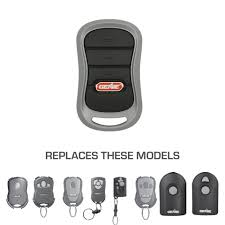
This is a very common issue among homeowners in the US, especially after battery changes or system resets. The good news is that programming a Genie remote is usually simple and only takes a few minutes when done correctly.
Read too: Tc1 Tricode Garage Door Opener Remote W/ Clip Chamberlain: Complete Guide
In this guide, you’ll learn a clear step-by-step process, common mistakes to avoid, and expert troubleshooting tips so your garage door works smoothly again.
What Is a Genie Garage Door Opener Remote?
A Genie remote is a wireless device used to operate garage door openers made by Genie Company, one of the most recognized brands in the garage automation industry.
These remotes communicate with the opener using radio frequency (RF) signals. Once programmed, they send a unique code that activates your garage door motor.
For a general understanding of remote communication systems, you can refer to Wikipedia Remote control.
How To Program A Genie Garage Door Opener Remote (Step-by-Step)
Programming depends slightly on your model, but most Genie systems follow a similar process.
Below is a simple and reliable method used for most modern Genie openers.
Step 1: Locate the “Learn” or “Program” Button
- Go to your garage door opener motor unit (usually on the ceiling)
- Look for a button labeled “Learn,” “Program,” or “Set”
- It is often near the antenna wire or LED light panel
👉 Tip: Some Genie models use a square “Learn” button, while older ones may use a small dip switch system.
Step 2: Activate Programming Mode
- Press and release the Learn/Program button once
- A small LED light will turn on or blink
- You usually have 30 seconds to complete the next step
📊 Expert note: According to garage automation technicians, most programming failures happen because users exceed this time window.
Step 3: Press the Remote Button
- Within 30 seconds, press the button on your Genie remote
- Hold it for 2–3 seconds
- Release when the garage light blinks or the motor clicks
This step sends the RF signal that pairs your remote with the opener.
Step 4: Test the Remote
- Stand about 10–15 feet away
- Press the remote button once
- The garage door should open or close smoothly
If it works, programming is complete.
Why Programming May Fail
Even though the process is simple, sometimes it doesn’t work on the first try.
Common Causes:
- Dead or weak battery
- Wrong button timing
- Memory full in opener system
- Compatibility issues with older models
Quick Fact:
Industry reports suggest that over 60% of garage remote issues are battery-related, not system failure.
Genie Remote Compatibility Overview
| Genie System Type | Compatibility | Notes |
|---|---|---|
| Intellicode systems | High | Most modern units |
| Older dip-switch models | Medium | Requires manual matching |
| Universal Genie remotes | High | Works with most openers |
How Genie “Intellicode” Technology Works
Modern Genie systems use Intellicode rolling code technology, which changes the access code every time you use the remote. This improves security and prevents unauthorized access.
This system is widely used in modern garage automation for safety and anti-hacking protection.
Troubleshooting: If Your Remote Still Doesn’t Work
1. Replace the Battery
- Use a fresh CR2032 or CR2025 battery (depending on model)
- Ensure correct polarity (+/-)
2. Clear Old Memory
- Hold Learn button for 10–15 seconds
- This resets stored remotes
3. Reprogram Again
- Repeat programming steps carefully within timing limits
4. Check Signal Interference
- LED lights or Wi-Fi routers can sometimes interfere with RF signals
Step-by-Step Reset Method (Advanced Fix)
If your remote still fails:
- Press and hold Learn button for 10 seconds
- Wait until LED turns off
- Release button
- Re-enter programming mode
- Reprogram remote
This clears all previously stored remotes and starts fresh.
Programming Time Estimate
- Basic setup: 2–5 minutes
- Troubleshooting: 10–15 minutes
- Full reset + reprogram: 15–20 minutes
Benefits of Genie Garage Remotes
✔ High security
Uses rolling code encryption
✔ Easy setup
No professional tools required
✔ Wide compatibility
Works with many Genie models
✔ Reliable performance
Stable RF signal transmission
Common Mistakes to Avoid
- Holding Learn button too long (can erase memory unintentionally)
- Using incorrect battery type
- Waiting too long after entering programming mode
- Pressing remote too briefly or too late
Safety Tips
- Never test garage door while standing under it
- Keep children away during programming
- Ensure door path is clear before testing movement
FAQ: How To Program A Genie Garage Door Opener Remote
1. How To Program A Genie Garage Door Opener Remote step-by-step?
Press the Learn button on the opener, then press the remote button within 30 seconds until the door responds.
2. Why is my Genie remote not programming?
It may be due to battery issues, incorrect timing, or memory limits in the opener system.
3. Do I need to reset my Genie opener before programming?
Not always, but resetting helps if previous remotes are interfering.
4. How many remotes can a Genie opener store?
Most Genie systems store between 5–30 remotes, depending on model.
5. How long does programming take?
Usually 2–5 minutes, but troubleshooting may take longer.
6. Can one Genie remote control multiple doors?
Yes, many Genie remotes support multi-door programming with multiple buttons.
Conclusion
Understanding How To Program A Genie Garage Door Opener Remote helps you quickly fix one of the most common household access problems without needing professional help. In most cases, the process takes only a few minutes and requires no special tools.
By following the correct steps, avoiding timing mistakes, and checking basic issues like battery health, you can restore your garage door functionality quickly and safely.
If this guide helped you, consider sharing it with friends or family—it might save them time, frustration, and unnecessary repair costs.
Leave a Reply