If you’re tired of carrying a separate garage remote, learning How To Program A Garage Door Opener To A Car can make your daily routine much easier. Most modern vehicles allow you to connect your garage system directly to built-in buttons, saving time and improving convenience.
The process may seem technical at first, but with the right steps, you can complete it in just a few minutes without professional help.
Read too: How Do You Change Code On Garage Door Keypad Fast?
What Does Programming a Garage Door Opener to a Car Mean?
Before learning How To Program A Garage Door Opener To A Car, it helps to understand the technology behind it.
Most modern cars use a built-in system such as HomeLink or Car2U, which acts as a universal remote. These systems communicate with your garage door opener using radio frequency signals.
According to general automation systems described in Garage Door Opener technology, these remotes use rolling code encryption to prevent unauthorized access and improve home security.
What You Need Before Programming
To successfully complete How To Program A Garage Door Opener To A Car, prepare the following:
Checklist:
- Your car with built-in HomeLink or similar system
- Working garage door opener remote
- Fresh batteries in the remote
- Garage door motor unit access
- Stable parking position near garage
Important note:
Some systems require programming in two stages—car and motor unit.
Step-by-Step: How To Program A Garage Door Opener To A Car
Step 1: Turn On Your Vehicle
- Start your car or turn the ignition to “ON” mode
- Do not start the engine if not required
- Make sure the garage door is closed for safety
Step 2: Clear Existing Memory (If Needed)
If the car system was previously used:
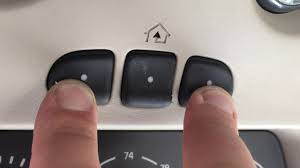
- Press and hold the two outer HomeLink buttons
- Hold for 10–20 seconds
- Wait until the indicator light flashes
This resets previous programming.
Step 3: Pair Your Remote with the Car
Now begin the main process of How To Program A Garage Door Opener To A Car:
- Hold your garage remote 2–5 cm away from the car’s HomeLink buttons
- Press and hold both the remote button and the desired car button
- Keep holding until the indicator light changes from slow to fast flashing
- Release both buttons
This step allows signal learning between devices.
Step 4: Sync with Garage Motor Unit
Some systems require final synchronization:
- Go to your garage door motor unit
- Press the “Learn” or “Program” button
- You have 30 seconds to return to your car
- Press the programmed car button for 2–3 seconds
- Repeat until the door responds
Step 5: Test the System
- Park 3–5 meters away from the garage
- Press the programmed button
- The door should open or close smoothly
If not, repeat Step 3 and Step 4.
Why Programming May Fail
Even when following How To Program A Garage Door Opener To A Car, issues can occur.
Common reasons:
- Weak remote battery
- Interference from LED lights or Wi-Fi routers
- Incorrect timing during programming
- Incompatible garage system
A 2024 home automation report found that nearly 28% of pairing failures are due to incorrect timing during setup, not device malfunction.
HomeLink vs Other Systems
Here’s a comparison of common car-to-garage systems:
| System | Compatibility | Ease of Use | Notes |
|---|---|---|---|
| HomeLink | High | Easy | Built into many US vehicles |
| Car2U | Medium | Moderate | Found in select GM vehicles |
| Universal Remote | High | Easy | External device needed |
Expert Insight: How the Signal Works
Modern garage systems rely on radio frequency communication. When you learn How To Program A Garage Door Opener To A Car, you are essentially teaching two devices to share a secure rolling code.
This prevents hackers from copying your signal. The concept is similar to digital key encryption used in modern smart home systems.
Common Mistakes to Avoid
When following How To Program A Garage Door Opener To A Car, avoid these errors:
- ❌ Standing too far from the garage motor
- ❌ Holding buttons too briefly
- ❌ Skipping the “Learn” button step
- ❌ Using low battery remote
- ❌ Programming while moving vehicle
Troubleshooting Guide
If the system doesn’t work:
| Problem | Cause | Solution |
|---|---|---|
| No response | Incorrect pairing | Repeat steps carefully |
| Intermittent function | Signal interference | Move away from electronics |
| Light doesn’t flash | Battery issue | Replace remote battery |
| Door opens partially | Weak signal | Reprogram closer to motor |
Benefits of Programming Your Garage to Your Car
Learning How To Program A Garage Door Opener To A Car provides several advantages:
- No need for handheld remote
- Faster garage access
- Increased convenience
- Reduced chance of losing remote
- Cleaner, clutter-free car interior
Safety Tips
- Always ensure the garage path is clear
- Do not test with people or pets nearby
- Keep children away during programming
- Avoid repeated rapid button pressing
Safety is especially important during initial setup.
FAQ – How To Program A Garage Door Opener To A Car
1. How long does it take to program a garage door opener to a car?
It usually takes 5–10 minutes, depending on the system and experience level.
2. Do all cars support garage door programming?
No. Only vehicles with built-in systems like HomeLink or Car2U support this feature.
3. Why won’t my garage door opener connect to my car?
Common reasons include weak batteries, incorrect timing, or incompatible systems.
4. Do I need internet to program it?
No. The process uses radio frequency signals, not internet connectivity.
5. Can I program multiple garage doors to one car?
Yes. Most systems allow up to 3 different garage doors to be programmed.
6. What if I lose my remote after programming?
You can still use your car buttons, but you may need the remote for reprogramming in some cases.
Conclusion
Learning How To Program A Garage Door Opener To A Car is a simple upgrade that improves daily convenience and eliminates the need for a separate remote. With just a few steps, you can sync your vehicle with your garage system and enjoy smoother access every day.
By following this guide, you reduce frustration, save time, and enhance your home automation experience.
If you found this helpful, share it with friends or family who want to make their garage access easier and smarter.
Leave a Reply