Struggling to sync your truck with your garage? You’re not alone. Many drivers search How To Program A Dodge Ram Garage Door Opener when they want quick, keyless access to their home. The good news is that programming your system is easier than you think—and you can do it in just a few minutes.
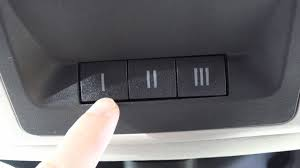
How To Program A Dodge Ram Garage Door Opener (Step-by-Step Guide)
Most Dodge Ram trucks come equipped with HomeLink, a built-in wireless control system.
Step 1: Clear Existing Codes
Before programming:
- Turn ignition to ON
- Press and hold the two outer HomeLink buttons
- Hold for 10–20 seconds until indicator light flashes
✔️ This resets previous codes.
Step 2: Position Your Remote
- Hold your garage remote 1–3 inches (2–7 cm) from the HomeLink buttons
- Ensure both are aligned
Read too: Tc1 Tricode Garage Door Opener Remote W/ Clip Chamberlain: Complete Guide
Step 3: Train the HomeLink System
- Press and hold:
- Desired HomeLink button
- Garage remote button
- Hold for 15–30 seconds
- Watch for indicator light:
- Slow blink → Fast blink = success
Step 4: Program Rolling Code Systems
Most modern openers use rolling codes for security.
Additional Steps:
- Locate “Learn” button on garage opener motor
- Press it (you’ll have ~30 seconds)
- Return to vehicle
- Press programmed HomeLink button 2–3 times
✔️ Door should activate.
Step 5: Test the System
- Press HomeLink button
- Ensure smooth operation
👉 If it works, you’re done!
What Is HomeLink and How Does It Work?
HomeLink is a built-in transmitter that replaces traditional remotes.
Key Features:
- Controls garage doors
- Works with gates and lighting
- Eliminates need for handheld remotes
👉 According to industry data, over 70% of modern vehicles include integrated systems like HomeLink.
Why Won’t My Dodge Ram Garage Opener Program?
Common Issues
- Dead remote battery
- Incorrect button timing
- Rolling code not synced
- Interference
Quick Fixes
- Replace remote battery
- Repeat steps carefully
- Move closer to opener
- Reset HomeLink
Compatibility Guide
| Opener Type | Compatibility |
|---|---|
| Fixed code | Easy setup |
| Rolling code | Requires extra steps |
| Smart openers | Usually compatible |
Tools You’ll Need
- Original garage remote
- Ladder (to access motor unit)
- Owner’s manual (optional)
How Long Does Programming Take?
| Task | Time |
|---|---|
| Reset system | 1 minute |
| Train remote | 2 minutes |
| Sync rolling code | 2 minutes |
👉 Total time: 5 minutes or less
Pros vs Cons of Using HomeLink
Pros:
- Convenience
- Cleaner interior (no remote)
- Quick access
Cons:
- Initial setup required
- Compatibility issues (rare)
Real-Life Example
A Dodge Ram owner upgraded to a new garage opener:
Problem:
- Old remote worked
- HomeLink didn’t sync
Solution:
- Completed rolling code steps
- Reprogrammed successfully
👉 Result: seamless access without remote.
Troubleshooting Table
| Problem | Cause | Solution |
|---|---|---|
| No response | Remote battery dead | Replace battery |
| Light doesn’t flash | Incorrect timing | Retry steps |
| Door won’t open | Rolling code issue | Sync with Learn button |
| Intermittent operation | Signal interference | Move closer |
Tips for Best Performance
- Replace remote batteries regularly
- Keep sensors clean
- Avoid programming near interference sources
- Reprogram after replacing opener
Safety Tips
- Never program while driving
- Keep clear of moving door
- Ensure area is safe during testing
Understanding Garage Door Openers
Garage door openers use radio frequency signals to communicate between the transmitter and receiver.
Modern systems use rolling codes for enhanced security.
Learn more here:
https://en.wikipedia.org/wiki/Garage_door_opener
FAQ Section
Q1: How do I program my Dodge Ram garage door opener?
A: Reset HomeLink, train it with your remote, and sync using the Learn button if needed.
Q2: Why is my HomeLink not working?
A: It may be due to a dead remote battery or unsynced rolling code.
Q3: Do all Dodge Ram trucks have HomeLink?
A: Most newer models include it, but older trims may not.
Q4: How many doors can I program?
A: Typically up to three devices.
Q5: Do I need the original remote?
A: Yes, for initial programming.
Q6: Can I program without a ladder?
A: Only if your opener doesn’t require pressing the Learn button.
Conclusion
Learning How To Program A Dodge Ram Garage Door Opener gives you quick, hassle-free access to your garage without needing a separate remote. With just a few simple steps, you can sync your truck in minutes and enjoy a more convenient daily routine.
If you run into issues, most problems can be solved with a quick reset or by syncing the rolling code properly.
Found this guide helpful? Share it with other Dodge Ram owners who want an easier way to access their garage! 🚗🚪
Leave a Reply