If your remote isn’t working—or you just bought a new one—you’re probably asking How To Program A Chamberlain Remote Garage Door Opener. The process may sound technical, but it’s actually quick and beginner-friendly. With just a few simple steps, you can sync your remote and regain full control of your garage door.
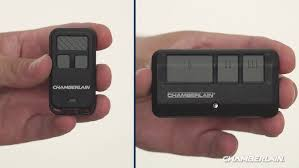
How To Program A Chamberlain Remote Garage Door Opener (Step-by-Step)
Programming a Chamberlain remote typically takes less than 10 minutes. Follow this proven method:
Step 1: Locate the “Learn” Button
The “Learn” button is the key to programming your remote.
Read too: Tc1 Tricode Garage Door Opener Remote W/ Clip Chamberlain: Complete Guide
Where to Find It
- On the motor unit mounted on the ceiling
- Behind the light cover or panel
Button Colors May Include:
- Yellow
- Purple
- Red/orange
- Green
👉 The color indicates frequency and compatibility.
Step 2: Press the Learn Button
- Press and release the Learn button
- An LED light will turn on (you have about 30 seconds to complete the next step)
Step 3: Press the Remote Button
- Press and hold the button on your remote for 2–3 seconds
- Release when the opener light blinks or clicks
Step 4: Test the Remote
- Press the remote again
- The door should open or close smoothly
✅ That’s it—your remote is now programmed!
Why Isn’t My Chamberlain Remote Programming?
If your remote doesn’t work, don’t worry. This is a common issue.
Top Causes
- Dead batteries
- Incompatible remote
- Memory full in opener
- Incorrect Learn button timing
Quick Fix Checklist
- Replace batteries
- Stand within 5–10 feet of the opener
- Repeat programming steps
- Clear memory and retry
👉 Over 30% of programming failures are due to weak batteries.
How to Reset a Chamberlain Garage Door Opener
If programming fails repeatedly, resetting can help.
Reset Steps
- Press and hold the Learn button for 6–10 seconds
- LED light will turn off
- All remotes are erased
- Reprogram from scratch
⚠️ This removes all previously connected remotes.
How Many Remotes Can You Program?
Most Chamberlain openers allow:
- 3 to 7 remotes
- Additional wireless keypads
👉 Check your model manual for exact limits.
Can You Program Multiple Remotes?
Yes—and it’s recommended.
Why Add Extra Remotes?
- Backup access
- Multiple drivers
- Convenience
Simply repeat the same steps for each remote.
What Type of Remote Works With Chamberlain Openers?
Compatibility is essential.
Compatible Options
- Original Chamberlain remotes
- LiftMaster remotes (same parent company)
- Universal remotes (with correct frequency)
Compatibility Table
| Remote Type | Compatibility | Ease of Setup |
|---|---|---|
| Chamberlain OEM | High | Easy |
| LiftMaster | High | Easy |
| Universal Remote | Medium | Moderate |
How Chamberlain Remote Technology Works
Chamberlain uses rolling code technology, which changes the signal each time you press the button. This prevents unauthorized access and improves security.
Learn more here:
https://en.wikipedia.org/wiki/Garage_door_opener
How Long Does Programming Take?
- Average time: 5–10 minutes
- First-time setup: up to 15 minutes
👉 Most users complete it in under 10 minutes.
Common Mistakes to Avoid
Avoid these errors to ensure success:
- ❌ Holding the Learn button too long (resets memory)
- ❌ Standing too far from the opener
- ❌ Using incompatible remotes
- ❌ Skipping battery replacement
Advanced Tip: Program Using a Wall Control Panel
Some newer Chamberlain models allow programming directly from the wall console.
Steps
- Access menu on wall control
- Select “Program”
- Follow on-screen instructions
👉 This method is faster for smart-enabled systems.
Can You Use a Smartphone Instead of a Remote?
Yes, many Chamberlain openers support smart control via apps.
Benefits
- Remote access from anywhere
- Notifications when door opens/closes
- No need for physical remotes
👉 Smart garage adoption has grown significantly, with over 40% of homeowners using connected devices.
Troubleshooting Guide (Quick Reference)
| Problem | Solution |
|---|---|
| Remote not responding | Replace batteries |
| No LED on Learn button | Check power supply |
| Door not moving | Reprogram remote |
| Intermittent signal | Reduce interference |
FAQ: How To Program A Chamberlain Remote Garage Door Opener
1. How do I program my Chamberlain remote without a Learn button?
Most models require the Learn button. If missing, use the wall control panel or consult your manual.
2. Why is my remote not syncing?
It could be due to dead batteries, incompatibility, or timing issues during setup.
3. Can I program a remote without clearing old ones?
Yes. New remotes can be added without deleting existing ones.
4. How far should I stand when programming?
Stay within 5–10 feet of the opener for best results.
5. Do all Chamberlain remotes use the same frequency?
No. Always check compatibility before purchasing.
6. Is programming different for older models?
Older models may use DIP switches instead of Learn buttons.
Conclusion
Learning How To Program A Chamberlain Remote Garage Door Opener is easier than it seems. With just a few simple steps—locating the Learn button, syncing your remote, and testing—you can restore full functionality in minutes.
Whether you’re adding a new remote or troubleshooting an issue, following this guide will save you time, money, and frustration. Keep your system updated, maintain fresh batteries, and always check compatibility for the best results.
If this guide helped you, share it on social media—someone else might need a quick fix today!
Leave a Reply