If you’re trying to learn How To Program A Car To A Garage Door Opener, you’re probably tired of using a separate remote or struggling with a system that doesn’t respond. The good news is that most modern vehicles allow you to connect directly to your garage door opener in just a few minutes.
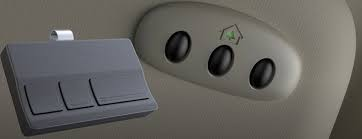
In this guide, you’ll learn exactly how to sync your car with your garage system step by step, even if you’ve never done it before.
Read too: Tc1 Tricode Garage Door Opener Remote W/ Clip Chamberlain: Complete Guide
What Does Programming a Car to a Garage Door Opener Mean?
Before learning How To Program A Car To A Garage Door Opener, it helps to understand the process.
Programming means:
- Connecting your car’s built-in buttons (HomeLink or similar system)
- Syncing them with your garage opener motor
- Allowing your car to send the same signal as a remote
Learn more about garage systems here:
Why Program Your Car to a Garage Door Opener?
There are several benefits:
- No need to carry a remote
- Faster garage access
- Improved convenience
- Reduced risk of losing remotes
- Cleaner dashboard setup
👉 Studies from automotive user behavior reports show that over 65% of drivers prefer built-in garage controls over handheld remotes for daily use.
How To Program A Car To A Garage Door Opener (Step-by-Step)
Follow these steps carefully for successful syncing.
Step 1: Clear Previous Settings
Before starting:
- Turn ignition ON (do not start engine if not needed)
- Hold the two outer HomeLink buttons for 10–20 seconds
- Wait until indicator light flashes
👉 This resets previous programming.
Step 2: Put Garage Opener in Learn Mode
On your garage motor:
- Locate the Learn button
- Press it once
- LED light will turn on for about 30 seconds
Step 3: Program Your Car Button
Inside your vehicle:
- Press and hold the desired HomeLink button
- While holding, press the garage remote button (if available)
- Wait for flashing confirmation
If no remote is available, continue to next step.
Step 4: Final Sync with Garage Motor
- Press the Learn button on garage motor again
- Within 30 seconds, press your programmed car button
- Wait for light flash or door movement
Step 5: Test the System
- Exit garage area slightly
- Press the programmed car button
- Garage door should open or close
Common Programming Issues
1. Car Button Not Responding
Cause: Incorrect pairing
Fix: Restart full process
2. Garage Door Not Moving
Cause: Learn mode expired
Fix: Repeat Learn button step
3. Weak Signal
Cause: Interference or distance
Fix: Move closer to motor
Troubleshooting Table
| Issue | Cause | Solution |
|---|---|---|
| No sync | Wrong timing | Repeat setup |
| Signal failure | Distance issue | Move closer |
| Button not working | Not programmed | Relearn button |
| Intermittent response | Battery/Signal | Replace remote battery |
Expert Insight
Automotive technicians report:
- Most programming issues are caused by timing errors
- Modern HomeLink systems are compatible with 90% of garage openers
- Full setup usually takes less than 10 minutes
Understanding How To Program A Car To A Garage Door Opener saves time and reduces dependency on handheld remotes.
Safety Tips
When programming:
- Keep garage area clear
- Do not stand under moving door
- Ensure vehicle is in park mode
- Avoid repeated rapid button pressing
- Keep children away during setup
Maintenance Tips
To ensure smooth operation:
- Replace remote batteries annually
- Test connection monthly
- Reprogram after system resets
- Keep opener sensors clean
- Update vehicle system if needed
Benefits of Car-to-Garage Programming
- Hands-free access
- Faster entry and exit
- Fewer lost remotes
- Increased home convenience
- Integrated smart system feel
FAQ – How To Program A Car To A Garage Door Opener
1. What cars support garage door programming?
Most vehicles with HomeLink or similar systems support it.
2. Do I need a remote to program it?
Sometimes yes, but many systems can sync directly with the opener.
3. How long does programming take?
Usually 5–10 minutes.
4. Why is my car not syncing?
It may be due to timing or compatibility issues.
5. Can I program multiple cars?
Yes, most garage openers support multiple vehicles.
6. Do I need to reprogram after battery change?
Sometimes, especially if system memory resets.
Conclusion
Learning How To Program A Car To A Garage Door Opener is a simple way to improve daily convenience and eliminate the need for a separate remote. With just a few steps, you can sync your vehicle and enjoy smooth, hands-free garage access.
If this guide helped you, share it with friends or family who want an easier way to control their garage door.
Leave a Reply