Struggling to connect your truck to your garage door? You’re not alone. Many drivers ask, “How To Program 2025 GMC Sierra Garage Door Opener” after upgrading to a newer vehicle. The process is actually simple once you understand the steps—and you can do it in just a few minutes.
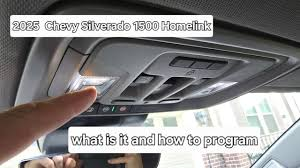
How To Program 2025 GMC Sierra Garage Door Opener (Step-by-Step Guide)
Programming your garage door opener in a 2025 GMC Sierra typically uses the HomeLink system, built into your vehicle.
Read too: Tc1 Tricode Garage Door Opener Remote W/ Clip Chamberlain: Complete Guide
Step 1: Clear Existing Codes
Before starting, reset the system:
- Turn ignition to ON (engine off)
- Press and hold the two outer HomeLink buttons
- Hold for 10–15 seconds until the indicator light flashes rapidly
👉 This clears previous programming.
Step 2: Position Your Remote
- Sit inside your truck
- Hold your garage remote 1–3 inches (2–7 cm) from the HomeLink buttons
Step 3: Press and Hold Both Buttons
- Press the HomeLink button you want to program
- Press and hold your remote button simultaneously
- Continue for 15–30 seconds
✔️ The light will change from slow blinking to rapid flashing when synced.
Step 4: Test the Button
- Press the programmed HomeLink button
- If the garage door moves, you’re done
If not, continue to Step 5.
Step 5: Sync With the Garage Motor (Rolling Code Systems)
Most modern systems use rolling code security.
- Locate the “Learn” or “Smart” button on your garage opener motor
- Press it (you have 30 seconds)
- Return to your truck
- Press the programmed HomeLink button 2–3 times
✔️ The door should activate.
Step 6: Final Test
- Press the button again
- Confirm smooth open/close operation
What Is HomeLink and How Does It Work?
HomeLink is a wireless control system built into many vehicles, including the GMC Sierra.
Key Features:
- Controls garage doors
- Works with gates and home lighting
- Uses radio frequency (RF) signals
For more technical context, visit:
https://en.wikipedia.org/wiki/HomeLink
How Long Does Programming Take?
| Step | Time |
|---|---|
| Clearing memory | 15 seconds |
| Syncing remote | 30 seconds |
| Rolling code setup | 1–2 minutes |
👉 Total time: 2–5 minutes
Why Won’t My GMC Sierra Garage Opener Program?
Common Issues & Fixes
1. Weak Remote Battery
- Replace battery before programming
2. Wrong Distance
- Keep remote within 1–3 inches
3. Skipping Rolling Code Step
- Always press the Learn button if needed
4. Interference
- Move away from LED lights or electronics
Compatibility: Will It Work With Your Garage Door?
Most systems are compatible if:
- Manufactured after 1993
- Use standard RF frequency
Compatibility Table
| Garage Type | Works with GMC Sierra |
|---|---|
| Chain drive | Yes |
| Belt drive | Yes |
| Smart openers | Yes |
| Very old systems | Maybe |
Benefits of Using Your GMC Sierra Garage Opener
Why Use Built-In HomeLink?
Pros:
- No need for handheld remote
- Cleaner interior (no clutter)
- More secure (less risk of theft)
- Always available in your vehicle
Cons:
- Requires initial setup
- May need reprogramming after battery change
Real-World Example
A GMC Sierra owner upgraded from a handheld remote to HomeLink.
Results:
- Reduced lost remote incidents
- Faster access when arriving home
- Improved convenience during bad weather
This small upgrade significantly improves daily usability.
Advanced Tips for Better Performance
- Program all three buttons for multiple doors
- Label buttons mentally (left = main garage, right = gate)
- Reprogram after opener replacement
- Keep firmware updated (for smart systems)
Safety Tips When Programming
- Keep children away during setup
- Ensure garage door path is clear
- Never stand under a moving door
- Test safety sensors after setup
Troubleshooting Quick Guide
| Problem | Solution |
|---|---|
| No light flash | Hold buttons longer |
| Door not responding | Repeat Learn button step |
| Intermittent operation | Replace remote battery |
| Signal delay | Reduce interference |
FAQ Section
Q1: How to program 2025 GMC Sierra garage door opener without a remote?
A: You typically need the original remote for initial programming. Some smart openers allow app-based setup.
Q2: Why is my HomeLink not working after programming?
A: Most likely you skipped the rolling code synchronization step.
Q3: How many garage doors can I program?
A: Up to three devices using the HomeLink buttons.
Q4: Do I need to reprogram after replacing my car battery?
A: Usually no, but occasionally settings may reset.
Q5: Can I program a gate or smart device?
A: Yes, HomeLink works with gates and some smart home systems.
Q6: Is HomeLink better than a remote?
A: Yes, for convenience and security, since it’s built into your vehicle.
Conclusion
Learning How To Program 2025 GMC Sierra Garage Door Opener is quick, simple, and highly rewarding. In just a few minutes, you can eliminate the need for a separate remote and enjoy seamless access to your garage.
By following the step-by-step guide and troubleshooting tips above, you’ll have your system working smoothly in no time.
If this guide helped you, share it with other GMC Sierra owners who want a smarter, easier garage experience! 🚗🚪
Leave a Reply