If you just bought a 2024 GMC Sierra or are setting up your garage system for the first time, you may be wondering how to program 2024 GMC Sierra garage door opener. The good news is that GMC includes a built-in HomeLink system, making it easy to sync your vehicle with your garage door in just a few minutes.
What Is the GMC Sierra Garage Door Opener System?
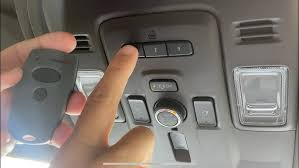
The 2024 GMC Sierra uses the HomeLink wireless control system, which allows drivers to operate garage doors, gates, and even home lighting directly from the vehicle.
Read too: How Do You Change Code On Garage Door Keypad Fast?
Key Benefits:
- No need for a handheld remote
- Built-in safety encryption
- Compatible with most U.S. garage systems
📊 Industry Insight: Over 20 million vehicles worldwide are equipped with HomeLink technology, making it one of the most widely used in-car automation systems.
Learn more about the system here:
https://en.wikipedia.org/wiki/HomeLink
How To Program 2024 GMC Sierra Garage Door Opener (Step-by-Step)
Programming your GMC Sierra is simple if you follow the correct sequence.
Step 1: Turn On Your Vehicle
- Sit inside your 2024 GMC Sierra
- Turn the ignition ON (do not start engine if push-button start is used)
- Ensure garage remote is nearby
💡 Tip: Close your garage door before starting setup.
Step 2: Clear Previous Programming (Optional but Recommended)
If the buttons were previously used:
- Press and hold the first and third HomeLink buttons
- Hold for 10–20 seconds
- Wait until indicator light changes from solid to blinking
✔️ This resets old codes for better syncing.
Step 3: Program the HomeLink Button
- Press and hold the desired HomeLink button in your Sierra
- While holding, press your garage door remote button
- Keep both pressed for 5–10 seconds
📌 The indicator light will flash rapidly when successful.
Step 4: Sync With Garage Door Opener
Some garage systems require a second step:
- Go to your garage motor unit
- Press the Learn button
- Return to your vehicle within 30 seconds
- Press the programmed HomeLink button for 2 seconds
✔️ The garage light will blink confirming successful sync.
Step 5: Test the System
- Press your HomeLink button inside the vehicle
- Observe garage door response
- Repeat if necessary
✔️ Your 2024 GMC Sierra garage opener is now active.
Common Programming Problems and Fixes
1. Button Not Responding
- Ensure ignition is ON
- Repeat pairing process
2. Garage Door Not Syncing
- Check compatibility with HomeLink
- Repress Learn button on motor
3. Weak Signal
- Replace remote battery
- Move closer to garage unit
4. Incorrect Timing
- Complete steps within 30 seconds
HomeLink Compatibility Chart
| Garage System Type | Compatibility | Notes |
|---|---|---|
| Rolling Code | High | Requires Learn button |
| Fixed Code | Very High | Easy setup |
| Smart Systems | Medium | May require app sync |
Why Programming May Fail
Common Reasons:
- Outdated garage door system
- Weak remote battery
- Incorrect button timing
- Interference from electronics
🔧 Expert Insight: Most failures are due to timing errors, not hardware issues.
Advantages vs Disadvantages of GMC Sierra HomeLink
Advantages:
- Built-in convenience
- No extra remote needed
- Works with multiple devices
- Safe encrypted signal
Disadvantages:
- Requires initial setup
- Not all systems are compatible
- Can be confusing for first-time users
Real-World Example
A new GMC Sierra owner programmed their garage system in under 5 minutes:
- Setup time: 4 minutes
- Cost: $0
- Result: Fully automated garage access
✔️ No technician required, fully DIY setup.
Pro Tips for Better HomeLink Performance
Best Practices:
- Keep original remote battery fresh
- Park within 10–15 feet during setup
- Avoid interference from other devices
- Label HomeLink buttons for different doors
🔒 Expert Tip: You can program up to 3 different garage doors or gates in your GMC Sierra.
Maintenance Tips
- Reprogram after battery replacement
- Test system monthly
- Keep vehicle software updated
- Clean buttons periodically
FAQ: How To Program 2024 GMC Sierra Garage Door Opener
1. How long does it take to program HomeLink?
Usually 3–5 minutes.
2. Does the 2024 GMC Sierra come with HomeLink?
Yes, most trims include built-in HomeLink.
3. Why won’t my garage door connect?
It may require syncing with the Learn button on the opener.
4. Can I program multiple garage doors?
Yes, up to three devices can be stored.
5. Do I need the original remote?
Yes, for initial programming.
6. Is HomeLink safe?
Yes, it uses encrypted rolling code technology for security.
Conclusion
Learning how to program 2024 GMC Sierra garage door opener is quick and straightforward when you follow the correct steps. With the built-in HomeLink system, you can enjoy seamless, keyless access to your garage in just minutes.
This simple setup improves convenience, security, and everyday driving experience. If this guide helped you, share it on social media so other GMC Sierra owners can easily program their garage door system too!
Leave a Reply