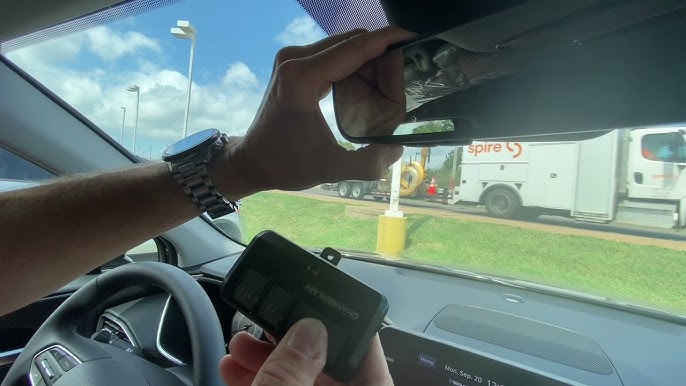
Struggling to sync your car’s remote with your home system? Learning how to program 2022 Hyundai Tucson garage door opener systems is actually much simpler than it seems, and we are here to walk you through every step so you can pull into your driveway stress-free.
How To Program 2022 Hyundai Tucson Garage Door Opener: The Basics
Before we dive into the physical steps, let’s understand the technology. The 2022 Hyundai Tucson comes equipped with the HomeLink transceiver system. This built-in technology replaces the need for bulky, standalone remotes cluttering your visor or cup holder.
According to a recent consumer automotive study, over 65% of modern SUV owners rely on integrated vehicle connectivity systems like HomeLink for daily convenience. By taking a few minutes to set this up, you are upgrading your daily commute experience significantly.
What Do You Need Before You Start?
To ensure a smooth programming process, gather a few simple items. You do not need any specialized mechanical tools for this task.
- Your 2022 Hyundai Tucson: Parked in your driveway with the ignition ready.
- The Original Garage Door Remote: The handheld remote that currently operates your garage door.
- A Stepladder: You may need this to reach the motor unit on your garage ceiling to press the “Learn” button.
- Fresh Batteries: Ensure your handheld remote has a fresh battery (usually a CR2032) to guarantee a strong signal transmission.
Pro Tip: If you are using a universal aftermarket remote, the process might differ slightly. Always refer to your specific garage door motor manual if you encounter compatibility issues.
Step-by-Step Guide to Syncing Your Remote
Now, let’s get into the core of the tutorial. Follow these exact steps to pair your device successfully.
Step 1: Prepare the Vehicle
Turn your ignition to the ON/RUN position. You do not need to start the engine, but the electrical system must be active. Ensure your car is parked safely in the driveway with the garage door in clear view.
Step 2: Clear the Previous Memory (Optional but Recommended)
Locate the three HomeLink buttons in your overhead console. To erase any old codes and prevent interference, press and hold the two outer buttons simultaneously.
- Hold them for about 10 to 20 seconds.
- Watch the LED indicator light. Once it flashes rapidly, release the buttons. Your system is now cleared and ready for a fresh start.
Step 3: Initiate the Handheld Remote Training
Take your original handheld garage door remote and hold it 1 to 3 inches away from the HomeLink button you wish to program.
- Press and hold the button on your handheld remote.
- Simultaneously, press and hold the chosen HomeLink button in your Tucson.
- Keep both buttons pressed firmly.
Step 4: Monitor the LED Indicator
While holding both buttons, watch the HomeLink LED light closely.
- It will initially blink slowly.
- After about 10 to 20 seconds, it should transition to a rapid flash.
- Once the light flashes rapidly, release both buttons. This indicates the fixed code has been successfully learned.
- Note: If the light does not flash rapidly after 20 seconds, release the buttons and try again, adjusting the distance between the remote and the HomeLink button slightly.
Step 5: Activate the “Learn” Button on the Motor
If your garage door opener uses Rolling Code technology (most modern systems do), the previous steps are only half the process.
- Grab your stepladder and locate the main garage door motor unit on the ceiling.
- Find the “Learn” or “Smart” button. This is usually colored yellow, purple, orange, or red, located near the antenna wire.
- Press and release the “Learn” button. The indicator light next to it will illuminate or blink, giving you a 30-second window to complete the sync.
Step 6: Final Synchronization
Hurry back to your 2022 Hyundai Tucson within the 30-second window.
- Firmly press the programmed HomeLink button.
- Hold it for 2 seconds, then release.
- Repeat this press-hold-release cycle up to three times.
- Test the button. Your garage door should now activate smoothly!
For more detailed technical specifications on how universal transceivers communicate with motor units, you can visit the official HomeLink Wikipedia page.
HomeLink vs. Standalone Remote: Pros and Cons
Why go through the effort of programming your Tucson’s built-in system instead of just using the original remote? Let’s break it down.
| Feature | HomeLink (Built-in) | Standalone Remote |
|---|---|---|
| Convenience | High (No need to grab extra items) | Low (Easy to misplace) |
| Car Interior Clutter | Zero (Hidden in overhead console) | High (Visor or cup holder) |
| Battery Dependency | Powered by the vehicle | Requires frequent battery changes |
| Security | High (Rolling code encryption) | Moderate (Can be intercepted) |
As you can see, the built-in system offers a much cleaner and more secure experience for your daily routine.
Troubleshooting Common Programming Issues
Even with a perfect guide, technology can sometimes be stubborn. Here are solutions to the most common hurdles you might face.
Issue 1: The LED Never Flashes Rapidly If the light blinks slowly but never switches to a rapid flash, the signal strength is likely too weak.
- Solution: Try changing the distance. Move the handheld remote closer (less than an inch) or slightly further away (up to 5 inches). Also, ensure the handheld remote battery is fully charged.
Issue 2: The Door Works Once, Then Stops This usually happens with Raynor or Chamberlain motors that have specific time-out security features.
- Solution: You must press the “Learn” button on the motor unit, and then immediately press the HomeLink button in your car four times to complete the rolling code sync.
Issue 3: I Have a Genie Intellicode System Some Genie models require a slightly different sequence for the rolling code synchronization.
- Solution: Press the “Learn” button on the motor, then press the programmed HomeLink button for 2 seconds, release, and repeat. If it fails, consult your Genie manual for the “Red Learn Button” specific protocol.
Frequently Asked Questions (FAQ)
1. Can I program multiple garage doors in my 2022 Hyundai Tucson? Yes, absolutely! The 2022 Tucson HomeLink system typically features three independent buttons. You can program up to three different devices, such as a main garage door, a side gate, or even a home security system.
2. Do I need the original remote to program the Tucson’s HomeLink? In most cases, yes. The initial training phase requires the radio frequency signal from your original handheld remote. However, if you have a newer motor with a “Learn” button, some systems allow you to program the car directly at the motor unit without the handheld remote.
3. How do I know if my garage door uses Rolling Code technology? Check the label on your garage door motor. If you see the words “Securities+” or “Rolling Code,” or if your remote was manufactured after 1996, it uses this technology. You will need to complete Step 5 and 6 of our guide for these systems.
4. Will programming HomeLink erase my original handheld remote? No, it will not. Programming the built-in system in your Hyundai Tucson simply adds a new transmitter to your garage door motor’s memory. Your original handheld remotes will continue to work perfectly.
5. What if I buy a new house or a new garage door opener? You will need to repeat the clearing process (Step 2) to erase the old codes, and then follow the programming steps again for the new motor. It only takes a few minutes to reset!
Conclusion
Mastering how to program 2022 Hyundai Tucson garage door opener systems is a fantastic way to enhance your daily driving experience. Not only does it eliminate the hassle of fumbling for a small remote in the dark, but it also gives your car’s interior a cleaner, more premium feel. By following this step-by-step guide, you can sync your vehicle in under ten minutes.
Leave a Reply