Introduction
Are you tired of juggling multiple remotes every time you pull into your driveway? It’s a common frustration for many drivers, but the good news is that your vehicle likely has a built-in solution. Learning how to program 2022 Honda Odyssey garage door opener systems can streamline your daily routine, allowing you to open your garage with just the push of a button on your dashboard. In this guide, we will walk you through the exact steps to get your HomeLink system up and running quickly and safely.
Understanding the HomeLink System in Your 2022 Odyssey
Before diving into the buttons and lights, it is helpful to understand what you are working with. The 2022 Honda Odyssey comes equipped with the HomeLink Universal Transceiver. This system is designed to replace up to three separate handheld remote controls for devices like garage doors, gate operators, and even home lighting systems.
Unlike older infrared systems, HomeLink uses radio frequencies, which makes it compatible with most major garage door opener brands manufactured after 1985. However, the programming process can vary slightly depending on whether your garage door opener uses a “rolling code” or a “fixed code.” Most modern openers, including those from LiftMaster, Chamberlain, and Genie, use rolling codes for enhanced security.
Why Use HomeLink Instead of a Separate Remote?
- Convenience: No more digging through bags or sun visors for a lost remote.
- Security: Reduces the risk of leaving a standalone remote in your car where it could be stolen.
- Aesthetics: Keeps your car interior clutter-free and organized.
Step-by-Step Guide: How To Program 2022 Honda Odyssey Garage Door Opener
Programming your HomeLink system is generally a straightforward process, but precision is key. Follow these steps carefully to ensure a successful connection.
Step 1: Prepare Your Vehicle and Garage Door Opener
- Park Close: Park your Honda Odyssey directly in front of the garage door, within range of the opener motor (usually within 10–15 feet).
- Clear Existing Codes (If Necessary): If you are reprogramming a button that was previously used, you should clear it first. Press and hold the two outer HomeLink buttons simultaneously for about 20 seconds until the indicator light flashes rapidly. Release the buttons.
- Locate the Learn Button: Find the “Learn” or “Smart” button on your garage door opener motor unit hanging from the ceiling. It is usually located near the hanging antenna wire. You may need a ladder to reach it. Note: The color of this button varies by brand (yellow, purple, red, or green).
Step 2: Initiate the Programming Mode
- Turn your ignition to the ON position (you do not need to start the engine, but the electronics must be active).
- Choose the HomeLink button you wish to program (1, 2, or 3).
- Press and hold the chosen HomeLink button. Do not release it yet.
Step 3: Sync with the Garage Door Opener
- While continuing to hold the HomeLink button, take your original handheld garage door remote.
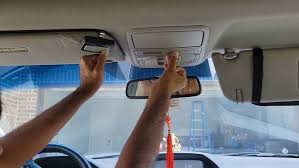
- Point the handheld remote at the HomeLink buttons on your Odyssey’s overhead console.
- Press and hold the button on the handheld remote that operates your garage door.
- Keep both buttons pressed. Watch the HomeLink indicator light. It will slowly flash and then change to a rapid flash.
- Once the light flashes rapidly, release both buttons.
Step 4: Finalize the Connection (Rolling Code Systems)
If your garage door opener uses a rolling code (most modern units), you need one final step to complete the pairing:
- Return to the garage door opener motor unit on the ceiling.
- Press and release the “Learn” or “Smart” button. You typically have 30 seconds to complete the next step.
- Return to your Honda Odyssey immediately.
- Press and hold the programmed HomeLink button for two seconds, then release it.
- Repeat this press-hold-release cycle two more times.
- Your garage door should now activate. If it does, the programming is successful.
Pro Tip: If the door does not move, try repeating Step 4. Sometimes the signal needs to be sent multiple times to register securely with the opener’s receiver.
Troubleshooting Common Issues
Even with careful following of instructions, things don’t always go smoothly the first time. Here are some common hurdles and how to overcome them.
| Issue | Possible Cause | Solution |
|---|---|---|
| Light Flashes Slowly Then Stops | Signal not received | Ensure you are close enough to the garage motor. Check batteries in the handheld remote. |
| Door Moves But Doesn’t Stop | Limit settings incorrect | Adjust the travel limits on the garage door motor unit itself. |
| Rapid Flash Never Occurs | Incompatible Frequency | Some very old openers (pre-1985) may not be compatible. Check your opener’s manual. |
| Works Intermittently | Weak Signal | Reprogram the button. Ensure no large metal objects are blocking the console area. |
What If I Don’t Have the Original Remote?
If you have lost your original handheld remote, you can still program HomeLink, but the process is different. You will need to access the garage door opener motor unit directly.
- Press and hold the HomeLink button in your Odyssey.
- While holding it, press and release the “Learn” button on the motor unit.
- Continue holding the HomeLink button for another 20–30 seconds.
- Release the button and test the door.
Note: This method works for many brands, but consult your specific garage door opener’s manual for “remote-less programming” instructions.
Safety and Security Considerations
When learning how to program 2022 Honda Odyssey garage door opener systems, safety should always be a priority. The HomeLink system includes safety features, but user vigilance is essential.
- Obstruction Sensors: Always ensure your garage door’s photo-eye sensors are clean and aligned. HomeLink sends the same signal as a remote; it does not bypass safety reversals.
- Secure Your Code: Rolling codes change with every use, making it difficult for thieves to intercept and replay the signal. However, never leave your car running unattended with the garage door open.
- Child Safety: Teach children not to play with the HomeLink buttons. Accidental activation can lead to injury or property damage.
For more detailed technical specifications on radio frequency standards used in home automation, you can refer to Wikipedia’s page on Home Automation to understand the broader context of how these devices communicate securely.
Frequently Asked Questions (FAQ)
1. Can I program more than one garage door to my 2022 Honda Odyssey?
Yes, the HomeLink system in the 2022 Odyssey can store up to three different devices. You can program a garage door, a gate, and a home lighting system simultaneously. Each button (1, 2, and 3) operates independently.
2. Why is my HomeLink light flashing rapidly but the door isn’t moving?
A rapid flash indicates that the HomeLink system has successfully learned the signal from your handheld remote. However, if the door doesn’t move, you likely missed Step 4 (the final sync with the motor unit’s “Learn” button). This step is crucial for rolling code openers.
3. Does programming HomeLink erase my existing handheld remote?
No, programming your car does not erase or disable your original handheld remote. Both the car system and the handheld remote will work simultaneously. This is useful if you have multiple drivers in the household.
4. What if my garage door opener is very old?
If your garage door opener was manufactured before 1985, it may use a fixed code that is incompatible with modern HomeLink systems. In such cases, you may need to install a universal receiver kit on your garage door motor or upgrade the opener entirely.
5. Can I reset HomeLink if I sell my car?
Absolutely. It is highly recommended to clear all HomeLink buttons before selling or trading in your vehicle. To do this, press and hold the two outer buttons for 20 seconds until the light flashes rapidly. This ensures the new owner cannot access your garage.
6. Is there a difference between HomeLink and Car2U?
Yes. Older Honda models used a system called Car2U. The 2022 Honda Odyssey uses the newer HomeLink system, which is more reliable and compatible with a wider range of devices. The programming steps outlined in this article are specific to HomeLink.
Conclusion
Mastering how to program 2022 Honda Odyssey garage door opener functions is a small task that yields significant daily convenience. By following the steps above, you can eliminate the hassle of carrying extra remotes and enjoy a seamless entry experience every time you come home. Remember to keep your original remote handy during the initial setup and pay close attention to the indicator lights on your console.
Did you find this guide helpful? Share it with fellow Honda Odyssey owners on social media who might be struggling with their HomeLink setup. A simple click can save someone else from frustration!
Disclaimer: Always refer to your specific 2022 Honda Odyssey Owner’s Manual and your garage door opener’s manual for model-specific instructions. Procedures may vary slightly based on regional specifications or aftermarket garage door units.
Leave a Reply