Introduction
Struggling to sync your new 2022 Ford F-150 with your garage door? You’re not alone. Many truck owners find themselves frustrated when their built-in garage door opener won’t connect properly. Learning how to program 2022 Ford F150 garage door opener doesn’t have to be complicated. This comprehensive guide walks you through every step, ensuring you can pull into your garage with the push of a button—no more fumbling for remotes in the rain.
The 2022 Ford F-150 comes equipped with the HomeLink universal transceiver system, which can control up to three different garage doors or gates. Whether you’re a first-time F-150 owner or upgrading from an older model, proper programming ensures seamless integration with your existing garage door system. Let’s dive into everything you need to know.
Understanding the HomeLink System in Your 2022 F-150
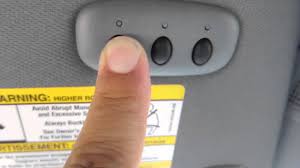
Before jumping into programming steps, it’s essential to understand what you’re working with. The HomeLink system in your 2022 Ford F-150 is located on the overhead console, typically near the rearview mirror. This system uses radio frequency signals to communicate with your garage door opener.
Key Features of HomeLink in 2022 F-150
- Three programmable buttons for multiple garage doors or gates
- Universal compatibility with most major garage door opener brands
- Rolling code technology support for enhanced security
- LED indicator lights that show programming status
According to HomeLink’s official documentation, the system operates on frequencies between 288-433 MHz, covering approximately 95% of garage door openers manufactured after 1982. This wide compatibility makes it one of the most versatile integrated systems available in modern vehicles.
What You’ll Need Before Starting
Preparation is key to successful programming. Gather these items before beginning:
- Your 2022 Ford F-150 with a fully charged battery
- Your existing garage door remote control
- A ladder (if your garage door opener motor is mounted high)
- Approximately 15-20 minutes of uninterrupted time
- A helper (optional but recommended for safety)
Important Safety Note: Ensure your garage door area is clear of people, pets, and obstacles before beginning any programming process.
Step-by-Step Programming Instructions
Step 1: Clear Existing HomeLink Memory
If your HomeLink system has been previously programmed, you’ll need to clear it first:
- Turn your ignition to the “ON” position (engine can be off)
- Press and hold the two outer HomeLink buttons simultaneously
- Continue holding for approximately 20 seconds until the LED indicator light begins flashing rapidly
- Release both buttons when the light changes from solid to rapid flashing
This process erases all previously stored codes and prepares the system for new programming.
Step 2: Position Your Vehicle Correctly
Proper positioning ensures strong signal transmission:
- Park your F-150 outside the garage, facing the door
- Maintain a distance of 1-3 feet from the garage door
- Keep the engine running or ignition in accessory mode
- Ensure all windows are closed to prevent interference
Step 3: Initiate Programming Mode
- Choose which HomeLink button you want to program (1, 2, or 3)
- Press and hold your chosen HomeLink button
- While holding the HomeLink button, press and hold your garage door remote button
- Hold both buttons simultaneously for 20-30 seconds
- Watch the HomeLink LED indicator—it will change from slow blinking to rapid flashing
Pro Tip: If the LED doesn’t change after 30 seconds, try moving your vehicle closer to the garage door opener motor unit.
Step 4: Train the Garage Door Opener Motor
This critical step programs your actual garage door opener to recognize the HomeLink signal:
- Locate the “Learn” or “Smart” button on your garage door opener motor unit (usually found on the back or side)
- Press and release the Learn button—the indicator light will begin blinking
- Within 30 seconds, return to your vehicle and press the programmed HomeLink button three times
- Wait 2-3 seconds between each press
- Your garage door should activate on the third press
If your garage door doesn’t respond, repeat this step, ensuring you’re pressing the Learn button correctly. Different manufacturers have varying procedures:
| Brand | Learn Button Location | Indicator Light Color |
|---|---|---|
| Chamberlain/LiftMaster | Back panel, near antenna | Yellow or purple |
| Genie | Side panel, labeled “Learn” | Red or blue |
| Craftsman | Front panel, near light cover | Orange or green |
| Stanley | Back panel, small recessed button | Red |
Step 5: Test and Verify Programming
After completing the training process:
- Press the programmed HomeLink button once
- Your garage door should open or close completely
- Test the reverse function by pressing again while the door is moving
- Verify the door stops and reverses direction properly
If everything works correctly, congratulations! Your 2022 Ford F-150 is now successfully programmed.
Troubleshooting Common Issues
Even with careful following of instructions, problems can arise. Here are solutions to common issues:
Problem: HomeLink LED Doesn’t Flash Rapidly
Solution:
- Ensure you’re holding both buttons for the full 20-30 seconds
- Check that your garage door remote has fresh batteries
- Try repositioning your vehicle closer to the garage
Problem: Garage Door Doesn’t Respond After Training
Solution:
- Verify you pressed the Learn button correctly on the motor unit
- Ensure you pressed the HomeLink button exactly three times within 30 seconds
- Check if your garage door opener uses rolling code technology (requires additional steps)
Problem: Intermittent Operation
Solution:
- Reprogram the HomeLink button following all steps again
- Check for radio frequency interference from nearby devices
- Ensure your garage door opener isn’t experiencing mechanical issues
Rolling Code Systems: Additional Steps Required
If your garage door opener uses rolling code technology (most units manufactured after 1995), you’ll need to complete an extra synchronization step:
- After completing Step 4 above, locate the Learn button again
- Press and hold the Learn button for 6-10 seconds until the indicator light turns off
- Return to your vehicle within 30 seconds
- Press and hold the programmed HomeLink button for 2 seconds, release, then press again for 2 seconds
- Repeat this cycle three times total
- Test the system to ensure proper operation
Frequently Asked Questions
Q: Can I program multiple garage doors to my 2022 F-150?
A: Yes, the HomeLink system supports up to three different garage doors or gates. Simply repeat the programming process for each additional door, using a different HomeLink button (1, 2, or 3) for each one. Each button operates independently, so programming one won’t affect the others.
Q: What if my garage door opener is very old?
A: Most garage door openers manufactured after 1982 are compatible with HomeLink. However, extremely old units (pre-1982) may use different frequencies or technologies that aren’t compatible. In such cases, consider upgrading your garage door opener to a newer model with rolling code security features. You can also purchase a HomeLink compatibility bridge module from the manufacturer.
Q: How long does the programming process take?
A: The entire programming process typically takes 15-20 minutes for a single garage door. This includes clearing previous codes, initial programming, training the motor unit, and testing. If you’re programming multiple doors, add approximately 10 minutes per additional door. Having a helper can speed up the process significantly.
Q: Will programming erase my other HomeLink settings?
A: Only if you clear the entire HomeLink memory by holding the two outer buttons. If you’re adding a new garage door without clearing memory, simply choose an unused button and program it directly. Your existing programmed buttons will remain unaffected. Always verify your other programmed devices still work after adding a new one.
Q: My HomeLink works intermittently. What could be wrong?
A: Intermittent operation usually indicates one of several issues: weak batteries in your original remote, radio frequency interference from nearby electronics, improper programming, or a failing garage door opener motor. Start by replacing your remote’s batteries and reprogramming the HomeLink system. If problems persist, consult a professional garage door technician to inspect your opener unit.
Q: Can I program HomeLink without the original remote?
A: Unfortunately, no. The original garage door remote is essential for the initial programming phase because it transmits the specific code that HomeLink needs to learn. If you’ve lost your remote, contact your garage door opener manufacturer to purchase a replacement. Some manufacturers offer universal remotes that can be programmed to work with your existing system.
Conclusion
Learning how to program 2022 Ford F150 garage door opener is straightforward when you follow the right steps. With proper preparation, patience, and attention to detail, you can enjoy the convenience of integrated garage door control in just 20 minutes. The HomeLink system in your F-150 represents one of the most user-friendly vehicle integration features available today.
Remember to keep your garage door opener manual handy for brand-specific instructions, and don’t hesitate to contact a professional if you encounter persistent issues. Now that you’re equipped with this knowledge, share this guide with fellow F-150 owners who might benefit from it. Happy driving—and even happier garage entries!
Did this guide help you successfully program your 2022 Ford F-150 garage door opener? Share your experience in the comments below or spread the word on social media to help other truck owners!
Leave a Reply