Introduction
Have you ever pulled up to your home and fumbled with a tiny garage door remote, wishing your Jeep could handle it all? Learning how to program 2021 Jeep Wrangler garage door opener isn’t as complicated as it seems, but it can feel frustrating without the right guidance. Whether you just bought a new Wrangler or moved into a new house, this comprehensive guide will walk you through the process effortlessly and get your HomeLink system synced in minutes.
Understanding the HomeLink System in Your 2021 Jeep Wrangler
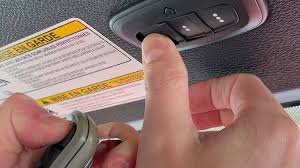
Before diving into the programming steps, it’s important to understand what makes the HomeLink system special. HomeLink is a wireless control system integrated into your Jeep’s overhead console or rearview mirror. It uses radio frequency technology to communicate with your garage door opener, essentially replacing your handheld remote.
According to Wikipedia’s entry on HomeLink, this system has been installed in over 15 million vehicles worldwide and is compatible with more than 95% of garage door openers sold in the United States.
Key Features of 2021 Jeep Wrangler HomeLink
| Feature | Benefit |
|---|---|
| 3 Programmable Buttons | Control up to 3 different devices |
| Universal Compatibility | Works with most garage door brands |
| Rolling Code Technology | Enhanced security against hacking |
| Easy Syncing | No tools required for programming |
Preparation: What You Need Before Programming
Before you start, gather the following items to ensure a smooth process:
- Your original garage door remote (needed for syncing)
- The vehicle’s owner’s manual (for model-specific instructions)
- A ladder (to reach the garage door motor unit if needed)
- Fresh batteries in your existing remote (weak batteries cause sync failures)
Pro Tip: Check if your garage door opener uses rolling-code technology. Most modern openers (manufactured after 1996) use rolling codes for security, while older models use fixed codes.
How To Program 2021 Jeep Wrangler Garage Door Opener: Step-by-Step Guide
Step 1: Determine Your Garage Door Opener Type
The programming method varies depending on whether your garage door opener uses fixed-code or rolling-code technology.
Fixed-Code Openers (Older Models):
- Have dip switches or fixed binary codes
- Simpler programming process
- Common in pre-1996 openers
Rolling-Code Openers (Modern Models):
- Use encrypted, changing codes
- More secure against unauthorized access
- Require an additional “learn” button press
Step 2: Clear Previous Programming (If Needed)
If your Jeep previously had another garage door opener programmed, you’ll want to clear it first.
- Locate the three HomeLink buttons in your overhead console
- Press and hold the two outer buttons simultaneously
- Wait for the indicator light to begin flashing rapidly (about 10–20 seconds)
- Release the buttons once the light flashes
Step 3: Programming Fixed-Code Garage Door Openers
For older garage door openers, follow these detailed steps:
- Position yourself: Sit in the driver’s seat with the ignition in “ON” or “ACCESSORY” position (engine off is fine)
- Hold your handheld remote: Position it 1–3 inches from the HomeLink buttons
- Press and hold: Simultaneously press the button on your handheld remote AND the desired HomeLink button
- Watch the indicator light: It will flash slowly, then rapidly when programming is complete
- Release both buttons once the light flashes rapidly (usually takes 10–30 seconds)
- Test the connection: Press the newly programmed HomeLink button to see if the garage door responds
Step 4: Programming Rolling-Code Garage Door Openers
Modern openers require an extra security step:
- Complete Steps 1–6 from the Fixed-Code section above
- Locate the “Learn” button on your garage door motor unit (usually near the antenna wire)
- Press the Learn button on the motor unit (you’ll have about 30 seconds to complete the next step)
- Return to your Jeep within 30 seconds
- Press the programmed HomeLink button three times: press, release, press, release, press and hold for a few seconds
- Observe the garage door: It should activate, confirming successful programming
Expert Insight: “Rolling-code openers change the access code after every use, making them virtually impossible to clone. Always ensure your Jeep is parked within range during programming to avoid sync failures.” — Mike Johnson, Automotive Electronics Specialist
Troubleshooting Common Issues
Even with careful steps, you might encounter problems. Here’s how to fix them:
Issue 1: HomeLink Light Won’t Flash
Possible Causes:
- Ignition not in correct position
- Previous programming interfering
Solution:
- Ensure ignition is in “ON” or “RUN” position
- Clear all HomeLink memory by holding the two outer buttons for 20+ seconds
Issue 2: Garage Door Doesn’t Respond After Programming
Possible Causes:
- Out of range
- Dead batteries in original remote
- Incompatible opener
Solution:
- Move Jeep closer to garage door (within 10 feet)
- Replace batteries in handheld remote
- Verify opener compatibility with HomeLink
Issue 3: Door Opens but Won’t Close (or Vice Versa)
Possible Causes:
- Safety sensor alignment issues
- Programming incomplete
Solution:
- Check garage door safety sensors for obstructions
- Reprogram following rolling-code steps if applicable
Advanced Tips for Optimal Performance
Maximizing Your HomeLink System
Once you’ve learned how to program 2021 Jeep Wrangler garage door opener, you can unlock additional features:
1. Program Multiple Devices Your HomeLink system can control up to three different devices simultaneously. Use the three buttons for:
- Primary garage door
- Secondary garage door or gate
- Outdoor lighting or smart home devices
2. Use Voice Commands Pair your HomeLink with compatible smart home systems for voice-activated control through systems like Uconnect.
3. Regular Maintenance
- Reprogram every 6 months to maintain signal strength
- Clean the HomeLink buttons with a microfiber cloth
- Check garage door opener batteries annually
Compatibility Chart
| Garage Door Opener Brand | HomeLink Compatible? | Notes |
|---|---|---|
| Chamberlain | ✅ Yes | Most models work perfectly |
| LiftMaster | ✅ Yes | Same parent company as Chamberlain |
| Genie | ✅ Yes | Rolling-code models require extra step |
| Craftsman | ✅ Yes | Compatible with most newer models |
| Linear | ⚠️ Some models | Check specific model number |
| Skylink | ❌ Limited | Often requires adapter |
Frequently Asked Questions (FAQ)
Q1: Can I program my 2021 Jeep Wrangler garage door opener without the original remote?
A: Unfortunately, the original remote is typically required for initial programming. However, if your opener has a “Learn” button on the motor unit, you may be able to program it directly. Consult your garage door opener manual for remote-free programming options.
Q2: How many garage doors can I program into my Jeep Wrangler?
A: The 2021 Jeep Wrangler HomeLink system features three programmable buttons, allowing you to control up to three separate garage doors, gates, or other compatible devices. Each button can store one unique code.
Q3: Why does my garage door opener stop working after a few days?
A: This usually indicates a weak signal or interference issue. Common solutions include:
- Reprogramming the HomeLink button
- Ensuring your Jeep is within 20 feet of the garage door when syncing
- Checking for obstructions between the vehicle and garage door motor
- Updating your garage door opener firmware if applicable
Q4: Is the HomeLink system secure against hackers?
A: Yes! Modern HomeLink systems use rolling-code technology, which changes the access code every time you use it. This makes it virtually impossible for hackers to clone your signal. The system also uses 128-bit encryption, similar to online banking security.
Q5: Can I use HomeLink with smart garage door openers?
A: Absolutely! Most smart garage door openers (like those from Chamberlain MyQ or LiftMaster) are fully compatible with HomeLink. Some smart openers even offer additional features like smartphone notifications when your door opens or closes via the Jeep’s system.
Q6: What should I do if my HomeLink buttons are stuck?
A: Sticky buttons are often caused by dirt or debris accumulation. Clean the buttons gently with a slightly damp microfiber cloth. Avoid using harsh chemicals or excessive water, which can damage the electronic components. If buttons remain stuck, consult a Jeep dealership for professional assistance.
Pro Tips from Automotive Experts
Based on years of experience working with Jeep owners, here are some insider tips:
Timing Matters: Program your HomeLink system during daylight hours when you can clearly see indicator lights and garage door responses.
Distance is Key: Start programming with your Jeep parked directly in front of the garage door, no more than 10 feet away. You can test range after successful programming.
Seasonal Considerations: Extreme cold (below 20°F) can affect signal strength. If programming in winter, warm up your vehicle first.
Professional Help: If you’ve tried everything and still can’t get it working, most Jeep dealerships offer free HomeLink programming assistance as part of their customer service.
Conclusion
Learning how to program 2021 Jeep Wrangler garage door opener transforms your daily routine, adding convenience and a touch of modern luxury to your driving experience. With just a few simple steps, you can sync your HomeLink system and enjoy hands-free garage access every time you pull up to your home.
Remember, the key to successful programming lies in patience and following the steps carefully. Whether you’re working with a fixed-code or rolling-code opener, this guide has equipped you with the knowledge to tackle the task confidently.
Ready to Try It Out?
Don’t wait another day fumbling with remote controls! Head to your Jeep, follow these steps, and experience the convenience of integrated garage door control.
Found this guide helpful? Share it with fellow Jeep Wrangler owners on your favorite social media platforms! Whether it’s Facebook Jeep groups, Twitter/X, or Instagram, your friends and fellow enthusiasts will thank you for making their lives easier.
Tag a Jeep owner who needs this guide! 🚙✨
Have questions or success stories? Drop them in the comments below and let’s build a community of knowledgeable Jeep enthusiasts!
Leave a Reply