Introduction
Struggling to sync your garage door with your 2021 Honda Pilot’s built-in HomeLink system? You’re not alone—thousands of Honda owners face this exact challenge when setting up their vehicle’s universal transceiver for the first time. This comprehensive guide will walk you through how to program 2021 Honda Pilot garage door opener step by step, so you can open your garage without fumbling for a remote again.
Why Your 2021 Honda Pilot Has HomeLink Technology?
The 2021 Honda Pilot comes equipped with the HomeLink Universal Transceiver, a built-in system that can control up to three different devices—including garage doors, gates, and even home lighting systems
owners.honda.com. According to Honda’s official documentation, this system is designed to replace multiple remotes with a single, integrated solution
owners.honda.com.
Key Benefits of HomeLink:
- Convenience: No more searching for remotes in your car
- Security: Rolling code technology prevents unauthorized access
- Versatility: Works with 95% of garage door opener brands in North America
- Clean Aesthetics: Buttons are integrated into your rearview mirror or overhead console
What You’ll Need Before Programming
Before diving into the programming process, gather these items:
| Item | Purpose |
|---|---|
| Original garage door remote | To transmit the signal to HomeLink |
| Ladder (if needed) | To access the “learn” button on your garage motor |
| Fresh batteries in remote | Ensures strong signal transmission |
| Vehicle parked in drive | Close to the garage but not blocking it |
Pro Tip: Make sure your garage door remote has working batteries. A weak signal is the #1 reason programming fails.
Step-by-Step: How To Program 2021 Honda Pilot Garage Door Opener
Step 1: Clear Previous HomeLink Settings
Before programming a new device, you must erase any existing codes. This prevents conflicts and ensures a clean setup.
Instructions:
- Turn the ignition to the “ON” position (engine can be off or running)
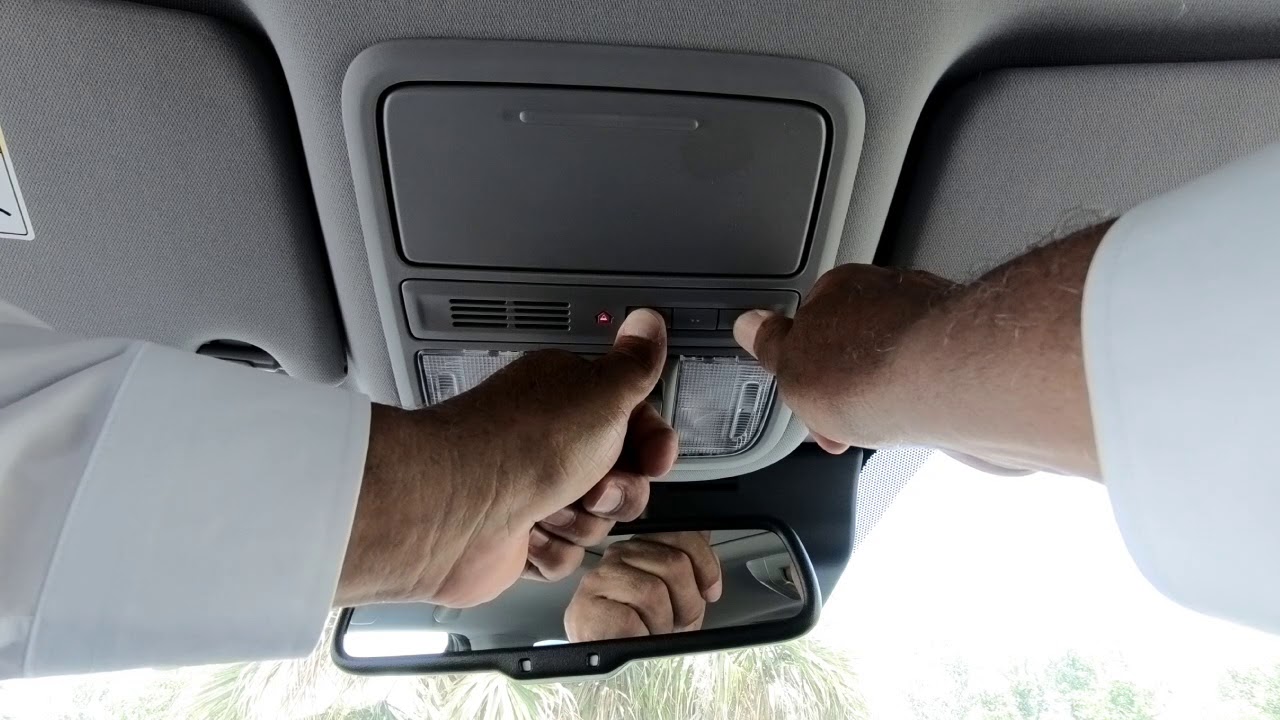
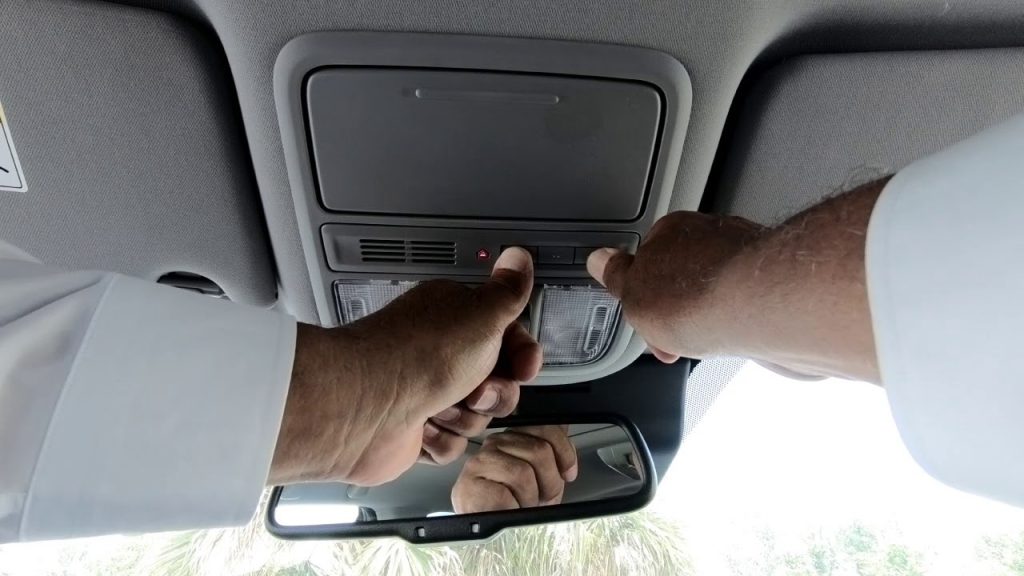
- Locate the three HomeLink buttons in your Pilot (usually on the rearview mirror or overhead console)
- Press and hold the outer two buttons (I and III) simultaneously for approximately 10-20 seconds www.piloteers.org
- Watch for the indicator light to begin flashing rapidly—this confirms the memory has been cleared techinfo.honda.com
Note: If the light doesn’t flash after 20 seconds, release and try again. Some models require up to 30 seconds.
Step 2: Program the HomeLink Button
Now you’ll teach your Pilot’s HomeLink system to recognize your garage door remote.
Detailed Steps:
- Hold your garage door remote 1-3 inches away from the HomeLink button you want to program www.cmashondaofwinchester.com
- Press and hold the button on your garage door remote
- While still holding the remote button, press and hold the desired HomeLink button
- Keep both buttons pressed for 20-30 seconds
- Watch the HomeLink indicator light:
- It will flash slowly at first
- Then flash rapidly after about 20 seconds
- Rapid flashing = successful programming www.frankletahonda.com
Critical Detail: The distance between the remote and HomeLink button matters. Keep them within 1-3 inches for optimal signal transfer
www.cmashondaofwinchester.com.
Step 3: Test the Connection
Before moving to the next step, test if the basic programming worked:
- Press the programmed HomeLink button
- The indicator light should illuminate
- If your garage door responds, you’re done!
- If not, proceed to Step 4 (rolling code synchronization)
Step 4: Sync Rolling Code Technology (If Required)
Most garage door openers manufactured after 1996 use rolling code technology for enhanced security. This means the code changes each time you use the remote, requiring an additional synchronization step
owners.honda.com.
How to Identify Rolling Code Systems:
- Check your garage door opener motor for a “Learn” or “Smart” button (usually yellow, purple, orange, or red)
- Consult your opener’s manual
- If your remote works but HomeLink doesn’t, you likely need this step
Rolling Code Synchronization Process:
- Locate the “Learn” button on your garage door opener motor unit (typically on the back or side)
- Press and release the Learn button—the indicator light will illuminate or blink
- Within 30 seconds, return to your Honda Pilot www.hondainfocenter.com
- Press and hold the programmed HomeLink button for 2 seconds
- Release the button
- The garage door opener light may flash or you may hear a click
- Test the HomeLink button—it should now operate your garage door www.hondainfocenter.com
Important: You only have a 30-second window after pressing the Learn button. If you miss it, repeat the process
www.hondainfocenter.com.
Troubleshooting Common Programming Issues
Even with careful following of instructions, problems can arise. Here’s how to solve the most common issues:
Problem: HomeLink Light Doesn’t Flash During Programming
Possible Causes & Solutions:
- Weak remote batteries: Replace with fresh batteries
- Distance too great: Move remote closer (1-3 inches)
- Wrong button combination: Ensure you’re holding both remote and HomeLink buttons
- Incompatible frequency: Some older openers use frequencies HomeLink doesn’t support
Problem: HomeLink Works Intermittently
Solutions:
- Reprogram the button following all steps again
- Check for LED or CFL bulbs near the garage door opener—they can interfere with signals
- Ensure your vehicle is within 20-30 feet of the opener when testing
Problem: Rolling Code Sync Fails
Advanced Troubleshooting:
- Clear HomeLink memory again (Step 1)
- Reprogram the remote (Step 2)
- Press the Learn button on the motor
- Immediately press the HomeLink button within 30 seconds
- If it still fails, try pressing the HomeLink button twice for 2 seconds each
How Many Devices Can You Program?
The 2021 Honda Pilot’s HomeLink system can store up to three different device codes
owners.honda.com. This means you can program:
- One garage door opener
- A gate opener
- A home lighting system or security system
Each button (I, II, III) controls one device. To add a second or third device, simply repeat the programming process using a different HomeLink button.
Can You Reset Just One HomeLink Button?
Yes! If you want to reprogram a single button without clearing all three:
- Press and hold the specific HomeLink button you want to reset
- While holding it, also hold the remote control button
- Continue holding both for 20+ seconds until the light flashes rapidly
- Reprogram with the new device
This saves you from reprogramming all three buttons when only one needs updating.
Expert Tips for Successful Programming
Industry Insight: According to automotive technology specialists, proper HomeLink programming success rates exceed 95% when users follow manufacturer guidelines precisely.
Best Practices:
- Park strategically: Position your Honda Pilot within 10 feet of the garage door during programming
- Use fresh batteries: Both in your remote and ensure your vehicle’s battery is charged
- Avoid interference: Turn off nearby electronics that might cause signal interference
- Be patient: Some systems require multiple attempts, especially rolling code models
- Consult your opener’s manual: Different brands (Chamberlain, LiftMaster, Genie) may have specific requirements
Honda Pilot HomeLink vs. Universal Remotes
| Feature | HomeLink (Built-in) | Universal Remote |
|---|---|---|
| Convenience | Integrated into vehicle | Separate device to carry |
| Power Source | Vehicle electrical system | Batteries (requires replacement) |
| Aesthetics | Clean, factory look | Additional clutter |
| Compatibility | 95% of openers | 90% of openers |
| Cost | Included in vehicle | $25-$50 additional |
| Installation | None (built-in) | Mounting required |
Verdict: HomeLink offers superior convenience and integration, making it the preferred choice for most Honda Pilot owners.
FAQ: Common Questions About Programming Your 2021 Honda Pilot Garage Door Opener
Q1: How long does it take to program the HomeLink system?
A: The entire process typically takes 5-15 minutes, depending on whether your garage door opener uses rolling code technology. Basic programming (Steps 1-2) takes about 3-5 minutes, while rolling code synchronization adds another 2-5 minutes. If you encounter issues and need troubleshooting, allow up to 20 minutes total.
Q2: Will programming HomeLink erase my existing garage door remote?
A: No, programming HomeLink does not affect your original remote. The HomeLink system learns the signal from your remote without altering the remote itself or the garage door opener’s memory. You can continue using your handheld remote as before. Think of HomeLink as a “clone” of your remote’s signal, not a replacement.
Q3: Can I program HomeLink without the original remote?
A: In most cases, you need the original remote to program HomeLink because the system must learn the specific radio frequency and code. However, if you have a rolling code system, you can sometimes program directly using the “Learn” button on the garage door opener motor without the remote. Check your opener’s manual for “direct learn” or “smart learn” capabilities. If you’ve lost your remote, contact your garage door opener manufacturer for assistance.
Q4: Why won’t my HomeLink work with my garage door opener?
A: Several factors can cause compatibility issues:
- Frequency mismatch: HomeLink operates on 288-390 MHz frequencies. If your opener uses a different frequency, it won’t work
- Outdated opener: Very old openers (pre-1996) may not be compatible
- Rolling code not synchronized: If you skipped Step 4, the system won’t function
- Signal interference: LED bulbs, wireless routers, or other electronics can block signals
- Weak batteries: Both in the remote and vehicle
Solution: Verify your opener’s compatibility at the official HomeLink website or consult your Honda dealer.
Q5: Can I program HomeLink in a rental garage or apartment complex?
A: Generally, no. Most apartment complexes and rental garages use commercial-grade access systems (keypad entry, card readers, or proprietary remotes) that aren’t compatible with HomeLink. Additionally, programming HomeLink to a shared garage door could create security issues for other residents. Always check with your property management before attempting to program any personal device to shared access systems.
Q6: Does HomeLink work with MyQ or smart garage door openers?
A: Yes, with limitations. HomeLink can control basic open/close functions of MyQ-enabled and other smart garage door openers. However, you won’t have access to smart features like remote monitoring, alerts, or integration with home automation systems through HomeLink. For full smart functionality, you’ll still need the manufacturer’s app. The HomeLink button essentially acts as a standard remote control, triggering the door’s basic operations.
Conclusion: Master Your 2021 Honda Pilot’s Garage Door Opener
Learning how to program 2021 Honda Pilot garage door opener transforms your daily routine, eliminating the hassle of fumbling for remotes and streamlining your entry into home. The HomeLink system offers unmatched convenience, security, and integration with your vehicle’s design.
Key Takeaways:
- Clear previous settings before programming new devices
- Keep the remote 1-3 inches from HomeLink buttons during learning
- Don’t forget rolling code synchronization for modern openers
- Troubleshoot systematically if issues arise
- You can program up to three different devices
Now that your garage door responds to your Honda Pilot’s built-in controls, enjoy the seamless experience every time you pull into your driveway.
Found this guide helpful? Share it with fellow Honda Pilot owners on Facebook, Twitter, or Pinterest! Tag us in your setup success stories—we love hearing how our guides make life easier. Don’t forget to bookmark this page for future reference when you need to program additional devices or troubleshoot issues.
Leave a Reply