Introduction
Are you tired of juggling multiple remotes every time you pull into your driveway? You are not alone. Many new owners of the 2021 Ford Explorer struggle initially with integrating their smart home devices into the vehicle’s built-in system. Knowing how to program 2021 Ford Explorer garage door opener correctly can save you time, reduce clutter, and enhance your daily convenience. This guide will walk you through the process with clarity and ease, ensuring you get it right the first time.
Understanding the HomeLink® System in Your 2021 Explorer
Before diving into the buttons, it is essential to understand what you are working with. The 2021 Ford Explorer comes equipped with HomeLink®, a universal transceiver that replaces your handheld remote controls for garage doors, gate operators, home lighting, and security systems.
Unlike older mechanical systems, HomeLink uses radio frequencies to communicate with your garage door motor. According to HomeLink’s official technical documentation, this system is compatible with over 95% of garage door openers manufactured since 1982. This high compatibility rate means that if you have a standard residential garage door, your Explorer can likely control it without needing extra hardware.
Why Use Built-In Controls?
- Security: Reduces the risk of losing handheld remotes.
- Convenience: One-touch access from your rearview mirror or overhead console.
- Aesthetics: Keeps your car interior clean and clutter-free.
Preparation: What You Need Before Starting
Programming your garage door opener is not just about pressing buttons in the car. You need to prepare your environment to ensure a successful sync. Failure to prepare is the number one reason why programming attempts fail.
Checklist for Success
- Your Original Remote: Have your existing handheld garage door remote ready. You will need it to transmit the signal to the car.
- Access to the Garage Motor: You may need a ladder to reach the “Learn” or “Smart” button on your garage door opener motor unit inside the garage.
- Fresh Batteries: Ensure both your car battery and your handheld remote batteries are fresh. Weak signals cause programming timeouts.
- Clear Space: Park your Explorer directly in front of the garage door, within clear line-of-sight of the motor unit.
Pro Tip: If you have a rolling code system (common in modern openers like LiftMaster or Chamberlain), you must complete the entire process within 30 seconds once you press the learn button on the motor. Have a helper ready if possible.
Step-by-Step: How To Program 2021 Ford Explorer Garage Door Opener
Follow these steps precisely. The 2021 Explorer interface is intuitive, but timing is critical.
Step 1: Clear Existing Memory (If Necessary)
If you are replacing an old garage door or reprogramming a button that was previously used, you must clear it first.
- Turn the ignition to the ON position (you do not need to start the engine).
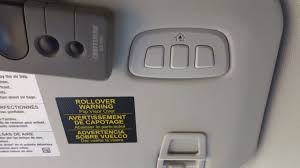
- Locate the HomeLink buttons on your overhead console or rearview mirror.
- Press and hold the two outer buttons simultaneously for about 10–20 seconds.
- Release when the indicator light begins to flash rapidly. This confirms the memory is cleared.
Step 2: Initiate Training Mode
- Keep the ignition ON.
- Hold your original handheld remote 1–3 inches away from the HomeLink button you wish to program.
- Press and hold both the HomeLink button in your car and the button on your handheld remote at the same time.
- Keep holding both until the HomeLink indicator light changes from a slow blink to a rapid flash. This usually takes 15–30 seconds.
- Release both buttons.
Step 3: Sync with the Garage Door Motor
This is the most critical step for rolling code systems.
- Locate the “Learn” or “Smart” button on your garage door opener motor unit (hanging from your garage ceiling). It is usually colored yellow, purple, or red.
- Press and release the “Learn” button. You typically have 30 seconds to complete the next step.
- Return to your Explorer.
- Press and hold the programmed HomeLink button for two seconds, then release.
- Repeat this press-and-release cycle three times.
- Watch your garage door. If it moves (opens or closes), the programming is successful.
Step 4: Test the Functionality
Drive your car out of the garage and close the door using the HomeLink button. Then, try opening it again. If the door responds consistently, you are done. If it works intermittently, you may need to adjust the sensitivity or repeat Step 3.
Troubleshooting Common Issues
Even with careful following of instructions, things can go wrong. Here is a breakdown of common problems and solutions.
| Issue | Possible Cause | Solution |
|---|---|---|
| Light flashes slowly but never rapidly | Signal interference or weak remote battery. | Replace remote battery. Move closer to the car’s sensor. |
| Door moves but stops immediately | Safety sensors are blocked or misaligned. | Check the photo-eye sensors at the bottom of your garage tracks. |
| “Learn” button times out | Took too long to return to the car. | Have a helper press the car button while you hit the motor unit. |
| Inconsistent operation | Rolling code desynchronization. | Repeat Step 3 (Sync with Motor) carefully. |
What If I Don’t Have a Handheld Remote?
If you have lost your original remote, you cannot use the standard method above. In this case, you must purchase a universal compatible remote or contact your garage door manufacturer to buy a replacement. Some newer smart garage hubs (like MyQ) allow programming via a smartphone app, which can sometimes bypass the need for a physical remote during initial setup.
Advanced Tips for Smart Home Integration
The 2021 Ford Explorer is part of a connected ecosystem. Once your garage door is programmed, consider these enhancements:
- Voice Control: If your garage opener is compatible with Amazon Alexa or Google Assistant, you can link your HomeLink account to these platforms. This allows you to check if your door is closed via voice command.
- Geofencing: Some advanced garage openers can detect when your Ford Explorer approaches via Bluetooth or Wi-Fi, automatically opening the door before you even press the button.
- Security Alerts: Ensure your garage door motor has Wi-Fi capability. This allows you to receive notifications on your phone if the door is left open, adding a layer of security beyond the car’s control.
FAQ Section
Q1: Can I program multiple garage doors to my 2021 Ford Explorer?
A: Yes. The HomeLink system in the 2021 Explorer typically supports up to three different devices. You can program a garage door, a gate, and a home lighting system simultaneously. Just repeat the programming steps for each button slot.
Q2: Why does my garage door only work when I am very close to the house?
A: This usually indicates a weak signal or interference. Try reprogramming the device. If the issue persists, check if there are large metal objects or LED lights near the garage motor causing interference. You may also need to replace the battery in your car key fob if it shares the same frequency band.
Q3: Is it safe to leave my garage door opener programmed in my car?
A: Generally, yes. Modern rolling code technology changes the access code every time you use it, making it extremely difficult for thieves to intercept and replicate the signal. However, always practice general security awareness, such as not leaving valuables visible in your parked car.
Q4: What should I do if the HomeLink light stays solid green but the door doesn’t move?
A: A solid green light usually means the car has successfully learned the signal, but the garage motor hasn’t accepted it. This points to an issue in Step 3 of the guide. You likely missed the 30-second window to press the “Learn” button on the motor unit. Clear the memory and start again, ensuring you have a helper to assist with timing.
Q5: Does programming the garage door opener affect my car’s warranty?
A: No. Using the built-in HomeLink system is a standard feature supported by Ford. It does not void your warranty. However, if you modify the electrical wiring of your garage door motor improperly, that could affect the garage door’s own warranty.
Conclusion
Learning how to program 2021 Ford Explorer garage door opener is a straightforward process that significantly enhances your driving experience. By following the steps outlined above—clearing memory, training the remote, and syncing with the motor—you can enjoy seamless access to your home. Remember, preparation is key, and patience during the synchronization phase ensures long-term reliability.
Now that your garage door is integrated, take a moment to appreciate the convenience. No more digging through bags for remotes! If you found this guide helpful, please share it with fellow Ford owners on social media. Have questions or tips of your own? Leave a comment below—we love hearing from our community.
Leave a Reply