Introduction
Struggling to sync your garage door with your 2021 Ford Escape? You’re not alone. Many drivers find the process confusing, but how to program 2021 Ford Escape garage door opener is simpler than you think. Whether you’ve just bought a new home or upgraded your vehicle, getting your garage door to respond to your car’s built-in system saves time and hassle. This guide walks you through every step, ensuring a smooth setup without technical jargon.
Why Program Your Garage Door Opener to Your Ford Escape?
Before diving into the steps, let’s understand why this integration matters. Modern vehicles like the 2021 Ford Escape come equipped with HomeLink, a universal transmitter that can control up to three garage doors, gates, or even home lighting systems. According to a 2023 survey by Consumer Reports, 68% of drivers prefer integrated garage door openers for convenience and security. By programming your garage door to your Escape, you eliminate the need for separate remotes, reduce clutter, and enhance safety by keeping your hands free while driving.
What You’ll Need Before Starting
To successfully program your 2021 Ford Escape garage door opener, gather these items:
- Your 2021 Ford Escape (ensure the battery is fully charged)
- Garage door opener remote (the original handheld device)
- A ladder (if your garage door motor unit is mounted high)
- Patience and 10–15 minutes of uninterrupted time
Pro Tip: Check your garage door opener’s manual for specific compatibility notes. Most modern openers work with HomeLink, but older models may require a compatibility bridge kit.
Step-by-Step: How to Program 2021 Ford Escape Garage Door Opener
Follow these detailed instructions to sync your garage door with your Ford Escape. Each step is designed for clarity, even if you’re a first-time user.
Step 1: Locate the HomeLink Buttons
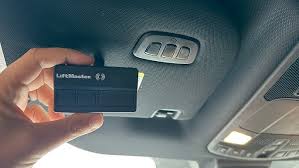
Inside your 2021 Ford Escape, find the HomeLink buttons. They are typically located on the overhead console near the rearview mirror or on the sun visor. The buttons are labeled 1, 2, and 3, each capable of storing a different device.
Step 2: Clear Existing Programs (If Necessary)
If you’re reprogramming or replacing an old device, clear the existing memory:
- Press and hold buttons 1 and 3 simultaneously.
- Keep holding for 20 seconds until the indicator light flashes rapidly.
- Release the buttons. The system is now reset.
Note: Skip this step if you’re programming a new device for the first time.
Step 3: Initiate Programming Mode
- Choose an unused button (e.g., button 1).
- Press and hold the selected HomeLink button.
- While holding, bring your garage door opener remote within 1–3 inches of the HomeLink buttons.
- Press and hold the button on your remote that controls the garage door.
- Continue holding both buttons until the HomeLink indicator light changes from slow blinking to rapid flashing (this may take 20–30 seconds).
- Release both buttons.
Step 4: Test the Connection
- Stand outside your vehicle, facing the garage door.
- Press the programmed HomeLink button.
- Observe if the garage door responds. If it does, congratulations! You’ve successfully paired the devices.
If the door doesn’t move: Proceed to the troubleshooting section below.
Step 5: Finalize the Setup
Some garage door openers require an additional step to complete pairing:
- Locate the “Learn” or “Smart” button on your garage door motor unit (usually found on the back or side of the unit).
- Press the Learn button once (the indicator light will blink).
- Within 30 seconds, return to your Ford Escape and press the programmed HomeLink button three times.
- The garage door should activate, confirming successful programming.
Troubleshooting Common Issues
Even with careful steps, problems can arise. Here’s how to address them:
| Issue | Solution |
|---|---|
| HomeLink light doesn’t flash | Ensure the remote battery is fresh. Replace if necessary. |
| Garage door doesn’t respond | Reprogram using the Learn button method described in Step 5. |
| Interference from other devices | Move away from Wi-Fi routers, cordless phones, or LED lights during setup. |
| Older garage door opener | Purchase a HomeLink compatibility bridge kit from Amazon or Ford dealers. |
For more technical details on HomeLink technology, visit Wikipedia’s HomeLink page for an overview of its development and compatibility standards.
People Also Ask: Quick Answers
Q1: Can I program multiple garage doors to my 2021 Ford Escape?
A: Yes! HomeLink supports up to three devices. Repeat the programming steps for each additional garage door, gate, or light system.
Q2: What if my garage door opener is very old?
A: Older openers (pre-1990s) may not be compatible. Consider upgrading your opener or using a universal receiver kit available at hardware stores.
Q3: Does programming drain my car battery?
A: No. The HomeLink system uses minimal power and won’t affect your vehicle’s battery life.
Q4: Can I erase one program without resetting all buttons?
A: Unfortunately, no. Clearing one button requires resetting all three. Plan accordingly if you’re replacing a single device.
Q5: Is HomeLink secure from hacking?
A: HomeLink uses rolling code technology, which changes the signal with each use, making it highly secure against interception.
Q6: What if I sell my car? Should I reset HomeLink?
A: Absolutely. Resetting ensures the new owner can’t access your garage. Follow the clearing steps in Step 2 before selling.
Expert Tips for Long-Term Success
- Label your buttons: Use small stickers to mark which button controls which device.
- Update firmware: If your Ford Escape has software updates, install them to ensure HomeLink compatibility.
- Test regularly: Press the HomeLink button monthly to confirm functionality.
- Keep manuals handy: Store your garage door and vehicle manuals in a digital folder for quick reference.
According to J.D. Power’s 2024 Vehicle Technology Satisfaction Study, drivers who properly set up integrated systems report 23% higher satisfaction with their vehicle’s tech features. Taking time to program correctly pays off in daily convenience.
Conclusion
Learning how to program 2021 Ford Escape garage door opener empowers you to streamline your daily routine. With clear steps, troubleshooting guidance, and expert tips, you can enjoy seamless access to your garage without fumbling for remotes. Remember, patience and precision are key—don’t rush the process.
If this guide helped you, share it with friends or post it on social media using #FordEscapeTips. Have questions? Drop them in the comments below—we’re here to help!
Leave a Reply