Introduction
Struggling to sync your new 2021 Dodge Ram with your garage door? You’re not alone. Many truck owners face confusion when trying to program their 2021 Dodge Ram garage door opener, especially with the advanced HomeLink system integrated into these modern vehicles. Whether you’ve just purchased your Ram or recently changed garage doors, getting this feature working correctly is essential for convenience and security. This comprehensive guide will walk you through every step, ensuring you can open your garage with the simple press of a button in your truck.
Understanding the HomeLink System in Your 2021 Dodge Ram
Before diving into the programming process, it’s important to understand what you’re working with. The 2021 Dodge Ram comes equipped with the HomeLink universal transceiver, a sophisticated system that allows your vehicle to communicate with various radio-controlled devices, including garage door openers, gate operators, and home lighting systems.
What Makes HomeLink Different?
Unlike traditional garage door remotes, HomeLink uses rolling code technology for enhanced security. This means the code changes each time you use it, preventing unauthorized access. According to HomeLink’s official documentation, this system has been integrated into millions of vehicles worldwide since its introduction in 1992, making it one of the most reliable universal remote systems available.
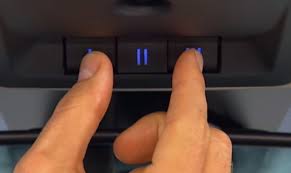
The 2021 Ram typically features three programmable buttons located on the overhead console near the rearview mirror. These buttons can be programmed to control up to three different devices, giving you flexibility beyond just your garage door.
Pre-Programming Checklist: What You Need Before Starting
Successful programming requires proper preparation. Here’s everything you should have ready:
Essential Items
- Your 2021 Dodge Ram with the engine running or in accessory mode
- Original garage door remote (if available)
- Stepladder to reach your garage door opener motor unit
- Patience – the process may take 10-15 minutes
Important Safety Considerations
Before beginning, ensure your garage area is clear of people and obstacles. Test that your garage door opens and closes properly using the existing remote or wall switch. If your current system isn’t functioning correctly, address those issues first before attempting to program your vehicle.
Pro Tip: Have someone assist you if possible. One person can stay in the vehicle while another monitors the garage door movement, making the process safer and more efficient.
Step-by-Step Guide: How to Program 2021 Dodge Ram Garage Door Opener
Method 1: Programming Without the Original Remote
This method works for most garage door openers manufactured after 1995. Follow these steps carefully:
Step 1: Clear Existing Programs
- Turn your ignition to the “ON” position (engine can be off)
- Press and hold the two outer HomeLink buttons simultaneously
- Continue holding for approximately 20 seconds until the indicator light begins to flash rapidly
- Release both buttons when the light changes from solid to flashing
Step 2: Position Your Vehicle
- Park your 2021 Ram 6-10 feet away from the garage door opener motor unit
- Ensure you have a clear line of sight to the motor
- Keep the engine running or in accessory mode throughout the process
Step 3: Initiate Learning Mode
- Choose which HomeLink button you want to program (1, 2, or 3)
- Press and hold your chosen button
- While holding the HomeLink button, locate the “Learn” or “Smart” button on your garage door opener motor unit
- Press and release the Learn button on the motor unit
- Continue holding the HomeLink button for 2-3 seconds after pressing the Learn button
Step 4: Test the Connection
- Release the HomeLink button
- Press the programmed button 3-4 times to test functionality
- The garage door should respond to each press
Method 2: Programming With the Original Remote
If you have your original garage door remote, this method often provides faster results:
Step 1: Prepare Both Devices
- Hold the original remote 1-3 inches away from the HomeLink buttons
- Ensure both devices have fresh batteries
Step 2: Simultaneous Button Press
- Press and hold your desired HomeLink button
- While continuing to hold the HomeLink button, press and hold the button on your original remote
- Hold both buttons for 20-30 seconds
Step 3: Monitor the Indicator Light
- Watch the HomeLink indicator light carefully
- When it changes from slow blinking to rapid flashing, release both buttons
- This indicates successful programming
Step 4: Verify Functionality
- Test the newly programmed button multiple times
- Ensure consistent operation before relying on it regularly
Troubleshooting Common Programming Issues
Even with careful following of instructions, problems can arise. Here are solutions to the most common issues:
Problem: HomeLink Light Doesn’t Flash Rapidly
Solution:
- Ensure your vehicle is in the correct mode (ignition ON)
- Check that you’re holding the buttons long enough (full 20 seconds)
- Try clearing the memory again and restarting the process
- Verify your garage door opener is compatible with HomeLink systems
Problem: Garage Door Responds Intermittently
Solution:
- Reposition your vehicle closer to the garage door opener (3-5 feet ideal)
- Check for interference from other electronic devices
- Ensure the garage door opener antenna is hanging freely
- Consider reprogramming using Method 2 if you have the original remote
Problem: Programming Won’t Complete
Solution:
- Consult your garage door opener manual for specific compatibility notes
- Some older openers may require a compatibility bridge/adapter
- Contact HomeLink support at 1-800-355-3515 for specialized assistance
- Visit HomeLink’s compatibility database for detailed manufacturer information
Advanced Tips for Optimal Performance
Maximizing Signal Strength
- Antenna Positioning: Ensure your garage door opener’s antenna hangs vertically and isn’t obstructed by metal objects
- Vehicle Location: Program your Ram in the exact spot where you typically park when entering/exiting the garage
- Battery Maintenance: Replace HomeLink backup battery annually for consistent performance
Security Best Practices
- Rolling Code Confirmation: After programming, verify that your system uses rolling codes by checking if the code changes with each use
- Regular Testing: Test your programmed buttons monthly to ensure continued functionality
- Multiple User Setup: If family members have different vehicles, program each separately for individualized access
Maintenance Schedule
| Task | Frequency | Importance |
|---|---|---|
| Test all programmed buttons | Monthly | High |
| Check HomeLink battery | Annually | Medium |
| Clean HomeLink buttons | Quarterly | Low |
| Update garage door opener firmware | As available | High |
Frequently Asked Questions
Q: Can I program my 2021 Dodge Ram to work with any garage door opener?
A: Most garage door openers manufactured after 1995 are compatible with HomeLink systems. However, some older models or specific brands may require additional adapters. Check your garage door opener’s manual or visit the HomeLink website for compatibility information. If your opener uses fixed codes rather than rolling codes, you may need a compatibility bridge.
Q: How many devices can I program to my 2021 Ram’s HomeLink system?
A: The 2021 Dodge Ram HomeLink system can store up to three different devices. This means you could program your garage door, a gate operator, and home lighting system simultaneously. Each button operates independently, so you can mix and match different types of controlled devices.
Q: What should I do if I sell my 2021 Ram?
A: For security reasons, always clear your HomeLink memory before selling or trading in your vehicle. To reset: press and hold the two outer buttons for 20 seconds until the light flashes rapidly. This ensures the new owner cannot access your garage or other programmed devices. It’s also wise to change your garage door opener codes as an additional security measure.
Q: Why does my garage door only work when I’m very close to it?
A: This typically indicates a weak signal or interference issue. Try reprogramming your HomeLink system while positioned in your normal parking spot. Ensure your garage door opener’s antenna is properly positioned and not damaged. If problems persist, consider installing a HomeLink compatibility bridge or consulting with a professional installer.
Q: Can weather affect my HomeLink performance?
A: Yes, extreme temperatures can occasionally impact signal strength. Cold weather may reduce battery efficiency, while heavy rain or snow can interfere with radio signals. If you notice seasonal performance changes, consider having your system checked or upgrading to a newer garage door opener with better signal range.
Q: Is it safe to leave my garage door opener programmed in my vehicle?
A: Modern HomeLink systems use rolling code technology, making them significantly more secure than traditional remotes. However, always practice good security habits: don’t leave your vehicle unlocked in public places, and consider using additional security measures like garage door sensors or smart home integration for enhanced protection.
Conclusion
Learning how to program your 2021 Dodge Ram garage door opener doesn’t have to be complicated. With the right preparation and following these detailed steps, you can have your HomeLink system working perfectly within minutes. Remember that patience is key – if the first attempt doesn’t work, try again with careful attention to timing and positioning.
The convenience of opening your garage directly from your truck’s console is invaluable, especially during bad weather or when carrying groceries. By taking the time to properly set up and maintain your HomeLink system, you’ll enjoy years of reliable service.
Did you find this guide helpful? Share it with fellow Ram owners on social media who might be struggling with their garage door programming. Your experience could save someone hours of frustration! Don’t forget to bookmark this page for future reference, and feel free to leave comments below if you have additional questions or success stories to share.
Remember: When in doubt, consult your vehicle’s owner manual or contact HomeLink customer support for personalized assistance. Your safety and satisfaction are paramount.
Leave a Reply