Are you frustrated because your new truck won’t open your garage? You are not alone. Many owners struggle when they first try to how to program 2021 Chevy Silverado garage door opener systems. This guide will walk you through the process simply and safely, so you can enjoy the convenience of hands-free access today.
Understanding the HomeLink System in Your 2021 Silverado
Before we dive into the buttons and lights, it is helpful to understand what you are working with. The 2021 Chevy Silverado uses a system called HomeLink. This technology allows your vehicle to communicate with radio-controlled devices, such as garage doors, gates, and even home lighting systems.
Unlike older universal remotes that required complex dip-switch settings, HomeLink uses a “learning” mode. It mimics the signal of your existing garage door remote. According to Wikipedia, HomeLink is one of the most widely used integrated transceiver systems in the automotive industry, known for its reliability and security features.
Why Programming Might Fail
Many users fail on their first attempt due to two common reasons:
- Interference: Other electronic devices nearby can disrupt the signal.
- Incorrect Mode: Not holding the button long enough to enter “learning mode.”
Understanding these basics helps set you up for success before you even sit in the driver’s seat.
Step-by-Step Guide: How to Program 2021 Chevy Silverado Garage Door Opener
Follow these instructions carefully. We recommend having a second person help you if possible, as you will need to operate both the car controls and your handheld garage remote simultaneously.
Step 1: Prepare Your Equipment
Ensure you have the following ready:
- Your 2021 Chevy Silverado (parked outside the garage).
- Your original handheld garage door remote.
- Fresh batteries in your handheld remote (weak batteries cause 50% of programming failures).
Important Safety Note: Keep your hands and feet clear of the garage door mechanism during testing. Ensure no children or pets are near the door.
Step 2: Clear Previous Settings (If Necessary)
If you are reprogramming a button that was previously used, you must clear it first.
- Press and hold the two outer HomeLink buttons simultaneously.
- Hold them for about 20 seconds.
- Release when the indicator light begins to flash rapidly.
- This resets the memory for those specific buttons.
Step 3: Enter Programming Mode
Now, let’s pair the car with your garage door.
- Choose the HomeLink button you wish to use (Button 1, 2, or 3).
- Press and hold this chosen button.
- Do not release it yet. Watch the indicator light. It will start slow, then turn solid orange.
- Once the light turns solid orange, continue holding the button.
Step 4: Sync with Your Handheld Remote
While still holding the HomeLink button in your truck:
- Take your handheld garage remote.
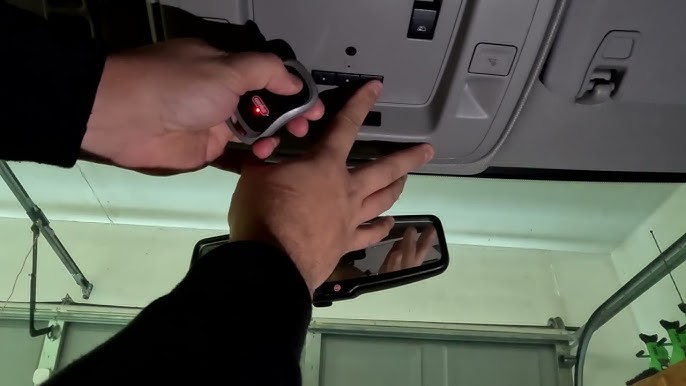
- Point it at the HomeLink mirror/console (usually within 1–3 inches).
- Press and hold the button on your handheld remote that opens your garage.
- Hold both buttons until the HomeLink indicator light flashes from slow to rapid.
- This rapid flash indicates the frequency has been learned.
Step 5: Test the Connection
- Release both buttons.
- Press the programmed HomeLink button in your Silverado firmly.
- Your garage door should activate.
If the door does not move, repeat Steps 3 and 4. Sometimes, it takes two or three attempts for the signal to register correctly.
Troubleshooting Common Issues
Even with careful steps, things can go wrong. Here is a breakdown of common problems and solutions.
| Issue | Possible Cause | Solution |
|---|---|---|
| Light stays solid orange | Signal not received | Move closer to the garage motor unit; check remote batteries. |
| Light flashes rapidly but door doesn’t move | Rolling code issue | See “Rolling Code Systems” section below. |
| No light at all | Fuse blown or system disabled | Check your vehicle’s fuse box or consult the owner’s manual. |
| Intermittent operation | Interference | Try programming at different times of day; avoid Wi-Fi routers nearby. |
Dealing with Rolling Code Systems
Most modern garage doors (manufactured after 1996) use rolling codes for security. This means the code changes every time you press the button. If your HomeLink light flashes rapidly but the door only works once or not at all, you likely have a rolling code system.
To fix this:
- Locate the “Learn” or “Smart” button on your garage door motor unit (inside the garage ceiling).
- Press the HomeLink button in your truck twice. The door should move.
- Immediately go to the motor unit and press the “Learn” button.
- Return to your truck and press the HomeLink button again.
- This syncs the changing codes between the car and the motor.
Tips for Better Performance
To ensure your 2021 Chevy Silverado garage door opener works reliably for years, consider these expert tips:
- Keep the Remote Handy: Always keep your original handheld remote in your glove box. If the HomeLink system ever loses its memory (rare, but possible after a battery disconnect), you will need it to reprogram.
- Avoid Metal Obstructions: When programming, ensure there is no metal sheeting between the car and the garage motor. Metal blocks radio frequencies.
- Update Firmware: While rare for HomeLink, ensure your vehicle’s software is up to date during regular dealership service visits.
Frequently Asked Questions (FAQ)
1. Can I program multiple garage doors to my 2021 Silverado?
Yes. The HomeLink system in the 2021 Chevy Silverado typically has three buttons. You can program each button to a different device, such as two different garage doors and a gate, or a garage door and home lights.
2. What if I don’t have my original handheld remote?
You cannot program HomeLink without an existing remote or access to the “Learn” button on the garage motor unit. If you lost your remote, you must buy a compatible universal remote from a hardware store and program that to your garage first, then use it to program the car.
3. Does this work with all garage door brands?
HomeLink is compatible with over 95% of garage door openers on the market, including major brands like Chamberlain, LiftMaster, Genie, and Craftsman. However, some very old or proprietary commercial systems may not be compatible.
4. Why does my garage door close immediately after opening?
This is usually a safety sensor issue, not a programming issue. Check the photo-eye sensors at the bottom of your garage door tracks. If they are misaligned or dirty, the door will reverse for safety. Clean the lenses and realign them.
5. Is it safe to leave my garage door opener programmed in my car?
Yes. HomeLink uses encrypted signals, especially with rolling codes. It is generally more secure than leaving a standalone remote visible on your dashboard. However, always practice good security habits and do not leave valuables in plain sight in your vehicle.
6. Can I reset the HomeLink system completely?
Yes. To reset all buttons, press and hold the two outer buttons for 20 seconds until the light flashes. This clears all three buttons. You will need to reprogram each device individually afterward.
Conclusion
Learning how to program 2021 Chevy Silverado garage door opener systems is a straightforward process that enhances your daily convenience. By following the steps above, you can integrate your home access with your vehicle seamlessly. Remember to check your batteries, identify if you have a rolling code system, and test the connection thoroughly.
Once programmed, you will enjoy the luxury of arriving home and entering your garage without fumbling for keys or remotes. It is a small feature that makes a big difference in your daily routine.
Leave a Reply