Are you tired of fumbling for a separate remote every time you pull into the driveway? We completely understand how frustrating it is to juggle multiple devices just to open your garage. In this guide, we will show you exactly how to program 2021 Audi Q5 garage door opener systems seamlessly so you can use your car’s built-in controls.
How To Program 2021 Audi Q5 Garage Door Opener: What You Need
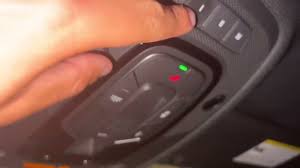
Before we dive into the actual programming, let’s gather everything you need. The 2021 Audi Q5 comes equipped with the integrated HomeLink system, usually located in the overhead console near your rearview mirror.
To ensure a smooth setup, please prepare the following:
- Your 2021 Audi Q5 parked outside the garage (never inside, as the car’s hood can block the signal).
- The original handheld garage door remote you want to sync.
- A fresh battery in your handheld remote (a weak battery is the #1 cause of syncing failures).
- A step ladder, which is often required to reach the motor unit’s “Learn” button on the ceiling.
Safety First: Always ensure the garage door area is clear of people, pets, and obstacles before testing your newly programmed buttons.
Step-by-Step Guide: Syncing Your Garage Door
Now that you are fully prepared, let’s walk through the process. The integrated control system in your vehicle, widely recognized as HomeLink, is a standard in the automotive industry designed to make your life easier. Follow these concrete steps to get it working perfectly.
Step 1: Clear the Existing Memory
If your Audi Q5 is pre-owned or you previously tried to program a button, you must clear the old memory first.
- Turn the ignition to the “ON” or “Accessory” position (you do not need to start the engine).
- Locate the two outer HomeLink buttons on the overhead console.
- Press and hold both outer buttons simultaneously for about 10 to 15 seconds.
- Release the buttons only when the LED indicator light begins to flash rapidly. This confirms the memory is erased.
Step 2: Program the Handheld Remote
Next, we will teach the car what signal to look for.
- Hold your original handheld remote 1 to 3 inches away from the HomeLink button you want to program.
- Press and hold the button on your handheld remote.
- While holding the remote button, press and hold the desired HomeLink button in your Audi Q5.
- Watch the LED light on the HomeLink button. It will blink slowly at first, then transition to a rapid flash.
- Once it flashes rapidly, release both buttons.
Step 3: Train the Garage Door Motor (Crucial for Rolling Codes)
According to industry data, over 90% of garage doors installed in the US since 1996 use “rolling code” technology for enhanced security. Because of this, Step 2 alone is usually not enough. You must sync the car directly to the garage motor.
- Open your car door and step out, keeping the ignition ON.
- Locate the motor head of your garage door opener on the ceiling.
- Find the “Learn” or “Smart” button (usually colored yellow, red, purple, or orange) near the antenna wire.
- Press and release the “Learn” button. The indicator light on the motor will illuminate or blink for 30 seconds.
- Within 30 seconds, go back to your Audi Q5 and firmly press and release the programmed HomeLink button.
- Press the same HomeLink button a second time to lock in the code. You should see the garage door move, or hear a distinct “click” from the motor.
Troubleshooting: Why Won’t My Garage Door Sync?
Even with perfect instructions, technology can sometimes be stubborn. If your garage door refuses to open, check these common culprits:
- Distance Issues: If the LED on the HomeLink button blinks rapidly but the door doesn’t move, you may have missed the 30-second window to press the motor’s “Learn” button. Simply repeat Step 3.
- Incompatible Frequencies: While rare, some very old openers (pre-1996) operate on frequencies that modern cars cannot detect. If this happens, you may need a compatibility clip from the garage door manufacturer.
- Weak Remote Battery: If the handheld remote’s battery is dying, the car won’t receive a strong enough signal during Step 2. Replace the battery (usually a CR2032) and try again.
Built-In HomeLink vs. Standalone Remotes: Pros and Cons
Still wondering if using your Audi’s built-in system is better than just keeping the original remote in your cupholder? Here is a quick comparison to help you decide.
| Feature | Built-In HomeLink (Audi Q5) | Standalone Handheld Remote |
|---|---|---|
| Convenience | High. Always with the car; no extra items to carry. | Low. Easy to lose in a bag or between car seats. |
| Aesthetics | Seamless. Integrated cleanly into the overhead console. | Cluttered. Adds visual clutter to your car interior. |
| Battery Life | N/A. Powered directly by the vehicle’s electrical system. | Limited. Requires battery replacements every 1-2 years. |
| Passenger Use | Easy. Passengers can easily reach the overhead console. | Difficult. Must pass the remote around the cabin. |
As you can see, taking 10 minutes to program your system offers massive long-term benefits for your daily routine.
Frequently Asked Questions (FAQ)
To further assist you, we have answered the most common questions drivers ask when setting up their vehicle’s garage door system.
1. How many garage door openers can the 2021 Audi Q5 store?
The HomeLink system in the 2021 Audi Q5 features three independent buttons. This means you can program up to three different devices, such as a main garage door, a side gate, or even a smart home lighting system.
2. Do I need the original remote to program the Audi Q5?
In most cases, yes. You need the original remote to “teach” the car the correct frequency. However, if you have lost the original remote, you can still program the system by using the “Learn” button directly on the garage door motor unit.
3. Will this work with major brands like LiftMaster or Chamberlain?
Absolutely. The HomeLink system is universally compatible with nearly all major garage door opener brands in the US market, including Chamberlain, LiftMaster, Genie, and Craftsman.
4. What if the HomeLink light flashes rapidly but the door doesn’t move?
A rapid flash means the car successfully learned the signal from your remote, but the garage motor hasn’t accepted it yet. This is the classic “rolling code” issue. You simply need to go to your garage ceiling motor and press the “Learn” button, then press the HomeLink button in the car to complete the handshake.
5. Can I program a gate entry system or smart lights using this method?
Yes! The exact same steps apply to radio-controlled gates, entry doors, and even some smart home lighting systems. Just ensure the device operates on a standard radio frequency (usually between 300 MHz and 390 MHz).
Conclusion
Mastering how to program 2021 Audi Q5 garage door opener systems is a straightforward process that pays off every single day. By utilizing the built-in HomeLink system, you eliminate the hassle of lost remotes, dead batteries, and cluttered cupholders. With just a few simple steps, your luxury SUV becomes the ultimate remote control for your home.
Leave a Reply