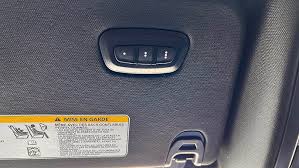
Are you tired of fumbling for your garage remote every time you pull into your driveway? Many 2020 Ram 2500 owners struggle initially with integrating their vehicle’s built-in system with their home garage. If you are wondering how to program 2020 Ram 2500 garage door opener, you are not alone, but the solution is simpler than you might think.
The 2020 Ram 2500 comes equipped with the HomeLink® system, a universal transceiver that allows you to control up to three different devices, such as garage doors, gate operators, or even home lighting systems. While the technology is robust, the pairing process can seem intimidating if you have never done it before. This guide will walk you through the exact steps to get your truck talking to your garage door, ensuring a seamless entry experience every time you come home.
Understanding the HomeLink System in Your 2020 Ram 2500
Before diving into the buttons and lights, it is essential to understand what you are working with. The HomeLink system in your Ram 2500 is not just a simple remote; it is a sophisticated learning device designed to mimic the signal of your existing garage door opener.
Unlike older vehicles that required specific frequency matching, the HomeLink system uses a “rolling code” technology for enhanced security. This means that every time you press the button, the code changes, preventing unauthorized access. According to HomeLink’s official documentation on Wikipedia, this system is compatible with over 95% of garage door openers manufactured since 1995, making it one of the most versatile solutions on the market.
Key Components You Need
- Your 2020 Ram 2500: Ensure the vehicle is parked outside the garage with the engine running or in accessory mode.
- Original Garage Remote: You will need your existing handheld remote to train the vehicle.
- A Ladder: Helpful if your garage door motor unit is mounted high on the ceiling.
- Patience: The process usually takes 5–10 minutes, but interruptions can reset the cycle.
Step-by-Step Guide: How to Program 2020 Ram 2500 Garage Door Opener
Programming your HomeLink system involves two main phases: clearing any previous settings (if applicable) and then training the new button. Follow these instructions carefully for the best results.
Phase 1: Clearing Previous Settings (If Necessary)
If your HomeLink buttons have been used before, or if you are buying a used Ram 2500, you should clear the memory first.
- Press and hold the two outer HomeLink buttons simultaneously.
- Keep holding them for about 20 seconds.
- Watch the indicator light. It will begin to flash slowly and then rapidly.
- Once the light flashes rapidly, release both buttons. The memory is now cleared.
Note: If you are programming a brand-new vehicle, you can skip this phase and move directly to Phase 2.
Phase 2: Training the HomeLink Button
This is the core part of learning how to program 2020 Ram 2500 garage door opener.
- Position Your Vehicle: Park your Ram 2500 outside the garage, facing the door. Ensure you are within range of the garage door receiver (usually 10–20 feet).
- Select a Button: Choose which of the three HomeLink buttons you want to use. Let’s assume we are using Button 1.
- Initiate Learning Mode: Press and hold the chosen HomeLink button. Do not release it yet.
- Bring in the Remote: While still holding the HomeLink button, bring your original garage door remote close to the rearview mirror (about 1–3 inches away).
- Sync the Signals: Press and hold the button on your handheld remote that operates the garage door. Keep both buttons pressed.
- Watch the Light: The HomeLink indicator light will change from a slow blink to a rapid flash. This indicates that the frequency has been recognized.
- Release Both Buttons: Once the light flashes rapidly, release both the HomeLink button and the handheld remote button.
Phase 3: Testing and Finalizing
Now that the signal is captured, you need to test if it works.
- Press the programmed HomeLink button firmly and hold it for two seconds.
- Observe your garage door. If it moves, you are done!
- If the door does not move, repeat Phase 2, ensuring the remote is closer to the mirror.
Troubleshooting Rolling Code Systems
If your garage door did not respond in Phase 3, you likely have a rolling code opener. Most modern openers (brands like Chamberlain, LiftMaster, and Genie) use this security feature. Here is how to handle it.
Identifying a Rolling Code Opener
Check your garage door motor unit. If it was manufactured after 1995, it almost certainly uses rolling codes. You may also see a “Learn” or “Smart” button on the motor unit itself.
The Additional Step for Rolling Codes
- Locate the “Learn” button on your garage door motor unit. It is usually colored yellow, purple, or red.
- Press and release the “Learn” button. You typically have 30 seconds to complete the next step.
- Return to your Ram 2500.
- Press and hold the programmed HomeLink button for two seconds, release it, and press it again for two seconds. Repeat this cycle (press-hold-release) up to three times.
- The garage door should activate. If it does, the programming is complete.
| Brand | Common Learn Button Color | Notes |
|---|---|---|
| LiftMaster | Yellow/Purple | May require a ladder to access |
| Chamberlain | Purple/Yellow | Often located on the back panel |
| Genie | Red/Purple | Look for a small antenna nearby |
| Craftsman | Red/Green | Compatible with most Sears models |
Why Use HomeLink Instead of a Separate Remote?
You might wonder why you should go through the trouble of programming your truck when you already have a handheld remote. There are several compelling reasons to integrate your 2020 Ram 2500 with your garage.
- Convenience: No more digging through bags or pockets for a remote. Your garage opener is always with you in your vehicle.
- Security: Handheld remotes can be lost or stolen. HomeLink is built into the vehicle, reducing the risk of unauthorized access to your home.
- Aesthetics: Keeps your car visor clutter-free. You do not need to clip extra devices to your sun visor.
- Reliability: The HomeLink system in the Ram 2500 is designed to withstand extreme temperatures and vibrations, often outlasting cheap plastic remotes.
Common Mistakes to Avoid
Even with clear instructions, users often make simple errors that prevent successful programming. Here are the most common pitfalls:
- Giving Up Too Soon: The initial training phase can take up to 45 seconds of holding buttons. Do not release early.
- Wrong Distance: Holding the remote too far from the HomeLink sensor during training will fail. Keep it within 1–3 inches.
- Ignoring the “Learn” Button: For rolling code systems, skipping the step at the garage motor unit is the number one reason for failure.
- Vehicle Off: Ensure your Ram 2500 is in accessory mode or running. Some systems disable HomeLink programming when the vehicle is completely off to save battery.
FAQ Section
1. Can I program more than one garage door to my 2020 Ram 2500?
Yes, the HomeLink system supports up to three different devices. You can program a second garage door, a gate, or even home lights by repeating the training process on a different button.
2. What if my garage door opener is very old?
If your opener was manufactured before 1995, it may use a fixed code rather than a rolling code. In this case, the standard Phase 2 instructions should work without needing to press the “Learn” button on the motor unit. However, consider upgrading your opener for better security.
3. Does programming HomeLink drain my truck’s battery?
No, the HomeLink system is designed to be energy efficient. Programming takes only a few minutes and has a negligible impact on your battery. Once programmed, it draws minimal power when idle.
4. Can I erase just one button instead of all three?
Unfortunately, no. The HomeLink system requires you to clear all three buttons simultaneously if you wish to reset the memory. You will need to reprogram any other devices you had previously saved.
5. Why does my garage door close immediately after opening?
This is a safety feature issue, not a programming error. Check the safety sensors on your garage door tracks. If they are misaligned or blocked, the door will reverse direction. Reprogramming HomeLink will not fix sensor issues.
6. Is HomeLink compatible with smart garage openers?
Yes, most smart garage openers (like MyQ) still broadcast a radio frequency signal that HomeLink can learn. However, you may need to enable “compatibility mode” in your smart opener’s app settings.
Conclusion
Learning how to program 2020 Ram 2500 garage door opener is a straightforward process that pays off in daily convenience. By following the steps outlined above, you can seamlessly integrate your vehicle with your home’s entry system. Remember to identify whether you have a rolling code system, as this determines whether you need to visit the garage motor unit for the final sync.
Once programmed, you will enjoy the luxury of entering your garage with just the press of a button on your rearview mirror. It is a small upgrade that makes a big difference in your daily routine.
Did this guide help you get your Ram 2500 connected? Share this article with fellow truck owners on social media who might be struggling with their HomeLink setup!
Leave a Reply