Introduction
Losing a garage door remote or buying a used 2019 Ram without one is frustrating, but you do not need a handheld transmitter to regain access. Learning how to program 2019 Ram garage door opener without remote relies entirely on the vehicle’s built-in HomeLink system and your overhead motor’s learn button. This guide walks you through the exact synchronization process safely, ensuring you can open your garage directly from your truck’s visor in minutes.
Understanding How HomeLink Works Without a Handheld Remote
Before diving into the steps, it is vital to understand why this works. Many drivers mistakenly believe they need an existing remote to “clone” a signal. In reality, the HomeLink system in your 2019 Ram acts as a universal transmitter. When you program it without a remote, you are essentially introducing your truck directly to the garage door opener’s logic board as a new, authorized device.
According to automotive safety standards and Wikipedia, HomeLink uses radio frequency (RF) signals typically between 288–390 MHz or 315 MHz to communicate with garage door motors. The 2019 Ram utilizes the latest generation of this technology, which supports both fixed-code and rolling-code security systems. Rolling code technology changes the access code every time the button is pressed, preventing thieves from recording and replaying your signal. Because of this security feature, direct programming via the motor’s learn button is often more secure than cloning an old remote.
Key Requirements Before You Start
- A 2019 Ram Truck: Ensure the ignition is in the “ON/RUN” position (engine can be off, but electronics must be active).
- Access to the Garage Door Motor: You must be able to reach the “Learn” or “Smart” button on the ceiling unit.
- A Stepladder: Safety first; do not stand on tires or unstable surfaces.
- Clear Line of Sight: Park outside the garage facing the motor for optimal signal transmission during programming.
Step-by-Step: How to Program 2019 Ram Garage Door Opener Without Remote
Follow these precise instructions to sync your vehicle. This method bypasses the need for a handheld remote entirely by utilizing the “Direct Learn” method.
Step 1: Clear Previous HomeLink Memory (Recommended)
If this is a newly acquired truck or you are unsure of previous settings, clear the memory to prevent interference.
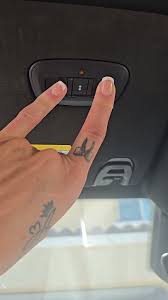
- Locate the three HomeLink buttons on your overhead console or rearview mirror.
- Press and hold the two outer buttons simultaneously.
- Hold for approximately 10 seconds until the indicator light flashes rapidly.
- Release both buttons. The system is now factory reset.
Step 2: Initiate Pairing Mode on the Truck
- Turn your 2019 Ram’s ignition to ON/RUN.
- Choose which of the three HomeLink buttons you wish to program.
- Press and hold that specific button. Watch the indicator light above or below the button.
- The light will begin to flash slowly (this indicates “training mode”). Keep holding the button throughout the next step.
Step 3: Activate the Garage Door Opener’s Learn Button
This is the critical step that replaces the handheld remote.
- While still holding the HomeLink button in your truck, walk to the garage door motor unit.
- Locate the “Learn” or “Smart” button. On most 2019-compatible openers (LiftMaster, Chamberlain, Genie), this is usually yellow, purple, orange, or red and located near the antenna wire or light lens.
- Press and release the Learn button on the motor. Do not hold it. A status LED on the motor will typically illuminate or begin blinking, indicating it is waiting for a new transmitter signal.
- You have exactly 30 seconds to complete the next step before the motor times out.
Step 4: Complete the Signal Handshake
- Return to your truck immediately (within the 30-second window).
- Continue holding the chosen HomeLink button.
- Watch the indicator light. It should transition from a slow flash to a rapid flash or become solid.
- Once the light changes pattern, release the HomeLink button.
- Test the system by pressing the programmed HomeLink button once. The garage door should activate.
⚠️ Safety Warning: Never attempt to program the system while the garage door is moving. Always ensure the door path is clear of people, pets, and objects before testing. If the door reverses unexpectedly, check the safety sensor alignment immediately.
Troubleshooting: What If the Direct Method Fails?
Even with perfect execution, some older or proprietary garage door openers struggle with direct pairing. Here is a comparison of common issues and solutions:
| Symptom | Probable Cause | Solution |
|---|---|---|
| Light never turns solid/rapid | Motor timed out or wrong Learn button | Repeat Step 3; ensure you press (don’t hold) the Learn button within 30 sec |
| Light flashes but door doesn’t move | Frequency mismatch or incompatible opener | Check opener manual; may require a HomeLink Compatibility Bridge |
| Door opens partially then stops | Travel limits need adjustment | Adjust limit switches on the motor unit itself (not a programming issue) |
| Works intermittently | Weak battery in truck or RF interference | Replace truck battery if weak; remove nearby LED bulbs causing interference |
| Solid light but no response after programming | Rolling code sync incomplete | Perform the “Rolling Code Re-Sync”: Hold HomeLink button for 2 sec, release, repeat 3x |
When You Absolutely Need a Compatibility Bridge
Some garage door openers manufactured before 2006 or certain European models use frequencies outside the standard HomeLink range. If your 2019 Ram cannot pair directly after multiple attempts, you may need a HomeLink Compatibility Bridge. This small device plugs into your garage door motor and acts as a translator between the truck and the opener. Consult your opener’s manufacturer website to verify compatibility before purchasing.
Expert Tips for Maintaining Your HomeLink System
Programming is only half the battle. Maintaining reliable operation ensures long-term convenience.
- Reprogram After Battery Changes: If your 2019 Ram’s battery dies or is disconnected, HomeLink memory is usually retained, but signal strength may temporarily weaken. Reprogramming takes less than two minutes and restores optimal performance.
- Avoid LED Bulb Interference: Cheap LED garage lights emit RF noise that blocks HomeLink signals. Use only garage-door-opener-rated LED bulbs or stick to incandescent bulbs if you experience range issues.
- Test Monthly: Press your HomeLink button monthly even if you use a keypad daily. This confirms the rolling code stays synchronized and prevents surprise failures during bad weather.
- Document Your Setup: Write down your opener’s brand, model, and Learn button color in your glovebox. This saves significant research time if you ever need to reprogram or replace components.
Frequently Asked Questions (FAQ)
Can I program my 2019 Ram HomeLink if my garage door opener has no Learn button?
Yes, but the process differs. Openers without a Learn button typically use DIP switches (fixed code). You must match the switch positions inside your garage door motor to the corresponding settings in your HomeLink system. Refer to your 2019 Ram owner’s manual section on “Fixed Code Programming,” as this requires cycling through binary switch combinations rather than the direct learn method described above.
Will programming HomeLink erase my existing remotes or keypads?
No. Using the Learn button to add your 2019 Ram simply adds a new authorized device to the opener’s memory. Your existing wall consoles, wireless keypads, and handheld remotes will continue to function normally. However, if you press and hold the Learn button on the motor for 10+ seconds, it will erase ALL devices. Always press and release when adding your truck.
How many devices can my 2019 Ram HomeLink store?
The 2019 Ram HomeLink system stores up to three separate devices. You can program one button for your primary garage, another for a secondary garage or gate, and a third for community amenities like pool gates or parking garages. Each button operates independently.
Why does my HomeLink work close up but not from the driveway?
This is almost always caused by RF interference or a weak truck battery. First, replace any non-rated LED bulbs in your garage opener. Second, test with a fully charged battery. Third, ensure your truck’s antenna (usually integrated into the rear window or shark fin) is undamaged. Range should typically be 50–100 feet under normal conditions.
Is it safe to program HomeLink alone, or do I need assistance?
You can absolutely program it alone. The direct learn method is designed for single-person operation. The key is preparation: have your stepladder positioned, know exactly where the Learn button is, and practice the timing mentally before starting. The 30-second window is generous when you are prepared.
Does the 2019 Ram HomeLink work with smart garage openers like MyQ or Tailwind?
Yes, but indirectly. HomeLink communicates with the motor, not the smart hub. Your MyQ or Tailwind app will still show door status and allow remote control via smartphone. HomeLink simply becomes another authorized trigger, just like a physical remote. No special configuration is needed beyond the standard programming steps.
Conclusion
Mastering how to program 2019 Ram garage door opener without remote eliminates dependency on easily lost handheld transmitters and leverages the superior security of direct HomeLink synchronization. By following the four-step direct learn process, respecting safety protocols, and understanding basic troubleshooting, you gain reliable, secure garage access directly from your vehicle’s overhead console. Remember to use rated LED bulbs, test monthly, and consult your opener’s manual for edge cases involving fixed-code systems.
Found this guide helpful? Share it on Facebook, X (Twitter), or Reddit to help fellow Ram owners reclaim their garage access! Have a unique programming challenge? Drop a comment below — our community of truck enthusiasts and garage door experts loves solving real-world problems together. Safe driving and smooth openings! 🚗🏠
Leave a Reply