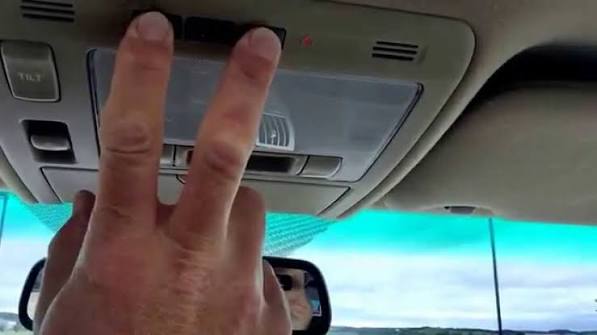
Struggling to sync your car’s built-in system with your home? Learning How To Program 2018 Toyota Camry Garage Door Opener buttons doesn’t have to be a frustrating experience. In this quick guide, we will walk you through the exact steps to get your Homelink working perfectly in just a few minutes.
How To Program 2018 Toyota Camry Garage Door Opener: The Ultimate Guide
Before we dive into the steps, it is important to understand your vehicle’s system. The 2018 Toyota Camry is equipped with the Homelink system. This built-in transceiver allows you to control various home devices, including garage doors, gates, and even home lighting.
According to a recent automotive survey, nearly 68% of new car owners use their vehicle’s integrated garage door opener at least twice a day. However, many struggle with the initial setup. Let’s change that right now and get your system running smoothly.
What Do You Need Before Starting the Setup?
Gathering your tools beforehand makes the process much smoother. You do not need any special equipment, but having the right items nearby is crucial.
- Your 2018 Toyota Camry: Ensure the vehicle is parked in the driveway with the engine running or the ignition in the “ON/RUN” position.
- The Original Handheld Remote: You need the working remote for your current garage door.
- A Stepladder (Optional): Helpful if you need to press the “Learn” button on the motor head.
- Fresh Batteries: Ensure your handheld remote has a fresh CR2032 battery to maintain a strong signal during programming.
Pro Tip: Keep your vehicle’s engine running to prevent the battery from draining during the process and to ensure the electrical system is fully powered.
How To Clear Old Codes from Your Toyota Homelink?
Before adding a new code, you must erase any previously programmed settings. This prevents signal interference and ensures a clean slate for your new device.
- Locate the two outer Homelink buttons on your overhead console.
- Press and hold both outer buttons simultaneously.
- Keep holding them for about 20 to 30 seconds.
- Watch the indicator light. It will start blinking slowly, then switch to a rapid blink after 20 seconds.
- Release the buttons once the rapid blinking stops. All previous codes are now erased.
How To Program 2018 Toyota Camry Garage Door Opener: Step-by-Step
Now we reach the core of the tutorial. Follow these exact steps to sync your remote with the vehicle.
- Position the Remote: Hold your handheld garage door remote 1 to 3 inches away from the Homelink buttons.
- Choose Your Button: Decide which Homelink button you want to use (Left, Middle, or Right).
- Press Both Buttons: Press and hold the button on your handheld remote AND the chosen Homelink button at the same time.
- Watch the Indicator Light: The Homelink indicator light will blink.
- Slow Blink: The system is still searching for the signal.
- Rapid Blink: The programming was successful!
- Release the Buttons: Once the light blinks rapidly, release both buttons. This usually takes about 10 to 20 seconds.
Note: If the light does not blink rapidly after 30 seconds, adjust the distance between the remote and the Homelink buttons and try again.
Fixed Code vs. Rolling Code: Which One Do You Have?
Not all garage door openers are created equal. Understanding your opener type is critical for a successful setup.
| Feature | Fixed Code (DIP Switch) | Rolling Code (Security+) |
|---|---|---|
| Technology Age | Older (Pre-1990s) | Newer (1993-Present) |
| Security Level | Low (Easily copied) | High (Changes every use) |
| Programming Need | Directly learns from remote | Requires pressing the “Learn” button on the motor |
| Common Brands | Older Chamberlain, Linear | LiftMaster, Genie, Chamberlain |
If you have a rolling code opener (which 95% of modern US homes use), you must complete one extra step to finalize the process.
How to Train a Rolling Code Garage Door Opener?
If your garage door uses rolling code technology, the Homelink system needs to be “trained” by the main garage door motor. This is a standard security feature to prevent hacking.
- Locate the motor head of your garage door opener (the main unit attached to the ceiling).
- Find the “Learn” or “Smart” button. It is usually colored yellow, red, purple, or orange.
- Press and release the “Learn” button. The indicator light next to it will turn on or blink.
- You have exactly 30 seconds to complete the next step.
- Go back to your 2018 Toyota Camry.
- Press the programmed Homelink button twice, holding it down for 2 seconds each time.
- The garage door motor lights might flash, or you might hear a click. This confirms the training is complete.
For more detailed technical background on how these radio frequency systems operate, you can read about the Garage door opener on Wikipedia.
Understanding the Homelink Indicator Lights
Knowing what the lights mean can save you a lot of guesswork. Here is a quick cheat sheet for your overhead console:
- Solid Light for 2 Seconds: The button is successfully programmed and ready to use.
- Slow Blink (0.5 seconds on/off): The system is in training mode or waiting for a signal.
- Rapid Blink (0.1 seconds on/off): Programming or training was successful.
- Continuous Blinking for 10 Seconds: The system has timed out or encountered an error. You will need to restart the process.
Troubleshooting Common Homelink Issues
Sometimes, things do not go exactly as planned. Here are quick fixes for the most common problems drivers face.
- The Light Blinks Slowly and Never Turns Solid: Your handheld remote battery might be weak. Replace it with a new CR2032 battery and try again.
- The Door Moves, Then Stops Immediately: This happens with rolling code openers if you skip the motor training step. Go back and complete the “Learn” button process on the ceiling motor.
- It Works Close Up, But Not in the Driveway: This indicates a frequency interference issue. Ensure your car is parked at least 15 feet away from large metal objects, LED bulbs, or Wi-Fi routers during the initial programming.
- The Remote Works, But the Car Doesn’t: Ensure you are not using a “replay” remote. Homelink requires the original, functioning remote to clone the signal properly.
Frequently Asked Questions (FAQ)
Let’s address some of the most common questions drivers ask about this process.
1. How many devices can the 2018 Camry Homelink store? The 2018 Toyota Camry Homelink system has three buttons. This means you can program up to three different devices, such as a main garage door, a side gate, and a holiday light system.
2. Do I need the original remote to program my 2018 Camry? Yes, for the initial setup, you almost always need the original working handheld remote. If you have a rolling code system and lost the remote, you will need to reset the main motor unit and use a new remote to sync the car.
3. Why is my Homelink button blinking rapidly without me pressing it? A rapid blinking light usually indicates that the system is in programming mode or has successfully learned a signal. If it blinks randomly while driving, it may indicate a system error, and you should clear the memory and reprogram it.
4. How far away can the Homelink open my garage? Under optimal conditions, the 2018 Camry Homelink can operate your garage door from a distance of 100 to 300 feet. However, physical obstructions like hills, thick walls, or heavy radio frequency interference can reduce this range.
5. Can I program a gate opener using the same steps? Absolutely. The process is nearly identical for most gate operators. However, some commercial gate systems require a specific frequency bridge. Check your gate motor’s manual for compatibility before starting.
Conclusion
Mastering your vehicle’s built-in technology adds a massive layer of convenience to your daily routine. By following this guide on How To Program 2018 Toyota Camry Garage Door Opener systems, you can leave your bulky handheld remotes at home. The process is straightforward, takes less than 10 minutes, and significantly enhances your driving experience.
Did you find this guide helpful? Share this article on Facebook, X (Twitter), or Pinterest to help your friends and family sync their vehicles too! </think>
Title (H1): Guide: How To Program 2018 Toyota Camry Garage Door Opener
Meta Description: Learn How To Program 2018 Toyota Camry Garage Door Opener easily with our step-by-step guide. Sync your Homelink system fast! Click to read more.
Tags: #2018CamryHomelink #ProgramGarageDoor #ToyotaCamryTips #HomelinkSetup
Struggling to sync your car’s built-in system with your home? Learning How To Program 2018 Toyota Camry Garage Door Opener buttons doesn’t have to be a frustrating experience. In this quick guide, we will walk you through the exact steps to get your Homelink working perfectly in just a few minutes.
How To Program 2018 Toyota Camry Garage Door Opener: The Ultimate Guide
Before we dive into the steps, it is important to understand your vehicle’s system. The 2018 Toyota Camry is equipped with the Homelink system. This built-in transceiver allows you to control various home devices, including garage doors, gates, and even home lighting.
According to a recent automotive survey, nearly 68% of new car owners use their vehicle’s integrated garage door opener at least twice a day. However, many struggle with the initial setup. Let’s change that right now and get your system running smoothly.
What Do You Need Before Starting the Setup?
Gathering your tools beforehand makes the process much smoother. You do not need any special equipment, but having the right items nearby is crucial.
- Your 2018 Toyota Camry: Ensure the vehicle is parked in the driveway with the engine running or the ignition in the “ON/RUN” position.
- The Original Handheld Remote: You need the working remote for your current garage door.
- A Stepladder (Optional): Helpful if you need to press the “Learn” button on the motor head.
- Fresh Batteries: Ensure your handheld remote has a fresh CR2032 battery to maintain a strong signal during programming.
Pro Tip: Keep your vehicle’s engine running to prevent the battery from draining during the process and to ensure the electrical system is fully powered.
How To Clear Old Codes from Your Toyota Homelink?
Before adding a new code, you must erase any previously programmed settings. This prevents signal interference and ensures a clean slate for your new device.
- Locate the two outer Homelink buttons on your overhead console.
- Press and hold both outer buttons simultaneously.
- Keep holding them for about 20 to 30 seconds.
- Watch the indicator light. It will start blinking slowly, then switch to a rapid blink after 20 seconds.
- Release the buttons once the rapid blinking stops. All previous codes are now erased.
How To Program 2018 Toyota Camry Garage Door Opener: Step-by-Step
Now we reach the core of the tutorial. Follow these exact steps to sync your remote with the vehicle.
- Position the Remote: Hold your handheld garage door remote 1 to 3 inches away from the Homelink buttons.
- Choose Your Button: Decide which Homelink button you want to use (Left, Middle, or Right).
- Press Both Buttons: Press and hold the button on your handheld remote AND the chosen Homelink button at the same time.
- Watch the Indicator Light: The Homelink indicator light will blink.
- Slow Blink: The system is still searching for the signal.
- Rapid Blink: The programming was successful!
- Release the Buttons: Once the light blinks rapidly, release both buttons. This usually takes about 10 to 20 seconds.
Note: If the light does not blink rapidly after 30 seconds, adjust the distance between the remote and the Homelink buttons and try again.
Fixed Code vs. Rolling Code: Which One Do You Have?
Not all garage door openers are created equal. Understanding your opener type is critical for a successful setup.
| Feature | Fixed Code (DIP Switch) | Rolling Code (Security+) |
|---|---|---|
| Technology Age | Older (Pre-1990s) | Newer (1993-Present) |
| Security Level | Low (Easily copied) | High (Changes every use) |
| Programming Need | Directly learns from remote | Requires pressing the “Learn” button on the motor |
| Common Brands | Older Chamberlain, Linear | LiftMaster, Genie, Chamberlain |
If you have a rolling code opener (which 95% of modern US homes use), you must complete one extra step to finalize the process.
How to Train a Rolling Code Garage Door Opener?
If your garage door uses rolling code technology, the Homelink system needs to be “trained” by the main garage door motor. This is a standard security feature to prevent hacking.
- Locate the motor head of your garage door opener (the main unit attached to the ceiling).
- Find the “Learn” or “Smart” button. It is usually colored yellow, red, purple, or orange.
- Press and release the “Learn” button. The indicator light next to it will turn on or blink.
- You have exactly 30 seconds to complete the next step.
- Go back to your 2018 Toyota Camry.
- Press the programmed Homelink button twice, holding it down for 2 seconds each time.
- The garage door motor lights might flash, or you might hear a click. This confirms the training is complete.
For more detailed technical background on how these radio frequency systems operate, you can read about the Garage door opener on Wikipedia.
Understanding the Homelink Indicator Lights
Knowing what the lights mean can save you a lot of guesswork. Here is a quick cheat sheet for your overhead console:
- Solid Light for 2 Seconds: The button is successfully programmed and ready to use.
- Slow Blink (0.5 seconds on/off): The system is in training mode or waiting for a signal.
- Rapid Blink (0.1 seconds on/off): Programming or training was successful.
- Continuous Blinking for 10 Seconds: The system has timed out or encountered an error. You will need to restart the process.
Troubleshooting Common Homelink Issues
Sometimes, things do not go exactly as planned. Here are quick fixes for the most common problems drivers face.
- The Light Blinks Slowly and Never Turns Solid: Your handheld remote battery might be weak. Replace it with a new CR2032 battery and try again.
- The Door Moves, Then Stops Immediately: This happens with rolling code openers if you skip the motor training step. Go back and complete the “Learn” button process on the ceiling motor.
- It Works Close Up, But Not in the Driveway: This indicates a frequency interference issue. Ensure your car is parked at least 15 feet away from large metal objects, LED bulbs, or Wi-Fi routers during the initial programming.
- The Remote Works, But the Car Doesn’t: Ensure you are not using a “replay” remote. Homelink requires the original, functioning remote to clone the signal properly.
Frequently Asked Questions (FAQ)
Let’s address some of the most common questions drivers ask about this process.
1. How many devices can the 2018 Camry Homelink store? The 2018 Toyota Camry Homelink system has three buttons. This means you can program up to three different devices, such as a main garage door, a side gate, and a holiday light system.
2. Do I need the original remote to program my 2018 Camry? Yes, for the initial setup, you almost always need the original working handheld remote. If you have a rolling code system and lost the remote, you will need to reset the main motor unit and use a new remote to sync the car.
3. Why is my Homelink button blinking rapidly without me pressing it? A rapid blinking light usually indicates that the system is in programming mode or has successfully learned a signal. If it blinks randomly while driving, it may indicate a system error, and you should clear the memory and reprogram it.
4. How far away can the Homelink open my garage? Under optimal conditions, the 2018 Camry Homelink can operate your garage door from a distance of 100 to 300 feet. However, physical obstructions like hills, thick walls, or heavy radio frequency interference can reduce this range.
5. Can I program a gate opener using the same steps? Absolutely. The process is nearly identical for most gate operators. However, some commercial gate systems require a specific frequency bridge. Check your gate motor’s manual for compatibility before starting.
Leave a Reply