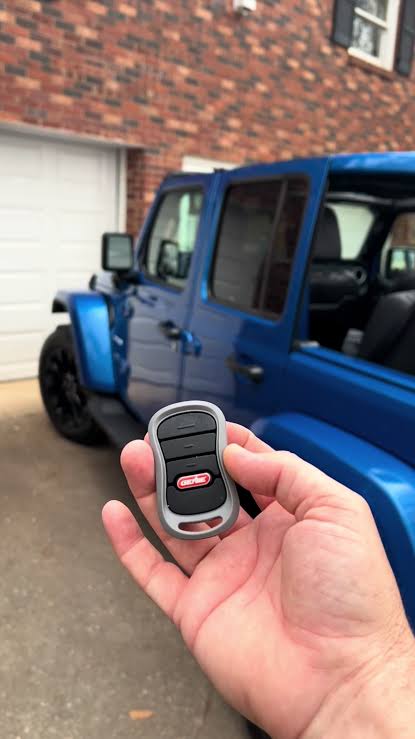
Are you tired of carrying an extra remote just to get into your garage? If you recently bought a new ride, learning how to program 2018 Jeep Wrangler garage door opener systems might seem like a daunting technical task. Don’t worry, my friend; we will walk you through this simple process together so you can pull right into your garage hassle-free!
How To Program 2018 Jeep Wrangler Garage Door Opener: What You Need
Before we dive into the steps, let’s gather everything required. The 2018 Jeep Wrangler comes equipped with the integrated HomeLink system. This brilliant feature is usually located on the overhead console or the rearview mirror.
According to automotive industry data, integrated systems like HomeLink are used by over 30 million drivers in the US alone. They significantly reduce dashboard clutter and prevent the dreaded “lost remote” panic.
Here is your quick checklist before we begin:
- Your 2018 Jeep Wrangler (parked safely outside the garage).
- Your existing, working garage door remote.
- A fresh set of batteries in your handheld remote (this is crucial!).
- A sturdy ladder (if you need to reach the motor unit).
Step 1: How Do I Clear the Old HomeLink Codes?
Many users ask this question when they buy a used Jeep. Before programming, it is best to start with a clean slate to avoid frequency conflicts.
- Turn the Jeep’s ignition to the ON/RUN position. (You do not need to start the engine, but the electronics must be powered).
- Locate the two outer HomeLink buttons on your overhead console.
- Press and hold both outer buttons simultaneously.
- Keep holding them for about 20 seconds until the indicator light flashes rapidly.
Once the light flashes rapidly, release the buttons. This confirms all previous memory has been successfully erased.
Step 2: How Do I Sync the Remote to the Jeep?
Now comes the core of how to program 2018 Jeep Wrangler garage door opener setups. This step teaches your car what frequency your garage uses.
- Turn your ignition back to the ON/RUN mode.
- Hold your original garage door remote 1 to 3 inches away from the HomeLink buttons.
- Press and hold the desired HomeLink button you want to program.
- At the same time, press and hold the button on your handheld remote.
- Watch the HomeLink indicator light closely. It will start blinking slowly, then shift to a rapid blink after about 20 to 30 seconds.
- Release both buttons once the rapid blinking occurs.
Your Jeep now knows the signal! However, for modern garage doors, we aren’t quite finished yet.
Step 3: How Do I Train the Garage Door Motor (Rolling Code)?
Most modern garage doors use “rolling code” technology for enhanced security. According to a leading smart home security expert, “Rolling codes change every single time the remote is used, making them nearly impossible for thieves to intercept and hack.”
Because the code changes, you must manually sync the Jeep’s new signal with the garage motor.
- Locate the “Learn” or “Smart” button on your garage door opener motor (usually hanging from the ceiling). It is often yellow, red, orange, or purple.
- Press and release this “Learn” button. The indicator light next to it will illuminate or blink for 30 seconds.
- Quickly return to your Jeep within those 30 seconds.
- Press and hold the programmed HomeLink button for 2 seconds, then release.
- Repeat this press-and-release sequence two more times.
Your garage door should now activate! If you want to understand the underlying technology of these integrated systems further, you can read more about the HomeLink transceiver system on Wikipedia.
Built-in HomeLink vs. Aftermarket Universal Remote
Not sure if you should use your Jeep’s built-in system or just buy a universal remote from an auto parts store? Here is a quick comparison to help you decide.
| Feature | Built-in HomeLink (2018 Jeep) | Aftermarket Universal Remote |
|---|---|---|
| Convenience | High (Always integrated in the car) | Medium (Need to keep it in the car) |
| Cost | Free (Included in vehicle) | $20 – $40 |
| Aesthetics | Sleek (Built into the overhead console) | Bulky (Clips to the sun visor) |
| Compatibility | Excellent for modern rolling codes | Varies by brand and price point |
Troubleshooting: What If My System Won’t Sync?
Sometimes, technology doesn’t cooperate on the first try. If you run into issues, check these common culprits:
- The Indicator Light Flashes Rapidly Immediately: This usually means the handheld remote you are using is incompatible, or the battery is too weak to transmit a strong signal. Replace the battery and try again.
- The Jeep Syncs, But the Garage Doesn’t Move: You likely skipped the “rolling code” training step at the motor unit. Go back to Step 3 and press the “Learn” button on your ceiling motor.
- The Range is Very Short: High-frequency interference from LED bulbs in your garage can block the signal. Try changing the lightbulbs in your garage door motor to rough-service incandescent bulbs.
Frequently Asked Questions (FAQ)
Where are the HomeLink buttons located in a 2018 Jeep Wrangler?
In the 2018 Jeep Wrangler, the HomeLink buttons are typically located on the overhead console near the rearview mirror. There are usually three buttons available, allowing you to control multiple devices.
Why won’t my 2018 Jeep Wrangler HomeLink program?
If it fails to program, the most common culprit is a weak battery in your handheld remote. Replace it with a brand-new battery and try again. Also, ensure you are holding the remote close enough (1-3 inches) during the initial sync.
Can I program a rolling code garage door to my 2018 Jeep?
Yes, absolutely. You just need to complete the extra step of pressing the “Learn” button on your garage door motor unit to sync the rolling code with the Jeep’s HomeLink system.
How many garage doors can the 2018 Jeep Wrangler HomeLink hold?
The standard HomeLink system in the 2018 Wrangler has three buttons, meaning you can program up to three different devices. This could be two garage doors and a gate, or a garage door and a home lighting system.
Does this work with older garage doors that use dip switches?
Yes, it does! For older garage doors with “dip switches” inside the remote, simply match the switch positions on your handheld remote to the motor. The HomeLink system will copy the fixed-code signal perfectly without needing the “Learn” button step.
Leave a Reply