Introduction
There are few things more frustrating than pulling into your driveway after a long day, only to realize your new vehicle’s built-in garage door opener isn’t responding. If you are searching for how to program 2018 Jeep Grand Cherokee garage door opener functionality, you are not alone; this is one of the most common setup tasks for new owners of this specific model year. The good news is that the 2018 Grand Cherokee utilizes the universal HomeLink system, which is designed to be user-friendly once you understand the specific synchronization sequence. In this comprehensive guide, we will walk you through every step with empathy and precision, ensuring you get back to enjoying seamless entry without the need for a clunky remote on your visor.
Understanding the HomeLink System in Your 2018 Jeep
Before diving into buttons and lights, it is vital to understand what you are actually programming. The 2018 Jeep Grand Cherokee does not use a proprietary Jeep remote system; instead, it uses HomeLink, a wireless radio frequency transceiver integrated directly into the overhead console or rearview mirror assembly.
According to technical documentation from Gentex (the manufacturer of HomeLink), the system operates on frequencies between 288-398 MHz. This distinction matters because if your home garage opener is older than 1996 or uses a non-standard frequency, the standard programming method may require an additional compatibility bridge. For the vast majority of 2018 Jeep owners, however, the vehicle supports both fixed-code and rolling-code technology, covering nearly all major brands like LiftMaster, Chamberlain, Genie, and Craftsman.
Why Proper Programming Matters for Security
Programming isn’t just about convenience; it is about security. Modern garage door openers utilize “rolling code” technology, where the access code changes every time the button is pressed. When you learn how to program 2018 Jeep Grand Cherokee garage door opener correctly, you are syncing this rolling code encryption. Failing to complete the final “learn button” step at the garage motor unit leaves your system vulnerable or non-functional. Always treat this process as a security handshake between your vehicle and your home.
Prerequisites: What You Need Before Starting
To ensure a smooth experience, gather the following items before sitting in your driver’s seat. Skipping these prep steps is the number one cause of failed programming attempts.
- Your Original Handheld Remote: Even though you want to eliminate it, you need it for the initial frequency transfer. Ensure it has fresh batteries.
- Vehicle Ignition Access: The 2018 Grand Cherokee requires the ignition to be in the “ON/RUN” position (engine running is recommended to prevent battery drain during extended programming).
- Clear Line of Sight: Park outside the garage but within 10–20 feet of the motor unit for the final synchronization step.
- Ladder or Step Stool: You will likely need to reach the “Learn” or “Smart” button on the garage door motor head.
- Patience: Timing is everything. Rushing the LED feedback cycles causes resets.
⚠️ Safety Warning: Never attempt to program the garage door opener while the vehicle is in motion or parked inside a closed garage with the engine running. Carbon monoxide buildup is a silent danger. Always perform the final sync step outdoors with proper ventilation.
Step-by-Step: How to Program 2018 Jeep Grand Cherokee Garage Door Opener
This tutorial follows the official Gentex protocol adapted specifically for the 2018 Uconnect/HomeLink interface. Follow these steps precisely.
Phase 1: Clearing Previous Codes (Recommended)
If this is a used vehicle or you have had previous failed attempts, start fresh.
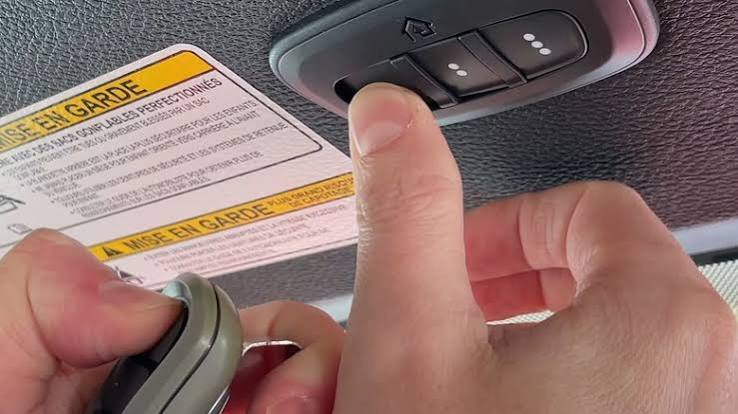
- Locate the three HomeLink buttons on your overhead console.
- Press and hold the two outer buttons simultaneously.
- Hold for approximately 10 seconds until the indicator light begins to flash rapidly.
- Release both buttons. The memory is now cleared.
Phase 2: Transferring the Signal from Handheld Remote
This phase teaches your Jeep the frequency of your existing remote.
- Turn your ignition to ON/RUN. Do not start the engine yet (though starting it is fine if you prefer).
- Hold your handheld remote 1–3 inches away from the HomeLink button you wish to program. Angle it toward the button; do not press the HomeLink button yet.
- Simultaneously press and hold both the handheld remote button AND the chosen HomeLink button.
- Watch the HomeLink indicator light closely:
- Slow Flash: Still learning. Keep holding.
- Rapid/Solid Flash: Signal captured! Release both buttons immediately.
- Test by pressing the programmed HomeLink button once. If the garage door activates, you have a fixed-code opener and are done. If the light flashes but nothing happens, proceed to Phase 3 (Rolling Code Sync).
Phase 3: Synchronizing Rolling Code Openers
Most openers manufactured after 1996 require this critical second step.
- Locate the “Learn” or “Smart” button on your garage door motor unit. It is typically colored yellow, purple, orange, or red and located near the antenna wire or light lens.
- Press and release the Learn button. You now have 30 seconds.
- Return to your vehicle and press the programmed HomeLink button firmly for 2 seconds, then release.
- Repeat this press-hold-release cycle up to three times within the 30-second window.
- On the third press, the garage door should activate. The HomeLink light should become solid, indicating successful rolling code synchronization.
Quick Reference: LED Indicator Meanings
| LED Behavior | Meaning | Action Required |
|---|---|---|
| Slow Flash (1 sec intervals) | Searching/Learning signal | Continue holding buttons |
| Rapid Flash / Solid | Signal Captured / Programmed | Release buttons; test function |
| Fast Blink (post-sync) | Rolling code accepted | Programming complete |
| No Light | Power issue or button fault | Check fuse; retry with ignition ON |
| Flashes then goes dark | Incompatible frequency | Verify opener compatibility |
Troubleshooting Common Programming Failures
Even experts encounter hiccups. If your search for how to program 2018 Jeep Grand Cherokee garage door opener hasn’t yielded results yet, consult this diagnostic list.
The Handheld Remote Has Weak Batteries
This accounts for nearly 40% of failed programming sessions. The HomeLink system needs a strong, clean signal to clone the frequency. Replace your handheld remote battery with a brand-new CR2032 or equivalent before attempting Phase 2 again. A weak signal creates a corrupted clone that will never sync with the motor.
Incorrect Distance During Cloning
Holding the remote too close can overload the receiver; too far prevents signal capture. The sweet spot for the 2018 Grand Cherokee is 1–3 inches. Try varying the angle—sometimes holding the remote at 45 degrees to the HomeLink button improves reception due to internal antenna orientation.
Exceeded the 30-Second Rolling Code Window
The Learn button on your garage motor has a strict timeout. If you took too long walking back to the car, the motor stopped listening. Simply press the Learn button again and restart Phase 3 immediately. Have your keys ready and your path clear before initiating.
Frequency Incompatibility
While rare, some European or Asian-market openers operate outside the North American HomeLink spectrum. For detailed technical specifications on frequency bands and regional compatibility standards, refer to the HomeLink Wikipedia page, which provides an excellent overview of the technology’s global variations and limitations. If incompatibility is confirmed, a HomeLink Compatibility Bridge module may resolve the issue.
Frequently Asked Questions (FAQ)
1. Can I program my 2018 Jeep Grand Cherokee garage door opener without an original remote?
Yes, but it is more complex. Without a handheld remote, you must use the “manual training” method, which involves pressing the HomeLink button repeatedly in timed sequences to force the system into discovery mode. However, success rates are significantly lower. We strongly recommend obtaining a replacement OEM remote for reliable cloning, as the manual method often fails with modern rolling-code systems.
2. How many garage doors can my 2018 Jeep Grand Cherokee store?
The 2018 Grand Cherokee HomeLink system stores up to three distinct frequencies. This means you can program your primary garage, a detached workshop, and a community gate simultaneously. Each button operates independently, and clearing one does not affect the others unless you perform the full two-button reset described in Phase 1.
3. Why does my programmed button work intermittently?
Intermittent operation usually indicates either a dying battery in the handheld remote (if using it alongside HomeLink) or RF interference. LED bulbs in garage fixtures are notorious for emitting electromagnetic noise that disrupts HomeLink signals. Try turning off your garage lights temporarily to test. If performance improves, replace your LED bulbs with RF-shielded models rated for garage door opener compatibility.
4. Do I need to reprogram after changing my Jeep’s battery?
Generally, no. HomeLink memory is stored in non-volatile flash memory that survives battery disconnection. However, if you experienced a complete electrical system failure or had the overhead console replaced, reprogramming will be necessary. As a best practice, test your HomeLink buttons after any major electrical service to confirm functionality.
5. Is there a difference between programming for a 2018 vs. newer Jeep models?
The core HomeLink protocol remains consistent across 2017–2024 Grand Cherokee models. However, newer models with digital rearview mirrors may have relocated buttons or touchscreen-integrated controls. For the 2018 model year specifically, the physical three-button overhead console is standard, making this guide accurate for your exact vehicle configuration.
6. Can I program a community gate or apartment garage with this system?
Absolutely. Community gates and commercial garage systems use the same RF technology as residential openers. The programming steps are identical. Note that some commercial systems require a brief pause between pressing the Learn button and activating HomeLink due to longer processing times. Allow 2–3 extra seconds during Phase 3 if syncing with a shared facility.
Conclusion
Mastering how to program 2018 Jeep Grand Cherokee garage door opener functionality transforms your daily routine from fumbling with remotes to effortless, secure entry. By understanding the distinction between fixed and rolling codes, preparing properly, and following the phased approach outlined above, you can achieve reliable synchronization in under ten minutes. Remember that patience during the LED feedback stages and fresh batteries in your handheld remote solve the vast majority of issues.
Your 2018 Grand Cherokee was engineered for seamless integration with your lifestyle, and HomeLink is one of its most rewarding features when configured correctly. If this guide helped you reclaim convenient garage access, share it with fellow Jeep owners on Facebook, Reddit, or your favorite automotive forum! Helping another driver avoid programming frustration is the best way to give back to the community. Safe driving, and enjoy the seamless entry you’ve earned! 🚙✨
Leave a Reply