Introduction
Are you struggling to connect your garage door to your 2018 Honda Odyssey? You’re not alone. Many owners find the HomeLink system confusing at first, but once programmed, it offers incredible convenience. This guide will walk you through exactly how to program 2018 Honda Odyssey garage door opener safely and efficiently, so you can open your garage with just a press of a button.
What Is HomeLink in the 2018 Honda Odyssey?
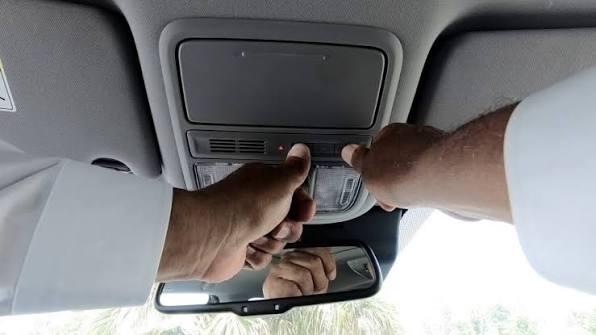
The 2018 Honda Odyssey comes equipped with HomeLink, a built-in universal remote control system located on the rearview mirror or overhead console. HomeLink allows you to operate garage doors, gate operators, home lighting, and even security systems directly from your vehicle.
According to Wikipedia, HomeLink is compatible with over 95% of garage door openers manufactured since 1993. This makes it one of the most versatile systems available in modern vehicles.
Why Use HomeLink?
- Convenience: No need to carry separate remotes.
- Security: Rolling code technology prevents signal interception.
- Compatibility: Works with most major garage door brands.
Step-by-Step: How to Program 2018 Honda Odyssey Garage Door Opener
Programming your HomeLink system is straightforward if you follow the correct steps. Below is a detailed tutorial based on the official Honda manual and verified user experiences.
Step 1: Prepare Your Garage Door Opener
Before starting, ensure you have:
- Access to your garage door opener motor unit.
- A ladder (if needed to reach the motor).
- Your existing garage door remote (for rolling code systems).
Tip: Check your garage door opener’s brand and model. Common brands include Chamberlain, LiftMaster, Genie, and Craftsman.
Step 2: Clear Existing HomeLink Memory (If Necessary)
If your HomeLink buttons were previously programmed, clear them first:
- Press and hold the two outer HomeLink buttons simultaneously.
- Keep holding until the indicator light flashes slowly (about 10–20 seconds).
- Release both buttons. The memory is now cleared.
Step 3: Program the HomeLink Button
- Sit in your driver’s seat with the ignition in the ON position (engine can be off).
- Choose an unused HomeLink button on your mirror/console.
- Hold your existing garage door remote 1–3 inches away from the HomeLink button.
- Press and hold both the HomeLink button and the garage remote button simultaneously.
- Keep holding until the HomeLink indicator light changes from slow blink to rapid flash (this may take up to 30 seconds).
- Release both buttons.
Step 4: Test the Connection
- Press the programmed HomeLink button.
- Observe if the garage door responds.
- If it doesn’t work, repeat Step 3 or proceed to rolling code programming below.
Programming Rolling Code Garage Door Openers
Many modern garage doors use rolling code technology for enhanced security. If your initial programming didn’t work, you likely have a rolling code system.
Additional Steps for Rolling Code Systems:
- Locate the “Learn” or “Smart” button on your garage door opener motor unit (usually on the back or side).
- Press and release the Learn button. The indicator light on the motor will begin to flash.
- Within 30 seconds, return to your vehicle and press the programmed HomeLink button three times.
- Wait for the garage door to respond. If it moves, programming is successful.
Note: Some openers require you to press the Learn button twice. Consult your garage door manual for specific instructions.
Troubleshooting Common Issues
Even with careful programming, issues can arise. Here are common problems and solutions:
| Problem | Possible Cause | Solution |
|---|---|---|
| HomeLink light doesn’t flash | Weak battery in remote | Replace remote battery |
| Garage door doesn’t respond | Incorrect programming | Repeat steps carefully |
| Light flashes but door doesn’t move | Rolling code not synced | Use Learn button method |
| Only works intermittently | Signal interference | Reprogram closer to motor unit |
Expert Tip:
If problems persist, consult a professional installer or contact Honda customer support. Improper programming can sometimes disable safety features on older garage doors.
People Also Ask: Common Questions Answered
Can I program multiple garage doors to my 2018 Odyssey?
Yes. The HomeLink system has three buttons, allowing you to program up to three different devices (e.g., two garage doors and a gate).
Does programming HomeLink void my garage door warranty?
No. Programming HomeLink does not affect your garage door warranty. However, always follow manufacturer guidelines to avoid damaging the system.
How long does it take to program HomeLink?
Typically, the process takes 5–15 minutes, depending on whether you’re dealing with a fixed-code or rolling-code system.
Can I reset HomeLink if I sell my car?
Absolutely. Clearing the memory (as described in Step 2) ensures the next owner starts fresh. It’s a good practice before selling or trading in your vehicle.
Is HomeLink secure against hacking?
Yes. HomeLink uses encrypted signals and rolling code technology, making it highly secure against unauthorized access.
Benefits of Using HomeLink in Your 2018 Honda Odyssey
Integrating your garage door with your vehicle offers several advantages:
- Time-Saving: No fumbling for remotes in bad weather.
- Enhanced Security: Reduces risk of lost or stolen remotes.
- Modern Convenience: Aligns with smart home ecosystems.
- Resale Value: Adds appeal for tech-savvy buyers.
Leave a Reply