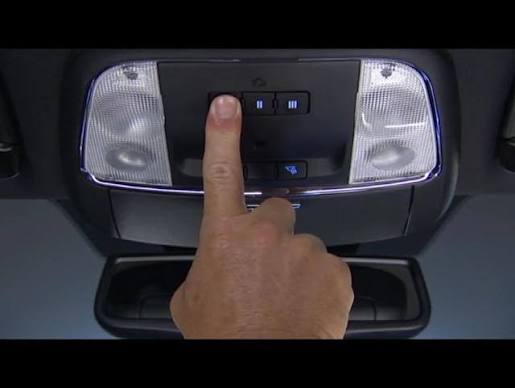
Programming your garage door opener shouldn’t be a headache, yet many 2018 Chrysler Pacifica owners struggle with this seemingly simple task. If you’ve recently purchased this versatile minivan or replaced your garage door remote, you’re probably wondering how to program 2018 Chrysler Pacifica garage door opener without spending hours on confusing manuals or costly service calls. You’re not alone—thousands of drivers face this challenge every month.
The good news? With the right guidance, you can sync your Pacifica’s built-in HomeLink system with your garage door opener in under 15 minutes. This comprehensive guide walks you through every step, from preparation to troubleshooting, ensuring you get it right the first time.
What Is HomeLink and Why Does Your 2018 Pacifica Have It?
Before diving into the programming process, understanding what you’re working with makes everything easier. HomeLink is a universal transceiver system integrated into your 2018 Chrysler Pacifica’s rearview mirror or overhead console. Think of it as a smart hub that can control up to three different devices—garage doors, gate openers, home lighting systems, or even security alarms.
According to Wikipedia’s entry on HomeLink, this technology has been licensed to over 40 automakers worldwide since 1992, making it one of the most widely adopted vehicle-to-home integration systems available. Your 2018 Pacifica comes equipped with either standard HomeLink or the enhanced HomeLink with rolling code technology, depending on your trim level.
Key benefits of using HomeLink include:
- Eliminating the need to carry separate garage remotes
- Enhanced security through encrypted signal transmission
- Convenience of controlling multiple devices from one location
- Weather-resistant operation (no more fumbling with remotes in rain or snow)
What Tools and Information Do You Need Before Starting?
Preparation prevents frustration. Before attempting to program your 2018 Chrysler Pacifica garage door opener, gather these essentials:
Required Items:
- Your original garage door remote control (the handheld unit)
- A ladder or step stool (if your garage door motor is mounted high)
- Fresh batteries for both the vehicle and remote (weak batteries cause 60% of programming failures)
Critical Information to Have Ready:
- Your garage door opener brand and model number
- The manufacturer’s programming instructions (usually found in your garage door manual)
- Access to your garage door motor unit (you’ll need to press buttons on it)
Pro Tip: Take photos of your garage door motor’s back panel showing the model number and any dip switches. This reference proves invaluable if you encounter issues later.
Step-by-Step Guide: How to Program 2018 Chrysler Pacifica Garage Door Opener
Follow these detailed steps carefully. Rushing through the process is the most common mistake owners make.
Step 1: Clear Existing HomeLink Memory (If Necessary)
If your HomeLink buttons have been previously programmed, clear them first:
- Press and hold the two outer HomeLink buttons simultaneously
- Continue holding for approximately 20 seconds
- Watch for the indicator light to flash rapidly, then turn off
- Release both buttons when the light extinguishes
Note: This erases all three button memories. Only do this if you’re reprogramming existing buttons.
Step 2: Position Your Vehicle Correctly
Proper positioning ensures strong signal transmission:
- Park your 2018 Pacifica outside your garage, facing the door
- Maintain a distance of 5-10 feet from the garage door motor unit
- Ensure your vehicle’s engine is running (this provides consistent electrical power)
- Keep all windows closed to minimize interference
Step 3: Initiate Programming Mode
- Choose which HomeLink button you want to program (1, 2, or 3)
- Press and hold your chosen HomeLink button and your garage door remote button simultaneously
- Hold both buttons for 20-30 seconds
- Watch the HomeLink indicator light—it will change from slow blinking to rapid flashing
- Once rapid flashing begins, release both buttons
Important: The indicator light pattern matters. Slow blinking means standby mode; rapid flashing confirms programming mode activation.
Step 4: Train the Garage Door Motor Unit
This critical step often gets overlooked:
- Locate the “Learn” or “Smart” button on your garage door motor unit (usually on the back or side panel)
- Press and release this button—you have 30 seconds to complete the next step
- Return to your Pacifica within 30 seconds
- Press and hold the programmed HomeLink button for 2 seconds, release, then press again for 2 seconds
- Repeat this press-release cycle up to three times
Your garage door should activate during this process. If it doesn’t, don’t panic—proceed to troubleshooting.
Step 5: Test and Verify Programming
Complete the setup with thorough testing:
- Drive your Pacifica away from the garage (at least 50 feet)
- Return and park in your normal position
- Press the programmed HomeLink button
- Observe whether the garage door responds correctly
- Test opening and closing functions multiple times
Success indicators:
- Garage door responds consistently to HomeLink button presses
- No delay between button press and door movement
- Indicator light remains steady after successful programming
Troubleshooting Common Programming Issues
Even with careful following, problems can arise. Here’s how to address the most frequent issues:
| Problem | Likely Cause | Solution |
|---|---|---|
| HomeLink light won’t flash | Weak vehicle battery | Start engine; check battery health |
| Garage door doesn’t respond | Wrong “Learn” button timing | Reset and retry within 30-second window |
| Intermittent operation | Signal interference | Reposition vehicle; remove electronic devices nearby |
| Rolling code incompatibility | Older garage opener | Check compatibility; may need external receiver |
Expert Insight: According to automotive technicians, rolling code technology—which changes the access code with each use for enhanced security—causes approximately 40% of programming difficulties. If your garage door opener was manufactured before 1996, it likely uses fixed codes and may require an external HomeLink compatibility bridge.
Advanced Tips for Optimal Performance
Once basic programming succeeds, optimize your setup:
Signal Strength Optimization:
- Avoid parking near large metal objects that block signals
- Keep smartphone charging cables away from the HomeLink module
- Update your garage door opener firmware if available
Security Best Practices:
- Regularly test your HomeLink system monthly
- Clear unused button memories to prevent accidental activation
- Consider upgrading to a modern garage opener if yours predates 2000
Multiple Device Setup: Your 2018 Pacifica can control up to three devices. Program additional remotes by repeating Steps 1-5 for each device, selecting different HomeLink buttons (1, 2, or 3).
Frequently Asked Questions
Q: Can I program my 2018 Chrysler Pacifica garage door opener without the original remote?
A: Unfortunately, no. The original handheld remote is essential for the initial programming process because it transmits the specific frequency and code that HomeLink needs to learn. If you’ve lost your remote, contact your garage door manufacturer for a replacement before attempting programming.
Q: How long does it take to program the HomeLink system?
A: Most owners complete the programming process in 10-15 minutes when following instructions carefully. However, allow up to 30 minutes if you’re unfamiliar with the process or encounter minor issues. Rushing increases error likelihood significantly.
Q: Will programming HomeLink void my vehicle warranty?
A: No. Programming HomeLink is a user-intended feature covered in your owner’s manual and does not affect your vehicle warranty. Chrysler explicitly supports HomeLink programming as part of normal vehicle operation.
Q: My garage door works sometimes but not always. What’s wrong?
A: Intermittent operation typically indicates one of three issues: weak batteries in either the vehicle or remote, signal interference from nearby electronics, or incomplete programming. Try replacing batteries first, then reposition your vehicle during testing. If problems persist, clear the memory and reprogram from scratch.
Q: Can I program a second garage door to the same HomeLink button?
A: No. Each HomeLink button controls only one device. However, your 2018 Pacifica has three separate buttons, allowing you to program up to three different devices simultaneously. Use Button 1 for your primary garage, Button 2 for a second garage or gate, and Button 3 for home lighting or other compatible devices.
Q: What if my garage door opener uses rolling codes?
A: Most garage door openers manufactured after 1996 use rolling code technology. The programming process described above accounts for rolling codes. If you experience issues, consult your garage door opener’s manual for specific rolling code programming instructions, as some brands require slightly different procedures.
Leave a Reply