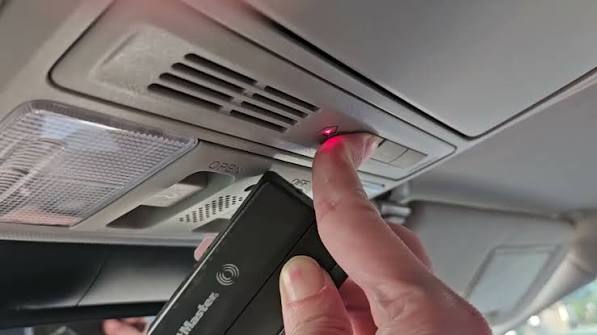
Are you tired of sitting in your driveway, digging through your bag or sun visor just to find your garage door remote? You are not alone, and the solution is already built into your car. Learning how to program 2016 Honda Odyssey garage door opener using the built-in HomeLink system will completely change your daily routine. In this guide, we will walk you through the exact steps to sync your garage door with your minivan in just a few minutes, so you can pull into your garage effortlessly every single time.
Why Learn How To Program 2016 Honda Odyssey Garage Door Opener?
The 2016 Honda Odyssey comes equipped with the HomeLink system, a universal transceiver integrated directly into your vehicle’s overhead console. According to a survey by the International Door Association (IDA), over 60% of homeowners use a vehicle-mounted opener as their primary method of entering their garage. By programming your built-in system, you eliminate the need for bulky, battery-draining remotes that often get lost or damaged.
Furthermore, the HomeLink system in the 2016 Odyssey supports both fixed-code and rolling-code garage door openers. Rolling code technology, which changes the access code every time the remote is used, provides an extra layer of security against code theft. As noted in the comprehensive Wikipedia article on Radio-controlled door openers, modern security protocols in vehicles like the Odyssey ensure that your home remains secure while offering unmatched convenience.
What You Need Before Programming Your Honda Odyssey HomeLink
Before we dive into the actual steps, let’s make sure you have everything ready. You don’t need any special tools, but you do need a few items on hand:
- Your 2016 Honda Odyssey: Parked outside the garage with the ignition turned to the “ON” position (or the engine running).
- The Original Garage Door Remote: The physical remote you currently use to open the garage. Note: Ensure it has fresh batteries.
- A Stepladder: You might need this to reach the garage door opener motor unit to press the “Learn” or “Smart” button.
- A Helper (Optional): Having a second person to watch the garage door and press the motor button can make the process much smoother.
Pro Tip: Make sure the area around your garage door is clear of people, pets, and obstacles before starting the programming process.
Step-by-Step: How To Program 2016 Honda Odyssey Garage Door Opener
Now that you are fully prepared, let’s get right into the process. Follow these detailed steps carefully to ensure a successful sync.
Step 1: Locate the HomeLink Buttons
Sit in the driver’s seat of your 2016 Honda Odyssey and look up at the overhead console, near the rearview mirror. You will see three oval-shaped HomeLink buttons. These buttons can be programmed to control your garage door, gate, entry lights, or even a home security system.
Step 2: Clear the Existing Memory (Highly Recommended)
If your Odyssey is pre-owned or the buttons were previously programmed, you must clear the factory memory to avoid signal interference.
- Locate the two outer HomeLink buttons (Button 1 and Button 3).
- Press and hold both buttons simultaneously.
- Keep holding them for about 20 seconds.
- Watch the small LED indicator light on the console. It will start blinking slowly, and then after about 20 seconds, it will blink rapidly.
- Release the buttons once the rapid blinking starts. The memory is now successfully erased.
Step 3: Program the Garage Door Remote to HomeLink
This step transfers the signal from your old remote to the car’s HomeLink system.
- Turn your vehicle’s ignition to the “ON” or “ACC” position. Do not start the engine yet.
- Hold your original garage door remote 1 to 3 inches away from the HomeLink buttons you want to program.
- Press and hold the button on your original remote with one hand.
- With your other hand, press and hold the desired HomeLink button in your Odyssey.
- Watch the LED indicator light on the HomeLink console. It will blink slowly at first.
- Keep holding both buttons until the LED light blinks rapidly (this usually takes 10 to 30 seconds).
- Release both buttons. The rapid blink indicates that the signal has been successfully captured.
Note: If your garage door opener uses a fixed code, the process stops here. You can now test the HomeLink button. If it works, you are done! However, most modern garage doors manufactured after 1996 use rolling code technology, which requires one more crucial step.
Step 4: Sync HomeLink with the Garage Door Motor (Rolling Code Technology)
If your LED indicator flashes rapidly and then turns solid, or if the garage door doesn’t move during Step 3, you need to sync the rolling code.
- Locate the garage door opener motor head hanging from your garage ceiling.
- Find the “Learn” or “Smart” button on the back or side of the motor unit. It is usually colored yellow, red, purple, or orange.
- Press and release the “Learn” button. The indicator light next to it will illuminate or start blinking, giving you a 30-second window to complete the sync.
- Return to your 2016 Honda Odyssey within those 30 seconds.
- Press and hold the programmed HomeLink button for about 2 seconds, then release it.
- Repeat this press-and-release cycle two more times (a total of three times).
- You should hear the garage door motor click, or see the lights on the motor flash, confirming the sync is complete. Test your new built-in remote!
How to Program a Garage Door Opener Without a Remote?
Many drivers ask this question when they have lost their original remote. If you do not have the original remote, you cannot use the standard remote-to-HomeLink method. However, you can still program your 2016 Honda Odyssey by using the “Learn” button directly on the garage motor.
- Press the “Learn” button on the garage motor unit.
- Within 30 seconds, go to your Honda Odyssey and press the desired HomeLink button.
- Hold it until the garage door motor light flashes or clicks.
- If it is a rolling code system, press the HomeLink button two more times to complete the sync.
Note: This method will erase all previously paired remotes from your garage door motor, so you will need to reprogram your other physical remotes as well.
Troubleshooting: Why Won’t My 2016 Honda Odyssey Garage Door Opener Sync?
Even with a perfect guide, technology can sometimes be stubborn. Here are the most common issues and how to fix them:
- Weak Remote Battery: If the LED on the HomeLink console doesn’t blink rapidly, your old remote might have a weak battery. Replace it with a fresh CR2032 battery and try again.
- Distance Issues: Ensure you are holding the remote exactly 1 to 3 inches from the HomeLink buttons during Step 3. Too close or too far will disrupt the frequency transfer.
- Incompatible Frequency: Some older or specialized European garage door openers operate on 433 MHz or 868 MHz frequencies, while the North American HomeLink system operates on 300-390 MHz. If you have an incompatible opener, you will need a frequency-compatible universal remote or a HomeLink repeater.
- Chamberlain/LiftMaster Compatibility: If you own a Chamberlain or LiftMaster opener manufactured after 2011, you might need to press the “Learn” button on the motor before starting the in-car programming process.
HomeLink vs. Universal Remote: Which is Better?
If you are debating whether to use the built-in system or buy a separate universal remote, let’s look at the facts.
| Feature | Built-in HomeLink (2016 Odyssey) | Standalone Universal Remote |
|---|---|---|
| Convenience | Excellent (Always in the car) | Good (Need to keep in visor/bag) |
| Cost | Free (Already installed) | $25 – $50 |
| Aesthetics | Seamless (No clutter) | Adds physical clutter |
| Battery Life | Powered by the car | Requires battery replacements |
| Security | High (Integrated rolling code) | Varies by brand |
As the table shows, utilizing the built-in system is vastly superior in almost every metric. It saves you money, reduces clutter, and ensures you never leave your “remote” at home.
Frequently Asked Questions (FAQ)
Q1: How many devices can I program into my 2016 Honda Odyssey HomeLink? A: The 2016 Honda Odyssey features a three-button HomeLink system. This means you can program up to three different devices, such as a main garage door, a side gate, and a driveway entry light or a second garage door.
Q2: Can I program a HomeLink button to open my garage door if I have a smart home system? A: Yes! If your garage door opener is Wi-Fi enabled (like MyQ or Aladdin Connect), you can still program the HomeLink button. However, you must ensure the motor unit itself is set to accept standard radio frequencies. The smart home features operate over Wi-Fi, while the HomeLink button uses standard RF signals.
Q3: What do I do if the HomeLink light blinks rapidly but the garage door won’t open? A: A rapid blink means the HomeLink button has successfully learned the frequency of your remote, but it hasn’t synced with the motor’s rolling code. You must go to your garage motor unit, press the “Learn” button, and then press the HomeLink button in the car three times to complete the synchronization.
Q4: Will programming a new garage door erase my previous HomeLink settings? A: No. Each of the three buttons in your 2016 Honda Odyssey operates independently. Programming Button 1 for your garage door will not affect Button 2 or Button 3, allowing you to control multiple different devices simultaneously.
Q5: Does the engine need to be running to program the HomeLink system? A: No, the engine does not need to be running. However, the ignition must be turned to the “ON” or “ACC” (accessory) position so that the vehicle’s electrical system is active. Keeping the engine off during programming saves fuel and prevents carbon monoxide buildup if you are in an enclosed space.
Conclusion
Mastering how to program 2016 Honda Odyssey garage door opener is a straightforward process that offers immense daily convenience and enhanced security. By utilizing the built-in HomeLink system, you eliminate the hassle of losing remotes, save money on replacement batteries, and keep your vehicle’s interior clutter-free. Whether you are dealing with a standard fixed-code opener or a modern rolling code motor, the steps outlined above will get you up and running in minutes.
Leave a Reply