Introduction
Are you tired of juggling multiple remotes every time you pull into your driveway? It is a common frustration for many drivers who want the convenience of opening their garage with the push of a button inside their vehicle. If you are wondering how to program 2014 GMC Sierra garage door opener systems, you are not alone. This guide will walk you through the process simply and safely, ensuring you get back on the road with full connectivity in no time.
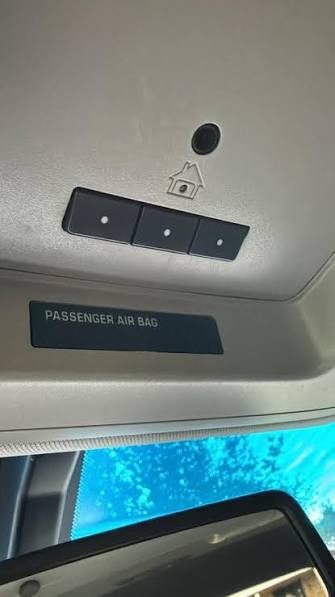
The 2014 GMC Sierra comes equipped with the HomeLink system, a universal transceiver that can replace up to three handheld remote controls. While the technology is robust, the programming process can vary depending on the age and brand of your garage door motor. Whether you have a newer rolling-code system or an older fixed-code unit, this article provides the exact steps you need to succeed.
Understanding the HomeLink System in Your 2014 Sierra
Before diving into the buttons, it is helpful to understand what you are working with. The HomeLink system in your 2014 GMC Sierra is designed to communicate with most major garage door opener brands, including LiftMaster, Chamberlain, Genie, and Craftsman.
Why Does Compatibility Matter?
Not all garage door openers speak the same language. Older models use “fixed codes,” which are static signals. Newer models (post-1993) use “rolling codes” for enhanced security. Rolling codes change the signal every time you press the button, preventing code theft.
According to HomeLink’s official compatibility resources, the system is compatible with over 95% of garage door openers manufactured since 1982. However, the programming method differs significantly between these two types. Identifying your opener type is the first critical step in this process.
Step-by-Step: Programming Fixed-Code Openers
If your garage door opener was manufactured before 1993, or if it does not have a “Learn” button, it likely uses a fixed code. This is the simpler of the two methods.
Preparation
- Park your 2014 GMC Sierra outside the garage. Do not park inside during programming to avoid accidental closure issues.
- Have your original handheld garage door remote ready.
- Ensure your vehicle’s ignition is in the “On” or “Accessory” position.
The Process
- Clear Existing Codes (Optional but Recommended): If you are reprogramming a button that was previously used, hold down the two outer HomeLink buttons for about 20 seconds until the indicator light flashes rapidly. This clears the memory.
- Position the Remote: Hold your handheld remote 1–3 inches away from the HomeLink buttons on your Sierra’s overhead console.
- Simultaneous Press: Press and hold both the desired HomeLink button in your truck and the button on your handheld remote. Keep holding both.
- Watch the Light: Continue holding until the HomeLink indicator light changes from a slow flash to a rapid flash. This usually takes 20–30 seconds.
- Test the System: Press the programmed HomeLink button in your Sierra. The garage door should activate. If it does, you are done!
Pro Tip: If the light does not flash rapidly, try moving the handheld remote slightly closer or further away. Interference can sometimes affect the signal transmission.
Step-by-Step: Programming Rolling-Code Openers
Most modern garage door openers, including those installed in homes built after 1993, use rolling codes. This method requires an extra step involving the motor unit itself.
Phase 1: Initial Vehicle Programming
- Ignition On: Turn your 2014 GMC Sierra’s ignition to the “On” position.
- Select Button: Choose the HomeLink button you wish to program.
- Hold and Wait: Press and hold the selected HomeLink button. Do not release it.
- Observe the Indicator: After about 20 seconds, the indicator light will begin to flash slowly, then rapidly. Once it flashes rapidly, release the button. Note: At this stage, the garage door will not yet operate.
Phase 2: Syncing with the Garage Motor
- Locate the Learn Button: Go to your garage door motor unit (hanging from the ceiling). Look for a “Learn,” “Smart,” or “Program” button. It is usually located near the hanging antenna wire and may be yellow, purple, orange, or red.
- Press the Learn Button: Press and release the Learn button on the motor unit. You typically have 30 seconds to complete the next step. A LED light on the motor will usually turn on or blink to indicate it is in learning mode.
- Return to Your Vehicle: Within those 30 seconds, go back to your 2014 GMC Sierra.
- Finalize the Code: Press and hold the programmed HomeLink button for two seconds, then release it. Repeat this “press-hold-release” cycle up to three times.
- Confirm Success: The garage door lights may flash, or the door may move slightly, indicating the code has been accepted.
Testing the Connection
Press the HomeLink button in your Sierra again. The garage door should now open or close. If it does not respond, repeat Phase 2, ensuring you are within the 30-second window after pressing the Learn button on the motor.
Troubleshooting Common Issues
Even with careful following of instructions, things can go wrong. Here are the most common hurdles users face when learning how to program 2014 GMC Sierra garage door opener systems and how to fix them.
| Issue | Possible Cause | Solution |
|---|---|---|
| Light won’t flash rapidly | Weak battery in handheld remote | Replace the battery in your original remote. |
| Door moves but reverses | Safety sensors blocked | Check the photo-eye sensors at the bottom of the garage tracks for dirt or obstruction. |
| Learn button not found | Older motor unit | Consult your garage door manual; some older units require dip-switch matching instead of a learn button. |
| Signal interference | LED bulbs in garage | LED lights can emit frequency noise. Try turning off garage lights during programming. |
The “Dip Switch” Method
If your garage door opener is very old (pre-1993) and has no Learn button, it likely uses dip switches. These are tiny switches inside the motor unit and your handheld remote.
- Open the cover of your handheld remote and note the position of the small switches (up or down).
- Open the cover of the motor unit on the ceiling.
- Match the dip switches in the motor unit to exactly match the positions in your handheld remote.
- Once matched, follow the “Fixed-Code” programming steps listed above.
Expert Tips for a Smooth Experience
To ensure long-term reliability and ease of use, consider these professional recommendations:
- Keep the Original Remote: Never throw away your original handheld remote. If you sell your truck or reset the HomeLink system, you will need the original remote to reprogram it.
- Update Firmware: While rare for 2014 models, some newer HomeLink systems allow firmware updates via dealership software. Ask your GMC dealer if any updates are available for your infotainment or overhead console module.
- Safety First: Always ensure the area around the garage door is clear of people, pets, and objects before testing the automatic function. The 2014 Sierra does not have visual confirmation of the door’s status, so rely on sound and sight.
Frequently Asked Questions (FAQ)
1. Can I program more than one garage door to my 2014 GMC Sierra?
Yes. The HomeLink system in the 2014 GMC Sierra can store up to three different devices. You can program a garage door, a gate, and even a home lighting system simultaneously. Each button on the overhead console corresponds to one device.
2. What if I don’t have the original handheld remote?
Programming without the original remote is difficult for rolling-code systems. However, some newer garage door motors allow you to program HomeLink directly by pressing the Learn button on the motor and then holding the HomeLink button in the car for an extended period (up to 60 seconds). Consult your garage door opener’s manual for “remote-less programming” instructions.
3. Why does my garage door close immediately after opening?
This is often a safety feature trigger. If the safety sensors (the eyes near the floor) are misaligned or blocked, the door will reverse. It can also happen if the force settings on the motor are too low. Check the sensors first, as this is the most common cause.
4. Does resetting HomeLink delete all my saved devices?
Yes. If you perform a full reset by holding the two outer buttons for 20 seconds, all three stored channels will be erased. You will need to reprogram each device individually afterward. Only do this if you are selling the vehicle or experiencing persistent errors.
5. Is it safe to program the garage door while sitting in the driveway?
It is highly recommended to program the system while parked outside the garage. This prevents the door from closing on your vehicle if the signal is accidentally triggered during the syncing process. Once programmed, test it carefully before driving fully into the garage.
Conclusion
Learning how to program 2014 GMC Sierra garage door opener functions is a straightforward task that pays off in daily convenience. By identifying whether you have a fixed-code or rolling-code system, you can choose the right method and sync your vehicle in minutes. Remember to keep your original remote handy and prioritize safety during the testing phase.
Leave a Reply