Introduction
Are you tired of juggling multiple remotes every time you pull into your driveway? It is a common frustration for many drivers, but the good news is that your vehicle likely has a built-in solution. If you are wondering how to program 2012 Honda Odyssey garage door opener, you are in the right place. This guide will walk you through the process simply and safely, helping you reclaim convenience and declutter your car console.
The 2012 Honda Odyssey comes equipped with the HomeLink® system, a universal transceiver that can replace up to three handheld remote controls. While the technology is reliable, the initial setup can feel intimidating if you have never done it before. Do not worry; we will break down every step so you can get your garage door syncing with your minivan in no time.
Understanding the HomeLink System in Your 2012 Odyssey
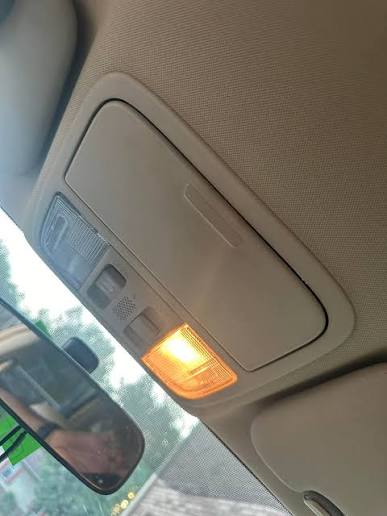
Before pressing any buttons, it helps to understand what you are working with. The HomeLink system in the 2012 Odyssey is located on the overhead console, near the rearview mirror. It typically features three circular buttons. These buttons are programmable and can control garage doors, gate operators, entry door locks, home lighting, and even security systems.
According to Wikipedia, HomeLink is one of the most widely used universal wireless control systems in vehicles today. Its compatibility extends to over 95% of garage door openers manufactured since 1982. This high compatibility rate means that regardless of whether you have an older chain-drive opener or a modern smart-jack system, your Odyssey can likely handle it.
Why Programming Fails: Common Culprits
Many users attempt to program their devices only to face failure. Understanding why this happens can save you time. Common issues include:
- Interference: Other electronic devices nearby can disrupt the signal.
- Rolling Codes: Modern garage openers use security encryption that requires a specific “learning” step at the motor unit.
- Weak Batteries: If your original handheld remote has weak batteries, the car may not pick up the signal clearly during training.
Step-by-Step Guide: How To Program 2012 Honda Odyssey Garage Door Opener
Programming your HomeLink system involves two main phases: clearing old codes (if necessary) and training the new device. Follow these steps precisely for the best results.
Phase 1: Clearing Previous Codes (If Needed)
If you bought your Odyssey used, or if you want to reprogram a button that already has a code, you must clear it first.
- Turn the ignition to the “ON” position (II). You do not need to start the engine.
- Press and hold the two outer HomeLink buttons simultaneously.
- Keep holding them for about 20 seconds until the indicator light begins to flash rapidly.
- Release both buttons. The memory is now cleared for those specific buttons.
Phase 2: Training the HomeLink Buttons
This is the core process where your car learns the signal from your garage door remote.
- Position Yourself: Sit in your driver’s seat with the garage door remote handy. Ensure your garage door is closed for safety.
- Select a Button: Choose which of the three HomeLink buttons you wish to program.
- Initiate Learning Mode: Press and hold the chosen HomeLink button and your handheld garage remote button simultaneously. Hold them about 1–3 inches apart.
- Tip: Point the handheld remote directly at the HomeLink buttons on the overhead console.
- Watch the Indicator Light: Continue holding both buttons. The HomeLink indicator light will slowly change from a slow blink to a rapid flash.
- Note: This process can take anywhere from 20 seconds to several minutes. Do not let go until the light flashes rapidly.
- Release Buttons: Once the light flashes rapidly, release both buttons. Your HomeLink system has now stored the frequency.
Phase 3: Programming Rolling Code Systems
Most garage door openers manufactured after 1995 use “rolling codes” for security. This means the code changes every time you press the button. If your opener uses rolling codes, the steps above are not enough. You must complete the synchronization at the garage door motor unit.
- Locate the “Learn” or “Smart” button on your garage door opener motor unit (usually hanging from the ceiling in your garage). It is often colored yellow, purple, or red.
- Press and release the “Learn” button. You typically have 30 seconds to complete the next step.
- Return to your Honda Odyssey.
- Press and hold the programmed HomeLink button for two seconds, then release it.
- Repeat this “press-hold-release” cycle three times.
- Test your garage door. If it opens and closes, the programming is successful. If not, repeat the cycle, ensuring you are within range of the motor unit.
Troubleshooting Common Issues
Even with careful following of instructions, things can go wrong. Here is a quick reference table to help you diagnose problems.
| Issue | Possible Cause | Solution |
|---|---|---|
| Light does not flash rapidly | Signal not detected | Check batteries in handheld remote. Move closer to the overhead console. |
| Garage door moves partially | Interference or weak signal | Reprogram the button. Ensure no large metal objects are blocking the signal path. |
| System works intermittently | Rolling code mismatch | Re-do the “Learn” button sequence at the motor unit exactly as described. |
| No response from HomeLink | Fuse blown or system off | Check the vehicle’s fuse box. Ensure the ignition is in the ON position. |
Expert Tip for Older Openers
If you have an older garage door opener without a “Learn” button, you may need to adjust the dip switches inside the motor unit to match the frequency of the HomeLink system. Consult your garage door opener’s manual for specific dip switch settings. In some rare cases, you may need to install a compatibility bridge kit, which can be purchased from major hardware retailers.
Safety Precautions and Best Practices
Safety should always be your priority when dealing with automated heavy machinery like garage doors.
- Keep Hands Clear: Never stand under a moving garage door.
- Test Regularly: Test your HomeLink system monthly to ensure it is functioning correctly.
- Child Safety: Teach children not to play with the HomeLink buttons or the garage door remote.
- Photo-Eye Sensors: Ensure your garage door’s safety sensors (the eyes near the floor) are aligned and clean. If these are blocked, the door will not close, even if the HomeLink signal is perfect.
Frequently Asked Questions (FAQ)
1. Can I program more than one garage door to my 2012 Honda Odyssey?
Yes, the HomeLink system in the 2012 Odyssey has three separate buttons. You can program each button to control a different device, such as two different garage doors and a gate operator. Each button is programmed independently using the steps outlined above.
2. What if my garage door opener doesn’t have a “Learn” button?
If your opener lacks a learn button, it likely uses fixed codes or dip switches. In this case, the standard training procedure (Phase 2) should be sufficient. However, if it does not work, you may need to consult the manufacturer of your garage door opener to see if a compatibility kit is required for universal remotes.
3. Why does my HomeLink light flash green then turn off?
A solid green light usually indicates that the button is programmed. A flashing green light indicates that the system is in learning mode. If it turns off without flashing rapidly, the training was unsuccessful. Try replacing the batteries in your handheld remote and repeat the process, ensuring you hold the buttons steady.
4. Does programming HomeLink void my garage door warranty?
No, programming a universal remote like HomeLink does not void your garage door opener’s warranty. It is a standard feature supported by most major garage door manufacturers, including LiftMaster, Chamberlain, and Genie.
5. Can I reset the HomeLink system completely?
Yes. To reset all three buttons, press and hold the two outer buttons for 20 seconds until the indicator light flashes rapidly. This clears all memory from the system, allowing you to start fresh. This is useful if you sell your car or buy a new garage door opener.
6. Is there a difference between programming a garage door and a gate?
The initial training process is identical. However, gates often require a different type of signal duration. Some gate operators require a “constant pressure” signal rather than a momentary pulse. If your gate does not respond, check your gate operator’s manual to see if it requires a continuous signal adjustment.
Conclusion
Learning how to program 2012 Honda Odyssey garage door opener is a straightforward task that pays off in daily convenience. By following the steps to clear old codes, train the new remote, and synchronize with rolling code systems, you can ensure seamless operation. Remember to prioritize safety and keep your handheld remote batteries fresh for the best results.
Leave a Reply