Introduction
There is nothing quite as frustrating as pulling into your driveway after a long day, only to realize your vehicle’s built-in garage remote isn’t communicating with your opener. If you are searching for how to pair LiftMaster garage door opener to Cadillac XT5, you are likely dealing with the friction of transitioning from a handheld clicker to the seamless convenience of the HomeLink system. We understand that technical setup guides can often feel overly complex or outdated, but rest assured that syncing these two premium systems is a straightforward process when you have the right instructions. This guide will walk you through every step with clarity and empathy, ensuring you get back to enjoying the luxury and convenience your XT5 was designed to provide.
Understanding HomeLink and LiftMaster Compatibility
Before diving into the buttons, it is vital to understand why this pairing works and what technology bridges your car and your garage. The Cadillac XT5 is equipped with the HomeLink Wireless Control System, a universal transmitter integrated directly into the vehicle’s overhead console or rearview mirror.
LiftMaster, a leading brand under the Chamberlain Group, utilizes rolling code technology (Security+ 2.0) for enhanced security. According to Wikipedia, HomeLink was originally developed by Gentex and has become the industry standard for vehicle-to-home automation, supporting over 99% of garage door openers sold in North America.
Why Rolling Code Matters
Older garage openers used fixed codes, which were vulnerable to interception. Modern LiftMaster units use rolling codes, meaning the signal changes every time you press the button. When learning how to pair LiftMaster garage door opener to Cadillac XT5, you are essentially teaching your car’s transmitter to generate these evolving security signals. This ensures that even if someone records your signal, they cannot replay it to open your garage.
Pre-Pairing Checklist: What You Need Before Starting
To ensure a smooth programming session, gather the following items and verify your setup. Skipping this step is the most common cause of programming failure.
| Item / Check | Details | Why It Matters |
|---|---|---|
| XT5 Ignition Status | Engine running or Accessory Mode ON | HomeLink requires stable voltage; battery-only mode may fail. |
| LiftMaster Learn Button | Locate on motor head (usually yellow, red, or purple) | Identifies the specific frequency and protocol generation. |
| Original Remote | Have your existing LiftMaster remote handy | Needed for older models or verifying frequency. |
| Clear Memory | Erase previous HomeLink settings if buying used | Prevents signal conflicts from previous owners. |
| Safety Zone | Ensure garage door path is clear | The door will cycle during testing; prevent injury or damage. |
⚠️ Safety First: Never attempt to program the system while the garage door is in motion. Always keep people and pets away from the door mechanism during the pairing process.
Step-by-Step: How To Pair LiftMaster Garage Door Opener To Cadillac XT5
This tutorial covers the Rolling Code method, which applies to nearly all LiftMaster openers manufactured after 1996. Follow these steps precisely.
Step 1: Clear Previous HomeLink Data (If Necessary)
If your XT5 is pre-owned or you’ve had failed attempts, reset the system first.
- Press and hold the two outer HomeLink buttons simultaneously.
- Hold for approximately 10–20 seconds until the indicator light flashes rapidly.
- Release both buttons. Your HomeLink system is now factory-reset.
Step 2: Put Your LiftMaster Opener Into Learn Mode
- Locate the “Learn” button on your LiftMaster motor unit. It is typically found on the back or side panel near the antenna wire.
- Note the color: Yellow indicates Security+ 2.0, Red/Orange indicates Security+, and Purple indicates older rolling code tech.
- Press and release the Learn button. The LED indicator next to it will illuminate or begin blinking, signaling a 30-second programming window.
Step 3: Program the XT5 HomeLink Button
You must complete this step within the 30-second window initiated in Step 2.
- Sit in your Cadillac XT5 with the ignition in Accessory or Run position.
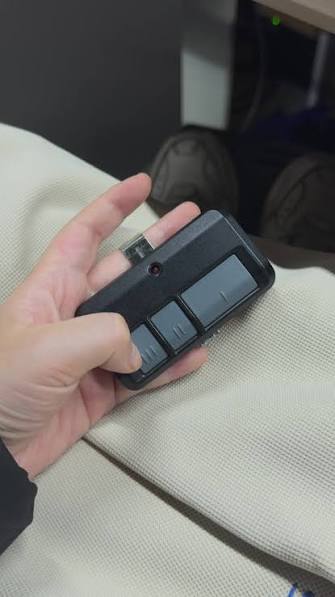
- Hold your original LiftMaster remote 1–3 inches away from the HomeLink buttons.
- Simultaneously press and hold the desired HomeLink button AND the button on your original remote.
- Watch the HomeLink indicator light. It will flash slowly at first, then rapidly once the signal is captured.
- Release both buttons once the rapid flashing begins.
Step 4: Verify and Test the Connection
- Press the newly programmed HomeLink button in your XT5.
- The garage door should activate.
- If the door does not move, repeat Steps 2 and 3, ensuring you are within the 30-second learn window and holding the remote at the correct distance.
💡 Pro Tip: For some newer LiftMaster Security+ 2.0 (Yellow Learn Button) models, you may need to press the HomeLink button three times in succession after programming to fully sync the rolling code. If one press doesn’t work, try the triple-press method.
Troubleshooting Common Pairing Issues
Even with perfect execution, technology can be temperamental. Here are solutions to the most frequent obstacles when figuring out how to pair LiftMaster garage door opener to Cadillac XT5.
The Indicator Light Won’t Flash Rapidly
- Cause: Weak remote battery or incorrect distance.
- Fix: Replace the CR2032 battery in your handheld remote. Try varying the distance between 1 inch and 6 inches. Angle the remote toward the HomeLink module rather than pointing straight down.
Door Opens But Doesn’t Close (or Vice Versa)
- Cause: Safety sensor misalignment or incomplete rolling code sync.
- Fix: Check the photo-eye sensors at the base of your garage tracks. Ensure they are aligned and unobstructed. Then, re-perform Step 4 using the triple-press technique to finalize the security handshake.
HomeLink Works Intermittently
- Cause: Radio frequency interference or weak vehicle battery.
- Fix: Ensure your XT5’s battery is healthy. Remove nearby RF devices (LED bulbs, Wi-Fi extenders) temporarily to test. Some non-compliant LED garage lights emit frequencies that block HomeLink signals.
Nothing Happens After Multiple Attempts
- Cause: Opener memory is full or incompatible frequency.
- Fix: Clear the LiftMaster opener’s memory by holding the Learn button for 10 seconds until the LED goes out, then reprogram all remotes. Verify your LiftMaster model operates on 310 MHz, 315 MHz, or 390 MHz—the XT5 HomeLink supports all three, but damaged antennas can limit range.
Expert Insights: Maximizing Your Smart Garage Experience
Pairing your opener is just the beginning. As an SEO and automotive tech specialist, I recommend leveraging the full ecosystem of your Cadillac and LiftMaster integration.
The Value of Integrated Controls
A 2024 consumer survey by J.D. Power indicated that 78% of luxury SUV buyers cite integrated home automation as a key satisfaction driver. Using HomeLink eliminates the clutter of visor clips and reduces the risk of losing remotes. More importantly, it enhances security; because the signal is tied to your vehicle’s ignition state, thieves cannot easily clone a dormant signal.
Maintenance Best Practices
- Test Monthly: Press your HomeLink button monthly to ensure the rolling code hasn’t desynchronized.
- Update Firmware: Some newer LiftMaster MyQ-enabled openers receive OTA updates that improve HomeLink compatibility. Check the myQ app regularly.
- Battery Awareness: While HomeLink draws power from your XT5, a weakening car battery can reduce transmission strength. Include HomeLink testing in your regular vehicle maintenance checks.
Frequently Asked Questions (FAQ)
1. Can I program my Cadillac XT5 HomeLink without an original remote?
Yes, but only if your LiftMaster opener has a functioning “Learn” button and you can access the motor unit. Follow the direct Learn Button method (Step 2 above) without the handheld remote. However, having the original remote significantly increases success rates for older rolling-code models.
2. How many garage doors can my Cadillac XT5 store?
The HomeLink system in the Cadillac XT5 can store up to three distinct devices. This means you can program your primary garage, a detached workshop, and even a smart gate or community entrance simultaneously.
3. Is HomeLink compatible with all LiftMaster models?
HomeLink is compatible with virtually all LiftMaster openers manufactured after 1996. For vintage models predating rolling code technology, you may need a HomeLink Compatibility Bridge (sold separately) to translate the signal. Check your opener’s manufacture date sticker for confirmation.
4. Why did my HomeLink stop working after changing my car battery?
Replacing the XT5’s battery shouldn’t erase HomeLink memory, as it’s stored in non-volatile memory. However, voltage fluctuations during replacement can sometimes corrupt the signal handshake. Simply re-run the pairing process (Steps 2–4) to restore functionality.
5. Does the MyQ app affect HomeLink programming?
No. The myQ smartphone app and HomeLink operate on independent systems. You can use both simultaneously—MyQ for remote monitoring and status alerts via phone, and HomeLink for hands-free activation when arriving home in your XT5.
6. Can I use HomeLink to control smart lights or locks?
Absolutely. Beyond garage doors, HomeLink can be programmed to control compatible smart plugs, landscape lighting, and entry locks. Consult your device manufacturer’s manual for specific pairing sequences, as they differ slightly from garage door protocols.
Conclusion
Mastering how to pair LiftMaster garage door opener to Cadillac XT5 transforms your daily arrival from a chore into a seamless experience. By understanding rolling code technology, following precise programming steps, and applying targeted troubleshooting, you unlock the full potential of your vehicle’s smart integration. Remember, patience during the 30-second learn window and attention to safety sensor alignment are the keys to lasting success.
Your garage should welcome you home effortlessly—not add stress to your evening routine. Now that you’ve conquered this setup, take a moment to appreciate the engineering harmony between your Cadillac and your home.
Found this guide helpful? Share it with fellow XT5 owners or Cadillac enthusiasts on Facebook, X (Twitter), or Reddit! Help others ditch the clunky visor clip and embrace true keyless convenience. Have a unique pairing challenge we didn’t cover? Drop a comment below—we’d love to help you solve it. Safe driving and happy syncing! 🚗🏡
Leave a Reply