Introduction
There is nothing quite as frustrating as pulling out of your driveway only to realize you cannot remember if you closed the garage door, or arriving home with groceries in hand while fumbling for a lost remote. If you are searching for how to open and close garage door with MyQ app, you are taking the first step toward eliminating that daily anxiety and gaining true peace of mind. This guide will walk you through the exact process of controlling your garage remotely, ensuring your home remains secure and accessible no matter where you are in the United States.
Understanding MyQ Technology and Compatibility
Before diving into the operational steps, it is vital to understand what makes this technology work and whether your current hardware supports it. The MyQ ecosystem, developed by Chamberlain Group, utilizes cloud-based connectivity to bridge your smartphone and your physical garage door opener. According to industry data on smart home adoption, over 30% of US homeowners now utilize some form of smart entry system, with garage control being one of the most frequently used features due to its direct impact on home security.
Is Your Garage Door Opener Compatible?
Not every opener works with the MyQ app right out of the box. Generally, Chamberlain and LiftMaster openers manufactured after 1993 with photoelectric sensors are compatible. However, older models may require a separate MyQ Smart Garage Hub. Always verify compatibility via the official Chamberlain website before attempting installation to avoid frustration.
Note: Safety sensors are mandatory. The MyQ system will not allow remote closing if your safety reversal sensors are misaligned or obstructed, as per federal safety regulations.
Prerequisites: What You Need Before Starting
To successfully learn how to open and close garage door with MyQ app, ensure you have the following ready. Skipping these prerequisites is the most common cause of setup failure.
- A Compatible Smartphone: iOS 14+ or Android 8.0+ with Bluetooth and location services enabled during setup.
- Strong Wi-Fi Signal: Your garage must have a stable 2.4 GHz Wi-Fi signal. Many users fail here because their router does not reach the garage; consider a Wi-Fi extender if signal strength is below -70 dBm.
- The MyQ Account: Create a free account at myq.com before downloading the app to streamline the linking process.
- Physical Access: You must be physically present at the garage for the initial pairing to press the “Learn” button on the motor unit.
Step-by-Step: How To Open And Close Garage Door With MyQ App
Once your hardware is confirmed compatible and your account is created, follow this precise tutorial. These steps apply to both native MyQ openers and those connected via the Smart Garage Hub.
1. Download and Link Your Device
- Download the MyQ app from the Apple App Store or Google Play Store.
- Log in with your pre-created credentials.
- Tap the + (Add) icon in the top right corner and select Garage Door Opener.
- Follow the on-screen prompts to connect via Bluetooth. When prompted, press and release the Learn Button on your physical opener (usually located on the back or side panel near the antenna wire).
- Wait for the confirmation chime and LED indicator on the opener. The app should display “Device Added Successfully” within 30 seconds.
2. Opening the Garage Door Remotely
Opening is generally unrestricted for security convenience.
- Launch the MyQ app and navigate to the Devices tab.
- Locate your specific garage door tile.
- Tap the large Open/Close button.
- Confirm the action when the prompt appears (this prevents accidental touches).
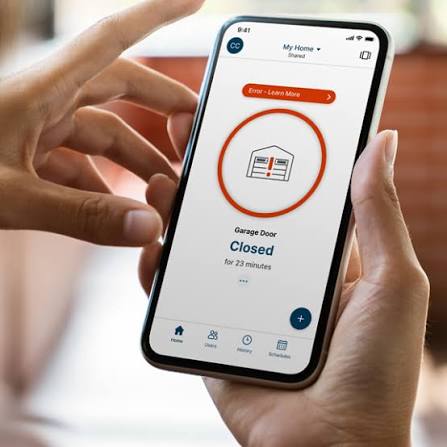
- Watch the status change from “Closed” to “Opening” and finally to “Open.”
3. Closing the Garage Door Remotely (Critical Safety Protocol)
Closing remotely involves additional safety measures mandated by UL standards.
- Tap the Close button on the device tile.
- Press and Hold: Unlike opening, you must often press and hold the close button for 3–5 seconds to confirm intent.
- Audible Warning: The physical opener will emit a loud beep and flash lights for approximately 5 seconds before movement begins. Do not enter the garage during this warning period.
- Monitor the status until it reads “Closed.” If it reverts to “Open,” check your safety sensors immediately.
Troubleshooting Common MyQ Control Issues
Even with perfect setup, users occasionally face hurdles. Here is a comparison of frequent problems and verified solutions based on technical support data.
| Issue | Probable Cause | Recommended Solution |
|---|---|---|
| “Offline” Status | Wi-Fi dropout or power loss | Reboot router; check breaker; verify 2.4 GHz band connection |
| Won’t Close Remotely | Misaligned safety sensors | Clean sensor lenses; realign brackets; ensure no sunlight interference |
| Delayed Response | Poor cellular/Wi-Fi latency | Test internet speed in garage; move router closer or add extender |
| App Login Failure | Server maintenance or cache | Clear app cache; check MyQ server status page; update app version |
| Multiple Users Can’t Access | Missing shared permissions | Owner must invite users via “Share Access” feature in app settings |
For deeper technical understanding of the wireless protocols involved in these systems, referencing foundational knowledge on wireless communication standards can help users understand why 2.4 GHz networks are specifically required over 5 GHz bands for garage penetration.
Security Best Practices for Remote Garage Access
Controlling your largest home entry point via smartphone requires vigilance. Cybersecurity experts recommend treating your MyQ account with the same rigor as online banking.
- Enable Two-Factor Authentication (2FA): This is non-negotiable. It prevents unauthorized access even if your password is compromised.
- Review Activity Logs Weekly: The MyQ app records every open/close event with timestamps. Audit this regularly to spot anomalous activity.
- Limit Shared Access: Only grant permanent access to trusted household members. Use temporary guest passes for deliveries or service workers instead of sharing login credentials.
- Keep Firmware Updated: Enable automatic updates in the app. Manufacturers frequently patch vulnerabilities that could expose your garage to digital intrusion.
- Disable Unused Integrations: If you do not use voice assistants like Alexa or Google Home for garage control, disable those integrations to reduce your attack surface.
Frequently Asked Questions (FAQ)
Can I open and close my garage door with MyQ without Wi-Fi?
No. The MyQ app requires an active internet connection to communicate with Chamberlain’s cloud servers, which then relay commands to your opener. Without Wi-Fi, the app cannot send remote commands, though your physical remotes and wall buttons will continue to function normally. Some newer models offer local network fallback, but standard MyQ operation is cloud-dependent.
Why won’t my MyQ app let me close the garage door remotely?
This is almost always a safety sensor issue. Federal law requires that remote closing be disabled if sensors detect obstruction, misalignment, or excessive sunlight interference. Check that both sensor LEDs are solid (not blinking), clean the lenses, and ensure nothing blocks the beam. If sensors appear functional, the issue may be outdated firmware requiring a manual update.
Is there a monthly fee to use the MyQ app for basic open/close functions?
No. Basic remote opening, closing, and status monitoring are completely free. MyQ offers premium subscriptions for advanced features like video storage, extended history, and certain smart home integrations, but core garage door control has no recurring cost. Be wary of third-party apps charging for functionality that MyQ provides gratis.
How many people can control the same garage door via MyQ?
The primary account holder can share access with up to three additional users for free under the standard plan. Each invited user receives their own login and can operate the door independently. For larger households or property managers, premium tiers expand this limit significantly. All shared users’ activities are logged in the primary account’s activity feed for accountability.
Does MyQ work with Apple HomeKit or Amazon Alexa?
Compatibility varies. MyQ natively integrates with Amazon Alexa, Google Assistant, and IFTTT. Apple HomeKit integration was discontinued for new users in 2023; existing HomeKit-linked accounts may still function but receive no updates. For Apple users seeking HomeKit support, third-party bridges like Homebridge exist but require technical configuration and are not officially supported by Chamberlain.
What happens if my power goes out while the garage is open?
If power is lost while the door is open, it will remain open until power is restored. The MyQ app will show the last known status and may display “Offline” once the backup battery (if equipped) depletes. Upon power restoration, the opener will reconnect automatically, and the app status will update. Never attempt to force-close a powered-down door manually unless using the emergency release cord, and exercise extreme caution doing so.
Conclusion
Mastering how to open and close garage door with MyQ app transforms one of your home’s most overlooked entry points into a secure, intelligent asset. From verifying compatibility and completing the initial pairing to understanding critical safety protocols and maintaining cybersecurity hygiene, each step ensures reliable performance for years to come. The convenience of confirming your garage is closed from your office desk or opening it for a delivery driver while on vacation is genuinely life-enhancing for modern US homeowners.
If this guide helped you gain confidence in your smart garage setup, please share it on social media to help fellow homeowners secure their homes more effectively. Tag us or leave a comment about your MyQ experience—your insights could save someone else hours of troubleshooting! Safe and smart garaging to all.
Leave a Reply