Introduction
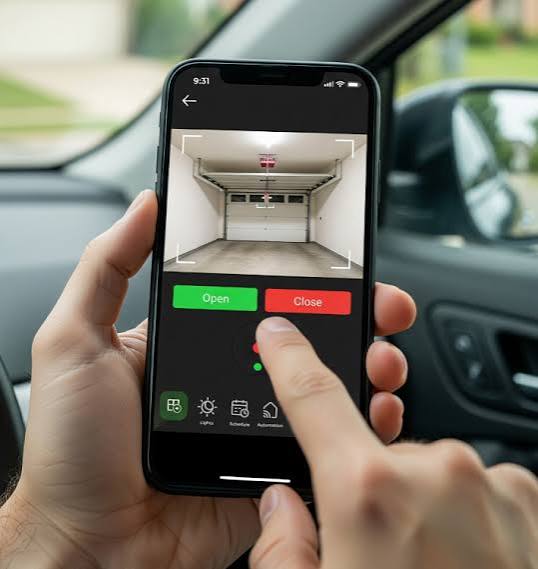
Have you ever pulled into your driveway in the pouring rain, only to realize you left your garage remote inside the house? You are not alone, and thankfully, there is a much better way to handle this everyday frustration. Learning how to open a garage door with your phone is the ultimate solution for modern convenience, enhanced security, and total peace of mind. Whether you need to let in a dog walker, check if you accidentally left the door open before a vacation, or simply avoid fumbling for a remote in the dark, your smartphone is all you need.
How to Open a Garage Door With Your Phone: The Basics
Before diving into the technical setup, it is helpful to understand how this technology actually works. Essentially, your smartphone communicates with your garage door opener via a secure Wi-Fi connection, translating a digital tap on your screen into a physical motor movement.
According to recent market research, approximately 7-9% of US internet households already own a smart garage door opener, and this number is steadily growing as home automation becomes mainstream
www.parksassociates.com. This shift is driven by the desire for seamless, interconnected living spaces.
There are two primary ways to achieve smartphone control:
- Retrofitting with a Smart Garage Hub: This is a small, affordable device you add to your existing, non-smart garage door opener. It acts as a bridge between your old motor and your home Wi-Fi network.
- Upgrading to a Built-in Smart Opener: This involves replacing your entire motor unit with a newer model that has Wi-Fi capabilities and advanced encryption natively built in.
For most homeowners, retrofitting with a smart hub is the most cost-effective, DIY-friendly, and straightforward path to modernization.
Step-by-Step Guide: Setting Up Your Smartphone Garage Control
If you are ready to upgrade your daily routine, follow this detailed, step-by-step tutorial. We will focus on the most common and accessible method: installing a smart garage hub (such as the Chamberlain myQ, Meross, or Tailwind).
Step 1: Verify Compatibility
Not all openers are compatible with smart hubs. Check your garage door motor unit for a “Learn” or “Program” button. If your opener was manufactured after 1993 and features a learn button (typically colored yellow, purple, red, orange, or green), it is highly likely to be compatible. Older models with dip switches may require a different type of universal receiver.
Step 2: Install the Smart Hub
Locate a standard 120V electrical outlet within 6 feet of your garage door motor. Plug the smart hub directly into the outlet. Pro tip: Avoid using extension cords, as they can cause voltage drops and intermittent connectivity issues. Mount the hub on the wall or ceiling using the included adhesive strips or screws. Ensure the device’s antenna is pointing downward for optimal radio frequency (RF) signal reception to the motor.
Step 3: Download the App and Connect to Wi-Fi
Download the manufacturer’s official app from the Apple App Store or Google Play Store. Create a secure account using a dedicated email address. Crucial detail: Most smart garage hubs strictly require a 2.4 GHz Wi-Fi network, not a 5 GHz network, due to its better wall-penetrating capabilities. Ensure your smartphone is connected to your 2.4 GHz band during the setup process to prevent pairing failures.
Step 4: Pair the Hub with Your Opener
Open the app and follow the on-screen prompts to add a new device. When the app instructs you to do so, press the “Learn” button on your garage door motor unit. You must do this within 30 seconds of the app’s prompt. You will know the pairing was successful when the hub’s LED indicator light turns solid or blinks in a specific, documented pattern, confirming a secure link.
Step 5: Test the Connection and Safety Features
Stand outside your garage and use the app to open and close the door. Observe the door’s movement carefully. Ensure the photoelectric safety sensors (the small eyes near the floor) are functioning correctly and that the door automatically reverses if an obstacle is detected during closure.
Smart Garage Hub vs. Built-in Smart Opener: A Quick Comparison
Choosing the right method depends entirely on your current setup, technical comfort level, and budget. Here is a quick breakdown to help you make an informed decision.
| Feature | Smart Garage Hub (Retrofit) | Built-in Smart Opener (New Unit) |
|---|---|---|
| Initial Cost | Low ($30 – $100) | High ($300 – $600+) |
| Installation Effort | DIY-friendly (15-30 minutes) | Professional installation highly recommended |
| Compatibility | Works with most openers post-1993 | Requires replacing the entire motor unit |
| Advanced Features | Basic open/close, activity notifications | Battery backup, ultra-quiet operation, built-in cameras |
| Ideal User | Budget-conscious homeowners, renters | New home builds, major garage renovations |
Security Best Practices for Phone-Operated Garage Doors
Connecting your garage to the internet introduces incredible convenience, but it also requires diligent security habits. Your garage is a primary entry point to your home, so protecting its digital access is non-negotiable.
- Enable Two-Factor Authentication (2FA): Always turn on 2FA in your garage door app settings. This ensures that even if someone guesses your password, they cannot access your door without a secondary, time-sensitive code sent directly to your phone.
- Use Strong, Unique Passwords: Avoid using obvious passwords like “123456” or “garage123”. Use a reputable password manager to generate and store a complex, unique password exclusively for your smart home accounts.
- Keep Firmware Updated: Manufacturers regularly release software updates to patch newly discovered security vulnerabilities. Enable automatic updates in your app settings to ensure you always have the latest protection.
- Secure Your Home Wi-Fi: Ensure your home router uses WPA3 or WPA2 encryption. Understanding the broader Internet of Things ecosystem can help you better secure all your connected devices under one robust, segmented network.
- Utilize Geofencing (If Available): Some advanced apps offer geofencing, which automatically opens the door when your phone’s GPS detects you are pulling into the driveway, and closes it when you leave, reducing the chance of human error.
Frequently Asked Questions (FAQ)
Q1: Can I open my garage door with my phone if the power goes out?
A: If your home loses power, your Wi-Fi router and the smart garage hub will also lose power, meaning you cannot use your phone to open the door. However, all modern garage door openers have a manual release cord (usually a red rope hanging from the motor track) that allows you to disengage the motor and lift the door manually. Some high-end smart openers also offer optional battery backup systems to maintain Wi-Fi connectivity during outages.
Q2: Is it safe to open a garage door with my phone?
A: Yes, it is highly safe when you purchase devices from reputable, established brands like Chamberlain, LiftMaster, or Genie. These companies use bank-level encryption (such as TLS 1.2 or higher) to protect the communication between your phone and the garage door. Following the security best practices mentioned above further minimizes any potential risk.
Q3: What if my Wi-Fi goes down? Can I still use my phone?
A: No, a smart garage hub relies on an active internet connection to communicate with your smartphone via the cloud. If your Wi-Fi is down, the app will not be able to send the open or close command. You will need to use your traditional physical remote or the wall-mounted button inside the garage until the internet connection is restored.
Q4: Does this work with both Android and iPhone?
A: Absolutely. Major smart garage door manufacturers develop their applications natively for both iOS (Apple) and Android operating systems. Furthermore, many of these hubs can be integrated with popular voice assistants like Apple HomeKit, Amazon Alexa, or Google Assistant for seamless, hands-free control.
Q5: How much does a smart garage door hub cost?
A: A reliable smart garage door hub typically costs between $30 and $100, depending on the brand and additional features like built-in cameras, lighting controls, or compatibility with specific smart home ecosystems. This makes it a very affordable upgrade compared to purchasing a brand-new smart garage door opener system.
Conclusion
Learning how to open a garage door with your phone is no longer a futuristic luxury; it is an accessible, practical upgrade for any modern home. Whether you choose to retrofit your existing opener with an affordable smart hub or invest in a brand-new, feature-rich smart system, the benefits of remote access, real-time activity notifications, and enhanced security are truly undeniable.
Take control of your home’s accessibility and peace of mind today. If you found this step-by-step guide helpful, please share it on your favorite social media platforms to help your friends, family, and neighbors discover the everyday convenience of smart garage control!
Leave a Reply