Have you ever pressed your garage remote and nothing happened? You might be dealing with a locked opener. Understanding How To Lock And Unlock LiftMaster Garage Door Opener is essential if you want to regain control quickly and avoid unnecessary stress. The good news? It’s easier than you think—and you can fix it in minutes.
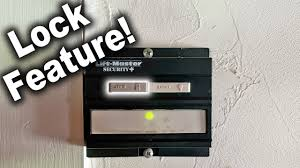
What Does the Lock Feature on a LiftMaster Garage Door Opener Do?
The lock feature—often called “vacation mode”—is designed to improve security.
Key Functions:
- Disables all remote controls temporarily
- Prevents unauthorized access
- Keeps your garage secure while you’re away
Read too: How Do You Change Code On Garage Door Keypad Fast?
According to home security experts, garages are one of the most common entry points for intruders. Disabling remote access adds an extra layer of protection.
How To Lock And Unlock LiftMaster Garage Door Opener (Step-by-Step)
This is the core solution you’re looking for. Follow these steps carefully.
How To Lock Your LiftMaster Garage Door Opener
- Locate the wall-mounted control panel inside your garage.
- Find the “Lock” button (sometimes labeled as “Vacation”).
- Press and hold the button for 2–3 seconds.
- Look for a flashing LED light—this indicates lock mode is active.
✅ Result: All remote controls are now disabled.
How To Unlock Your LiftMaster Garage Door Opener
- Go back to the wall control panel.
- Press and hold the “Lock” button again for 2–3 seconds.
- Wait until the LED light stops flashing.
✅ Result: Remote controls are now functional again.
Why Is My LiftMaster Garage Door Stuck in Lock Mode?
Sometimes the lock feature activates accidentally.
Common Causes:
- Holding the lock button too long
- Power interruptions resetting settings
- Children pressing buttons unknowingly
- Faulty wall control panel
💡 Quick Tip: If your remote suddenly stops working, always check the lock mode first—it’s the most common issue.
How Do You Know If Lock Mode Is Activated?
Here are clear signs:
- Remote control does not open or close the door
- Wall button still works normally
- LED indicator is blinking
This combination confirms that your opener is locked—not broken.
LiftMaster Lock Feature: Pros vs Cons
Advantages vs Disadvantages
| Pros | Cons |
|---|---|
| Enhances home security | Can confuse users |
| Prevents unauthorized access | Easy to activate accidentally |
| Ideal for vacations | Disables all remotes |
Can You Lock a LiftMaster Without a Wall Control Panel?
In most cases, no. The lock feature is built into the wall-mounted control system.
However, newer smart models allow control via mobile apps.
Alternative Options:
- Use a smart garage app
- Disconnect power temporarily (not recommended long-term)
- Upgrade to a smart control panel
Troubleshooting: What If Unlocking Doesn’t Work?
If your garage door remains unresponsive, try these fixes:
Step-by-Step Troubleshooting:
- Check Power Supply
Ensure the opener is plugged in and receiving power. - Inspect the Wall Panel
Look for damage or unresponsive buttons. - Reset the System
- Unplug the opener for 30–60 seconds
- Plug it back in and try again
- Reprogram Remote Controls
Sometimes remotes lose connection. - Check Manual Lock on Door
Some garage doors have a physical lock.
How Secure Is the LiftMaster Lock Feature?
The lock feature adds an important layer of protection but should not be your only security measure.
Best Practices:
- Combine with motion sensor lights
- Use rolling code technology (standard in modern openers)
- Avoid leaving remotes in vehicles
For more details on how garage door systems work, you can read:
https://en.wikipedia.org/wiki/Garage_door_opener
Expert Insight: Why This Feature Matters
Home improvement professionals emphasize that simple features like lock mode can significantly reduce risk.
A study by home safety organizations shows that over 9% of burglars enter through garages. While that may seem small, it’s preventable with proper usage of built-in features like this one.
Maintenance Tips to Avoid Lock Issues
Keep your system running smoothly with these habits:
- Test the lock feature every 3 months
- Clean the wall control panel regularly
- Replace remote batteries every 6–12 months
- Avoid pressing buttons randomly
FAQ: How To Lock And Unlock LiftMaster Garage Door Opener
Q1: Why is my LiftMaster remote not working but the wall button works?
Answer: Your opener is likely in lock mode. Disable it by holding the lock button for 2–3 seconds.
Q2: How long does it take to unlock the garage door opener?
Answer: It takes less than 5 seconds. Just press and hold the lock button until the light stops blinking.
Q3: Can the lock feature turn on by itself?
Answer: Not usually. It’s typically activated by accidentally pressing the button or holding it too long.
Q4: Does lock mode affect the keypad entry?
Answer: Yes. Lock mode disables remotes and keypads, but the wall control still works.
Q5: Is it safe to leave lock mode on all the time?
Answer: It’s safe, but not practical if you rely on remote access daily.
Q6: What should I do if the lock button is not responding?
Answer: Check power, inspect the panel, or consider replacing the wall control unit.
Conclusion
Understanding How To Lock And Unlock LiftMaster Garage Door Opener can save you time, frustration, and even money. It’s a simple feature, but incredibly useful for both convenience and security.
By following the steps in this guide, you can quickly fix lock-related issues and keep your garage functioning smoothly. If you found this article helpful, share it with friends or on social media—someone else might be struggling with the same problem!
Leave a Reply