Introduction
There are few things more frustrating than standing in your driveway with a new remote in hand, only to realize you have no idea where to press to sync it. If you are currently staring at your motor unit wondering how to find the learn button on garage door opener mechanisms, please know that you are not alone; this is one of the most common hurdles homeowners face during DIY maintenance. This guide will walk you through locating that elusive button safely and accurately, regardless of your opener’s age or brand, so you can get back into your garage without delay.
What Is the Learn Button and Why Do You Need It?
Before we start climbing ladders, it is helpful to understand what this component actually does. The “learn” button (sometimes labeled as “Smart,” “Program,” or “Set”) is the primary interface for syncing wireless devices to your garage door opener’s logic board. When pressed, it puts the opener into a temporary pairing mode, allowing it to accept signals from new remotes, keypads, or smart home hubs.
According to technical documentation from major manufacturers like Chamberlain and Genie, this button also serves a secondary security function: holding it down for 6–10 seconds typically clears all previously programmed devices, which is essential when moving into a new home or after losing a remote. Understanding this dual purpose helps explain why the button is often recessed or color-coded—to prevent accidental resets while still being accessible for intentional programming.
For a broader understanding of how these radio frequency systems integrate with modern home automation standards, you can refer to the Wikipedia entry on Garage Door Openers, which details the evolution of rolling code technology and safety protocols.
Where Is the Learn Button Located? (By Brand)
The location varies significantly by manufacturer and manufacturing era. Below is a detailed breakdown to help you identify yours.
LiftMaster, Chamberlain, and Craftsman
These three brands share similar internal architectures. The learn button is almost always located on the back panel or the side panel near the antenna wire.
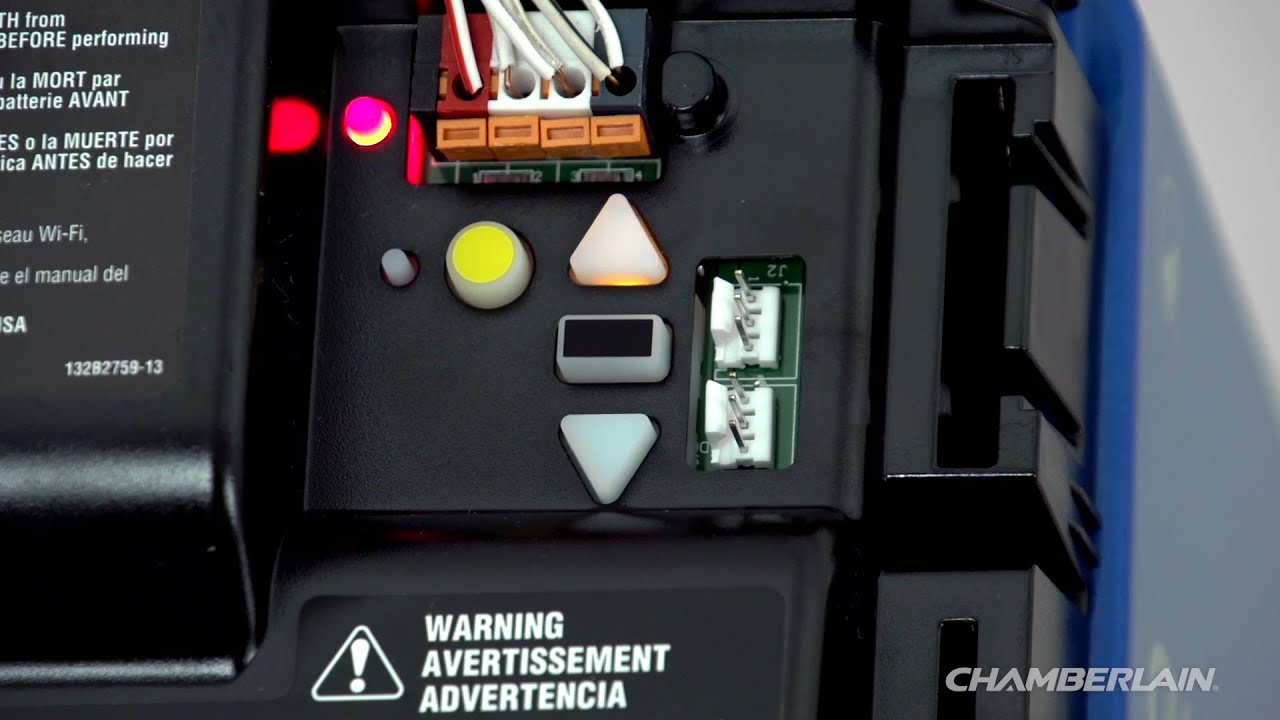
- Yellow Learn Button (2011–Present): Indicates Security+ 2.0 rolling code technology. Usually round and located near a small LED light.
- Purple Learn Button (2006–2014): Security+ 1.0 system. Often found on the rear housing.
- Red/Orange Learn Button (1997–2005): Older rolling code models. Typically square-shaped.
- Green Learn Button (Pre-1997): Fixed-code DIP switch era. Rare in modern homes but still present in some legacy installations.
Genie and Overhead Door
Genie units often place the learn button under the light lens cover. You may need to remove the plastic diffuser to access it.
- Square “Learn” Button: Common on Intellicode models from the late 1990s to mid-2000s.
- Round “Program/Set” Button: Found on newer ChainMax and SilentMax series. Usually black or blue.
- Behind the Lens: On many Aladdin Connect-compatible units, the button is intentionally hidden under the light cover to reduce visual clutter.
Linear, Wayne Dalton, and Other Brands
- Linear: Typically has a small, recessed circular button on the back panel, often labeled “Learn.”
- Wayne Dalton: Uses a “Program” button that is frequently green or yellow, located near the terminal strip on the rear.
- Sommer: European-style openers often feature a dedicated “P” or “Learn” button on the underside of the motor head.
Step-by-Step: How to Safely Access and Identify the Button
Safety must come first. Garage door openers are mounted 8–12 feet above ground, and improper ladder use causes thousands of injuries annually. Follow these concrete steps:
- Prepare Your Workspace: Clear the floor beneath the opener. Use a fiberglass ladder (non-conductive) rated for at least 250 lbs. Ensure the ladder feet are on stable, level ground.
- Disconnect Power (Optional but Recommended): While finding the button doesn’t require power disconnection, if you plan to clean or inspect wiring, unplug the unit or turn off the circuit breaker. Note: You will need to restore power to test the learn function.
- Locate the Antenna Wire: Visually trace the hanging antenna wire (usually yellow, purple, or gray). The learn button is within 2–4 inches of where this wire connects to the housing.
- Check Under the Light Cover: If you don’t see it on the exterior panels, gently squeeze the sides of the plastic light lens and pull downward. Set the cover aside safely.
- Identify by Color and Shape: Cross-reference what you see with the brand-specific guide above. Take a photo with your phone for future reference.
- Test Functionality: Press the button briefly (less than 1 second). An LED should illuminate or blink, confirming you’ve found the correct control. Do not hold it down unless you intend to erase all codes.
⚠️ Critical Safety Note: Never stand directly under the garage door while working on the opener. Always keep hands clear of moving parts, springs, and cables. Torsion springs store lethal energy—do not attempt to adjust them yourself.
Learn Button Color Guide: Quick Reference Table
| Button Color | Era / Technology | Compatible Remote Type | Notes |
|---|---|---|---|
| Yellow | 2011–Present (Security+ 2.0) | 890MAX, 891LM, 893LM | Most common in current US homes |
| Purple | 2006–2014 (Security+ 1.0) | 971LM, 973LM | Rolling code, single-frequency |
| Red/Orange | 1997–2005 | 970LM, 371LM | Early rolling code transition |
| Green | Pre-1997 | 61LM, 66LM | Fixed code; requires DIP matching |
| Black/Blue | 2010–Present (Genie) | G3T-R, GSTB-R | Intellicode & Aladdin Connect |
| White/Yellow | 2015+ (Wi-Fi Enabled) | 895MAX, myQ Hub | Smart home integration capable |
Troubleshooting: What If You Can’t Find or Use the Learn Button?
Even experienced DIYers encounter issues. Here are solutions to the most frequent problems:
- Button Is Missing or Worn Off: Some older units have labels that fade. Look for a small, unlabeled circular indentation near the antenna. Consult the model number (found on the motor housing) and search the manufacturer’s PDF manual.
- LED Doesn’t Light Up When Pressed: The logic board may have failed, or the button itself is mechanically stuck. Try pressing firmly but gently. If there’s still no response after verifying power, professional repair may be needed.
- Remote Won’t Pair Despite Finding Button: Ensure you’re using a compatible remote. A yellow-button opener will not accept a green-era remote. Also, replace the remote battery—even a weak battery can fail during programming despite working for basic operation.
- Learn Button Resets Immediately: This indicates electrical interference or a faulty capacitor. Unplug the unit for 60 seconds, then retry. Persistent issues suggest board-level failure.
- Multiple Learn Buttons Present: Some dual-band or commercial units have separate buttons for different frequencies. Refer to the label diagram on the housing to select the correct one for your remote type.
Frequently Asked Questions (FAQ)
Q1: Can I program a garage door remote without a learn button?
Generally, no. Modern openers (post-1997) require the learn button for rolling code synchronization. However, pre-1997 fixed-code openers use physical DIP switches inside both the remote and the motor unit. If your opener lacks a learn button entirely, check for a bank of tiny toggle switches instead.
Q2: How long do I hold the learn button to program a remote?
For most residential openers, press and release the learn button once (under 1 second), then press and hold the remote button within 30 seconds. Holding the learn button for 6+ seconds will erase all stored codes. Always consult your specific model’s manual, as timing varies between LiftMaster (30-second window) and Genie (15-second window).
Q3: Does the learn button color matter for compatibility?
Absolutely. The color indicates the encryption protocol and frequency. Mixing incompatible systems (e.g., trying to pair a Security+ 2.0 remote with a green-button opener) will fail regardless of programming attempts. Universal remotes exist but must explicitly list compatibility with your opener’s color/code system.
Q4: Where is the learn button on a Wi-Fi-enabled smart opener?
Smart openers (myQ, Aladdin Connect) still have a physical learn button, but it may serve dual purposes. On Chamberlain myQ units, the yellow learn button handles both traditional remotes and Wi-Fi setup. On some Genie smart models, Wi-Fi pairing uses a separate “Wi-Fi” button, while the standard learn button remains for remotes. Check the underside or rear panel carefully.
Q5: My learn button is broken—can I replace just the button?
In most cases, no. The learn button is soldered directly onto the logic board. Replacing it requires desoldering skills and exact part matching. For most homeowners, replacing the entire logic board ($80–$150) or upgrading to a new opener is more cost-effective and safer than attempting micro-soldering repairs.
Q6: How often should I reprogram my garage door opener?
You don’t need to reprogram routinely. However, experts recommend clearing and reprogramming all devices every 2–3 years or immediately after losing a remote, moving into a new home, or experiencing unauthorized access attempts. This maintains rolling code security integrity.
Conclusion
Knowing how to find the learn button on garage door opener units empowers you to handle routine maintenance, security updates, and remote replacements confidently and safely. Whether you have a modern yellow-button LiftMaster or a vintage green-switch Craftsman, the key is identifying your system’s era and following safe access procedures. Remember: when in doubt, consult your model-specific manual or contact a certified technician rather than risking injury or damage.
If this guide helped you locate your learn button and get back into your garage, please share it on social media! Tag a friend who’s been struggling with their opener, or post it in your neighborhood Facebook group. Helping others avoid frustration is what our community is all about. Safe programming! 🏡🔧
Leave a Reply