Introduction
There is nothing quite as frustrating as standing in your garage with a broken part in hand, ready to order a replacement, only to realize you have absolutely no idea which specific unit you own. If you are currently staring up at your motor unit wondering how to find model number on Chamberlain garage door opener, please know that you are not alone; this is one of the most common hurdles homeowners face during maintenance. In this comprehensive guide, we will walk you through every possible location for this crucial identifier so you can get your garage back to working order safely and efficiently.
Where Is the Model Number Located on a Chamberlain Opener?
For the vast majority of Chamberlain units manufactured in the last two decades, the primary location for identification is consistent. However, knowing exactly where to look saves time and prevents unnecessary disassembly.
Check the Motor Unit Cover (Primary Location)
The most reliable place to find your information is directly on the motor housing itself. You do not need to remove any covers for this step.
- Position Your Ladder Safely: Ensure your ladder is stable and positioned directly beneath or slightly to the side of the motor unit. Never lean excessively to reach the opener.
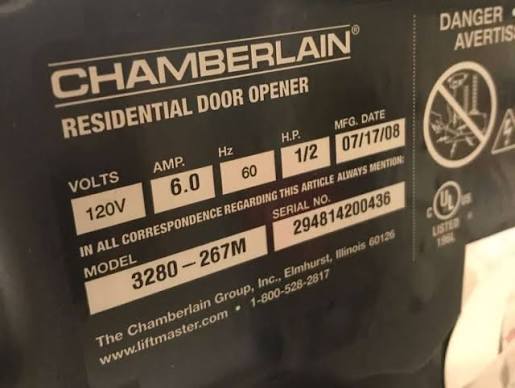
- Locate the Product Identification Label: Look for a white or silver sticker. On most belt-drive and chain-drive models, this label is located on the side panel opposite the light lens. On some older chain-drive models, it may be on the back panel facing the rear wall of the garage.
- Identify the Correct Field: The label contains multiple data points. You are looking specifically for the field labeled “MODEL” or “MOD.” It typically consists of alphanumeric characters (e.g., B970T, C450, HD950WF).
- Note the Serial Number: While searching for the model, write down the serial number as well. Many parts suppliers require both to ensure compatibility, especially for circuit board replacements.
⚠️ Safety Warning: Never attempt to open the motor housing cover to find a label unless you have disconnected power and possess electrical repair experience. Internal components contain capacitors that can hold a lethal charge even when unplugged. All necessary identification is external.
Alternative Locations for Older or Unique Models
If the motor unit label is faded, painted over, or missing, check these secondary sources:
- The Original Remote Control: Some older Chamberlain remotes have the compatible model numbers printed inside the battery compartment or on the back clip.
- The Wall-Mounted Door Control: For newer MyQ-enabled systems, the model number is sometimes printed on the back of the smart wall control panel. Remove it gently from the wall mount to check.
- Purchase Documentation: Check your email inbox for “Chamberlain” or “MyQ” receipts, or physical warranty cards stored in your home filing system.
- The MyQ App: If your opener is WiFi-connected and previously registered, open the MyQ app, select the device, and navigate to Settings > Device Info. The model number is listed digitally.
Why Is the Exact Model Number Critical for Repairs?
You might be tempted to guess based on the color or general shape of the unit, but this approach frequently leads to wasted money and safety hazards. Chamberlain has produced hundreds of variations over the years, and internal components are rarely universal.
Compatibility and Safety Standards
According to industry standards referenced in technical documentation on Wikipedia, modern openers must comply with evolving UL 325 safety entrapment protection standards. A logic board designed for a 2018 model with photo-eye reversal may not function correctly—or safely—in a 2015 chassis, even if they physically fit. Using the exact model number ensures:
- Correct Gear Ratios: Chain-drive and belt-drive gears are not interchangeable.
- Proper Safety Sensor Alignment: Newer sensors operate on different frequencies than legacy ones.
- WiFi Protocol Matching: MyQ integration varies significantly between generations.
Quick Reference: Common Chamberlain Model Prefixes
| Prefix | Drive Type | Typical Era | Key Feature |
|---|---|---|---|
| B | Belt Drive | 2010–Present | Ultra-quiet, residential premium |
| C | Chain Drive | 2005–Present | Durable, standard residential |
| HD | Heavy Duty | 2012–2020 | Commercial-grade residential |
| RJO | Wall Mount | 2015–Present | Jackshaft, frees ceiling space |
| WD | Whisper Drive | 2000–2010 | Legacy belt drive series |
Note: Always verify against your specific label, as manufacturing overlaps occur.
What If the Label Is Faded or Missing Entirely?
After years of heat, humidity, and vibration, adhesive labels can degrade. If you cannot read the model number, follow this forensic identification process:
- Photograph the Unit: Take clear photos of the entire motor, the rail type, and any visible internal markings through ventilation slots.
- Count the Light Bulbs: Note whether the unit uses incandescent bulbs or LED panels, and how many. This narrows down the generation.
- Check the Rail Length and Type: Measure the rail. Standard residential rails are typically 10 feet for 7-foot doors and 13 feet for 8-foot doors. T-rail vs. square-tube rail also indicates specific series.
- Contact Chamberlain Support Directly: Provide them with your photos and serial number (if partially visible). Their technical support team maintains cross-reference databases for unlabeled legacy units.
- Consult a Certified Technician: A professional installer can often identify a unit by sight alone due to years of field experience. This is the safest option if you are unsure.
FAQ: Finding Your Chamberlain Model Number
1. Is the model number the same as the serial number?
No. The model number identifies the product type and specifications (e.g., B970T), while the serial number is a unique identifier for your specific individual unit used for warranty tracking and manufacturing date decoding. You typically need both when ordering specialized parts like circuit boards.
2. Can I use the remote’s FCC ID to find my opener model?
Sometimes, but it is not definitive. Multiple opener models often share the same remote frequency and FCC ID. The FCC ID confirms remote compatibility but does not guarantee the internal motor components match. Always prioritize the motor unit label over remote-based identification.
3. Does the color of my Chamberlain opener indicate the model?
Color provides a clue but is not conclusive. Chamberlain has used similar gray, black, and orange color schemes across multiple generations and drive types. Relying solely on color matching is the most common cause of incorrect part orders. Always verify with the alphanumeric model code.
4. Where is the model number on a Chamberlain wall-mount (RJO) opener?
On RJO (Residential Jackshaft Operator) models, the identification label is typically located on the bottom edge of the unit, facing downward toward the floor. You may need a flashlight and mirror to read it without removing the unit from the wall. Some newer RJO models also display the model digitally via the MyQ app.
5. How do I decode the manufacturing date from my serial number?
Chamberlain serial numbers typically encode the production date. The format varies by era, but many post-2010 units use the first four digits as YYWW (Year-Week). For example, a serial starting with “1823” was manufactured in the 23rd week of 2018. For precise decoding, consult Chamberlain’s official support resources or provide the full serial to their customer service team.
6. My opener is too old to have a readable label. Should I replace it entirely?
If your unit predates 1993 and lacks functioning photo-eye safety sensors, replacement is strongly recommended regardless of label condition. Units manufactured before federal safety mandates pose significant entrapment risks. Even if repairable, parts availability for pre-1993 models is extremely limited, making replacement more cost-effective and safer long-term.
Conclusion
Knowing how to find model number on Chamberlain garage door opener is the essential first step toward safe, accurate maintenance and repair. By checking the motor unit side panel first, utilizing the MyQ app for connected devices, and understanding why precision matters, you avoid costly mistakes and ensure your garage operates reliably for years to come. Remember: when in doubt, photograph everything and consult a certified professional rather than guessing.
Found this guide helpful? Share it with fellow homeowners on Facebook, Pinterest, or Nextdoor who might be struggling with their own garage door mysteries. A quick share could save someone hours of frustration and prevent an unsafe repair! 🔧🏡
Leave a Reply