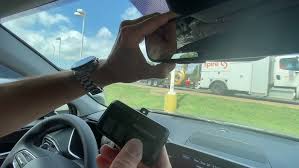
Have you ever pulled into your driveway only to realize you need to dig through your bag or glove compartment to find your garage door remote? It’s frustrating, especially when you’re carrying groceries or dealing with bad weather. Learning how to connect Hyundai Santa Fe to garage door opener systems can transform this daily hassle into a seamless, one-button experience that saves you time and stress every single day.
The Hyundai Santa Fe comes equipped with HomeLink technology, a built-in universal transmitter that can replace multiple handheld remotes for your garage door, gate, or even home lighting systems. While the concept sounds straightforward, many Santa Fe owners struggle with the programming process due to unclear instructions or compatibility issues with newer garage door models. This comprehensive guide will walk you through everything you need to know, from initial setup to troubleshooting common problems.
What Is HomeLink and How Does It Work in Hyundai Santa Fe?
HomeLink is a wireless control system integrated directly into your Hyundai Santa Fe’s rearview mirror or overhead console. Developed by Gentex Corporation, this technology has been featured in millions of vehicles worldwide and serves as a universal remote control for various radio-frequency devices.
Understanding the Technology
The HomeLink system operates on multiple frequencies, typically supporting 270-430 MHz bands, which covers most residential garage door openers manufactured after 1995. According to Gentex Corporation’s technical documentation, the system uses rolling code technology for enhanced security, making it nearly impossible for unauthorized users to intercept or replicate your signal.
In the Hyundai Santa Fe, you’ll typically find three HomeLink buttons located either on the rearview mirror assembly or the overhead console near the sunroof controls. Each button can be programmed to control a different device, giving you the flexibility to manage multiple garage doors, gates, or other compatible systems from your vehicle.
Compatibility Considerations
Before beginning the programming process, it’s essential to verify compatibility between your Santa Fe’s HomeLink system and your garage door opener. Most major brands work seamlessly, including:
- Chamberlain/LiftMaster
- Genie
- Craftsman
- Sommer
- Linear
However, some older models or specialized security systems may require additional steps or might not be compatible at all. Check your garage door opener’s manual for HomeLink compatibility information, or look for a “Learn” button on your garage door motor unit, which indicates programmability.
Step-by-Step Guide: How To Connect Hyundai Santa Fe To Garage Door Opener
Programming your Hyundai Santa Fe’s HomeLink system requires patience and attention to detail. Follow these precise steps to ensure successful connection with your garage door opener.
Preparation Phase
Before starting the programming process, gather the following items:
- Your original garage door remote control
- A step ladder (if needed to reach the garage door motor unit)
- Your Hyundai Santa Fe owner’s manual for reference
- Approximately 10-15 minutes of uninterrupted time
Ensure your vehicle is parked outside your garage with the engine running or in accessory mode. The HomeLink system requires power to complete the programming sequence successfully.
Programming Steps
Step 1: Clear Existing Programs (If Necessary)
If your HomeLink buttons have been previously programmed, clear them first:
- Press and hold the two outer HomeLink buttons simultaneously
- Continue holding for approximately 20 seconds until the indicator light begins flashing rapidly
- Release both buttons when the light changes from slow to rapid flashing
Step 2: Initiate Programming Mode
- Choose which HomeLink button you want to program (1, 2, or 3)
- Press and hold the selected button while simultaneously pressing your original garage door remote button
- Hold both buttons until the HomeLink indicator light changes from slow blinking to rapid blinking (typically 20-30 seconds)
- Release both buttons once rapid blinking occurs
Step 3: Program the Garage Door Opener Unit
This crucial step varies depending on your garage door opener brand:
For Chamberlain/LiftMaster Openers:
- Locate the “Learn” button on your garage door motor unit (usually yellow, purple, or red)
- Press and release the Learn button within 30 seconds
- Return to your Santa Fe and press the programmed HomeLink button three times
- Wait for the garage door to respond
For Genie Openers:
- Find the “Program” button on the motor unit
- Press and hold until the LED blinks
- Press your HomeLink button repeatedly until the door operates
For Other Brands:
- Consult your garage door opener manual for specific programming instructions
- Generally, you’ll need to activate the learning mode on the motor unit, then test the HomeLink button
Step 4: Test the Connection
After completing the programming sequence:
- Press the programmed HomeLink button in your Santa Fe
- Observe whether the garage door responds correctly
- Test the button multiple times to ensure consistent operation
- Verify that the door opens and closes completely each time
Troubleshooting Common Issues
If your initial programming attempt fails, consider these solutions:
| Problem | Possible Cause | Solution |
|---|---|---|
| No response from garage door | Incorrect frequency match | Try reprogramming with different timing |
| Intermittent operation | Weak signal or interference | Reprogram closer to the garage door |
| Rapid blinking continues | Programming incomplete | Restart the entire process from Step 1 |
| Door reverses immediately | Safety sensor alignment issue | Check and adjust garage door sensors |
Advanced Tips for Optimal Performance
Once you’ve successfully learned how to connect Hyundai Santa Fe to garage door opener systems, these advanced techniques will enhance your experience and ensure long-term reliability.
Signal Strength Optimization
The distance between your vehicle and the garage door affects signal strength. For optimal performance:
- Program the HomeLink system while parked in your normal parking position
- Avoid programming during severe weather conditions, as atmospheric interference can affect signal transmission
- Keep the HomeLink buttons clean and free from debris that might interfere with the internal antenna
Security Best Practices
Modern garage door openers use rolling code technology, which changes the access code with each use. To maintain security:
- Never share your HomeLink programming sequence with unauthorized individuals
- If you sell your Santa Fe, clear all HomeLink buttons using the procedure outlined in Step 1
- Consider changing your garage door opener’s access codes periodically for added security
Multiple Device Management
Your Santa Fe’s three HomeLink buttons can control different devices:
- Button 1: Primary garage door
- Button 2: Secondary garage door or gate
- Button 3: Home lighting system or third garage door
Label each button clearly in your vehicle’s documentation to avoid confusion, especially if family members share the vehicle.
Frequently Asked Questions
Q: Can I program my Hyundai Santa Fe HomeLink without the original garage remote?
A: Unfortunately, no. The original garage door remote is essential for the initial programming process because it transmits the specific frequency and code pattern that your HomeLink system needs to learn. If you’ve lost your original remote, contact your garage door opener manufacturer to purchase a replacement before attempting HomeLink programming.
Q: Why won’t my HomeLink system program even after following all steps correctly?
A: Several factors could prevent successful programming:
- Your garage door opener may use an incompatible frequency or security protocol
- The garage door motor unit might need to be reset before accepting new programming
- Interference from other electronic devices could disrupt the signal
- Your Santa Fe’s HomeLink system might require a software update from your Hyundai dealer
Try moving your vehicle closer to the garage door during programming, and ensure no other vehicles with active remotes are nearby.
Q: How do I know if my Hyundai Santa Fe has HomeLink capability?
A: Look for three small buttons on your rearview mirror or overhead console. These buttons typically have LED indicators that illuminate when pressed. You can also check your vehicle’s owner’s manual or look for the HomeLink logo on the buttons themselves. Most Santa Fe models from 2013 onwards include HomeLink as standard equipment on mid-level trims and above.
Q: Will programming HomeLink void my garage door opener warranty?
A: No, programming your HomeLink system will not void your garage door opener warranty. HomeLink is designed to work with existing garage door systems without modifying their internal components. However, always follow the manufacturer’s instructions for both your vehicle and garage door opener to ensure proper operation.
Q: Can I reprogram a HomeLink button if I move to a new house?
A: Absolutely. You can reprogram any HomeLink button at any time by following the same programming procedure. Simply clear the existing program using the two-button hold method, then program the new garage door opener using the steps outlined in this guide. This flexibility makes HomeLink ideal for families who move frequently or own multiple properties.
Q: What should I do if my garage door only partially opens when using HomeLink?
A: Partial opening typically indicates a programming issue rather than a mechanical problem. Try reprogramming the HomeLink button, ensuring you complete all steps precisely. If the problem persists, check your garage door opener’s travel limits and force settings, as these may need adjustment. Consult your garage door opener manual or contact a professional technician if mechanical adjustments are required.
Conclusion
Learning how to connect Hyundai Santa Fe to garage door opener systems doesn’t have to be complicated or time-consuming. With the right preparation and careful attention to the programming steps, you can enjoy the convenience of hands-free garage access within minutes. The HomeLink system in your Santa Fe represents years of technological refinement, offering reliable, secure, and user-friendly control over your home access points.
Remember that successful programming depends on following each step precisely, maintaining proper distance during the learning process, and ensuring compatibility between your vehicle and garage door opener. If you encounter difficulties, don’t hesitate to consult your vehicle’s owner manual or contact your local Hyundai dealership for assistance.
Now that you’ve mastered this valuable skill, why not share this guide with fellow Santa Fe owners who might benefit from streamlined garage access? Share this article on social media platforms or forward it to friends and family members who drive Hyundai vehicles. Your experience could save someone else hours of frustration and help them discover the convenience that modern automotive technology provides.
What other Hyundai Santa Fe features would you like to explore? Leave a comment below or check out our other automotive guides for more helpful tips and tutorials.
Leave a Reply