If you’ve recently bought a Tesla, you might be wondering, “How To Connect Garage Door Opener To Tesla Model Y?” Unlike traditional cars, Tesla uses a more advanced system that requires a slightly different setup. The good news? Once configured, it offers seamless, automatic control every time you arrive home.
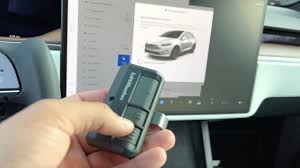
How To Connect Garage Door Opener To Tesla Model Y (Step-by-Step)
Tesla vehicles use a system called HomeLink (optional upgrade in some models). Follow these steps to connect your garage door opener:
Step 1: Confirm HomeLink Is Installed
- Check your Tesla touchscreen
- Go to Controls > HomeLink
👉 If not available, you may need to purchase the HomeLink module separately.
Step 2: Park Near Your Garage
- Position your car within 10–20 feet of the garage door
- Ensure the door is closed
Read too: Tc1 Tricode Garage Door Opener Remote W/ Clip Chamberlain: Complete Guide
Step 3: Open HomeLink Setup
- Tap Create HomeLink on the screen
- Enter a name (e.g., “Home Garage”)
Step 4: Pair With Your Remote
- Hold your garage remote 2–5 inches (5–12 cm) from the front bumper
- Press and hold the remote button
✔️ The Tesla screen will indicate when the signal is detected.
Step 5: Sync With Garage Motor (Rolling Code)
Most modern systems require this step:
- Press the “Learn” button on your garage opener motor
- Return to your Tesla within 30 seconds
- Tap Continue on the screen
- Tesla will attempt to sync automatically
Step 6: Test the Connection
- Tap the HomeLink icon
- Check if the garage door opens/closes
Step 7: Enable Auto-Open & Auto-Close (Optional)
- Set GPS-based triggers
- Example:
- Auto-open at 30 feet from home
- Auto-close when leaving
What Is Tesla HomeLink and How Does It Work?
Tesla’s HomeLink system uses radio frequency signals to communicate with your garage door opener.
Key Features:
- Touchscreen control
- GPS-based automation
- Integration with smart home systems
For more technical details, visit:
https://en.wikipedia.org/wiki/HomeLink
Do All Tesla Model Y Vehicles Have HomeLink?
Not Always
| Model Year | HomeLink Included |
|---|---|
| Early models | Optional |
| Newer versions | Often optional add-on |
👉 If not installed:
- You can purchase it separately
- Tesla service installs it in ~1 hour
How Much Does It Cost to Add HomeLink to Tesla Model Y?
Typical Pricing (US)
| Item | Cost |
|---|---|
| HomeLink module | $200 – $350 |
| Installation | Included or $50–$100 |
👉 Total: $250 – $400
Why Connect Your Garage Door to Tesla Model Y?
Key Benefits
Convenience:
- No need for a remote
Automation:
- Opens automatically when you arrive
Security:
- Controlled via Tesla system
Clean Interior:
- No extra devices cluttering your car
Pros vs Cons
Pros:
- Hands-free operation
- Smart automation
- Reliable integration
Cons:
- Extra cost if not included
- Setup required
- Limited compatibility with very old systems
Common Problems and How to Fix Them
1. Tesla Not Detecting Remote
- Move remote closer (2–5 inches)
- Replace remote battery
2. Garage Door Not Responding
- Repeat “Learn button” step
- Ensure opener is compatible
3. Auto-Open Not Working
- Adjust GPS distance settings
- Check location accuracy
4. Delayed Response
- Reduce signal interference
- Ensure clear line of sight
Compatibility: Will It Work With Your Garage Door?
Most systems are compatible if:
- Manufactured after 1993
- Use rolling code technology
Compatibility Table
| Garage Type | Works with Tesla |
|---|---|
| Chain drive | Yes |
| Belt drive | Yes |
| Smart openers | Yes |
| Older fixed-code | Limited |
Real-Life Use Case
Imagine arriving home after a long day:
- Your Tesla approaches the driveway
- The garage door opens automatically
- No button pressing, no remote
This level of automation improves both comfort and efficiency.
Advanced Tips for Tesla Owners
- Set different distances for open vs close
- Use multiple HomeLink profiles (home, office)
- Rename devices clearly
- Test automation weekly
Safety Tips
- Always test system after setup
- Ensure sensors are working
- Avoid standing under moving door
- Disable auto-close if unsure
Troubleshooting Quick Table
| Issue | Solution |
|---|---|
| No signal detected | Move remote closer |
| Sync failure | Repeat Learn step |
| Auto-open fails | Adjust GPS |
| Intermittent use | Check interference |
FAQ Section
Q1: How to connect garage door opener to Tesla Model Y without HomeLink?
A: You’ll need to install the HomeLink module or use a third-party smart garage app.
Q2: Does Tesla Model Y support automatic garage opening?
A: Yes, with HomeLink and GPS-based automation enabled.
Q3: Why is my Tesla not connecting to my garage door?
A: Usually due to skipped rolling code setup or weak remote signal.
Q4: Can I control multiple garage doors with Tesla?
A: Yes, you can program multiple HomeLink profiles.
Q5: Is Tesla HomeLink worth it?
A: Yes, for convenience, automation, and seamless integration.
Q6: How long does setup take?
A: Typically 5–10 minutes once HomeLink is installed.
Conclusion
Learning How To Connect Garage Door Opener To Tesla Model Y unlocks a smarter, more convenient driving experience. With just a few simple steps, you can automate your garage access and eliminate the need for traditional remotes.
Whether you’re upgrading your Tesla or improving your daily routine, this feature adds real value and efficiency.
If this guide helped you, share it with other Tesla owners looking to upgrade their garage experience! 🚗🚪
Leave a Reply