Introduction
There is nothing quite as frustrating as sitting in your driveway, fumbling through a cluttered center console for a bulky remote while the rain pours down or the temperature drops below freezing. If you have ever wondered how to connect a car to a garage door opener, you are not alone; millions of American homeowners seek this convenience annually to streamline their daily routines. This guide provides clear, empathetic, and manufacturer-approved steps to help you sync your vehicle’s built-in system with your garage door safely and effectively, eliminating the need for extra remotes forever.
Understanding Your Vehicle’s Built-In System
Before attempting any programming, it is vital to identify which technology your vehicle uses. Most modern cars sold in the United States utilize one of two primary systems: HomeLink or Car2U. These are universal transmitters integrated directly into your rearview mirror, overhead console, or visor.
According to automotive industry data, over 85% of new vehicles sold in North America come equipped with HomeLink as standard or optional equipment. However, older vehicles (pre-2010) may use different frequencies or require an external compatibility bridge. Knowing your specific system prevents wasted time and ensures you follow the correct protocol.
HomeLink vs. Car2U: Quick Comparison
| Feature | HomeLink | Car2U |
|---|---|---|
| Prevalence | Standard in most US brands (Ford, GM, Toyota, Honda) | Common in Chrysler, Dodge, Jeep, some Hyundai/Kia |
| Frequency | 300–400 MHz range | Typically 310–390 MHz |
| Programming Style | Usually requires holding button + remote simultaneously | Often uses rapid press sequences |
| Smart Home Integration | Widely supported by LiftMaster, Chamberlain, Genie | Limited smart home ecosystem support |
| Compatibility Bridge | Rarely needed for post-2000 openers | May require adapter for newer rolling-code openers |
Note: Always consult your vehicle owner’s manual for the exact location and type of transmitter.
Safety First: Pre-Programming Checklist
Garage doors are heavy mechanical devices under high spring tension. Before you begin learning how to connect a car to a garage door opener, please observe these critical safety precautions:
- Clear the Area: Ensure no people, pets, or objects are in the path of the door.
- Verify Sensor Alignment: Check that the photo-eye sensors near the floor are clean and properly aligned. Misaligned sensors can cause erratic behavior during programming.
- Disconnect Manual Locks: If your garage has a manual slide lock, disengage it before programming to prevent motor damage.
- Check Battery Health: Weak car batteries or dying opener backup batteries can interrupt the pairing signal.
- Read Manufacturer Warnings: Both your car and garage door opener manuals contain model-specific cautions. Ignoring them can void warranties or create hazards.
The U.S. Consumer Product Safety Commission (CPSC) emphasizes that proper maintenance and adherence to safety protocols significantly reduce garage-door-related injuries. For comprehensive background on garage door safety standards and mechanisms, refer to the Garage door entry on Wikipedia.org, which details the evolution of safety regulations and mechanical designs.
Step-by-Step: Programming HomeLink Systems
This is the most common scenario for US drivers. Follow these precise steps for rolling-code openers (most units manufactured after 1996).
Step 1: Clear Previous Codes (If Applicable)
If your car was previously owned or you are reprogramming, hold down the two outer HomeLink buttons for 10–20 seconds until the indicator light flashes rapidly. This resets the memory. Skip this step if programming a brand-new vehicle for the first time.
Step 2: Position Yourself Correctly
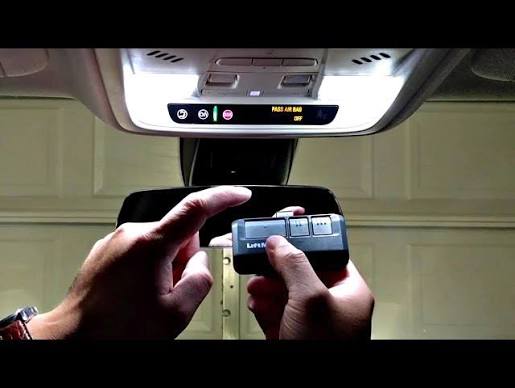
Sit in the driver’s seat with the ignition in the “ON” or “ACC” position (engine running is recommended to prevent battery drain). Hold your original handheld garage remote 1–3 inches away from the HomeLink button you wish to program.
Step 3: Simultaneous Press-and-Hold
Press and hold both the HomeLink button AND your handheld remote’s transmit button at the same time. Maintain steady pressure. Watch the HomeLink indicator light:
- Slow flash: Still learning.
- Rapid flash/solid light: Programming successful (usually takes 5–20 seconds).
Release both buttons once the light changes pattern.
Step 4: Sync With the Garage Door Motor (Rolling Code Only)
For security, modern openers require a second handshake:
- Locate the “Learn” or “Smart” button on your garage door motor unit (typically on the back or side panel, often colored yellow, purple, orange, or red).
- Press and release the Learn button. You typically have 30 seconds to complete the next action.
- Return to your car and press the newly programmed HomeLink button firmly for 2 seconds. Release. Repeat up to 3 times if necessary.
- Test the door. It should respond consistently.
Precise Timing Note: The 30-second window is critical. If exceeded, repeat Step 4 from the beginning. Do not hold the Learn button—only press and release.
Troubleshooting Common Connection Failures
Even when following instructions perfectly, issues arise. Here are evidence-based solutions:
- Light Flashes But Door Doesn’t Move: Your opener likely uses rolling code technology, and you skipped Step 4 above. Return to the motor unit and complete the Learn button sequence.
- Works Intermittently: Signal interference from LED bulbs, Wi-Fi routers, or nearby radio towers can disrupt transmission. Try replacing garage LED bulbs with RF-shielded models rated for garage door openers. Also, ensure your car’s windshield does not have metallic tint film blocking the signal.
- Older Fixed-Code Opener Won’t Pair: Vehicles made after 2015 sometimes lack backward compatibility with pre-1996 fixed-code openers. Solution: Install a HomeLink Compatibility Bridge (available from major opener manufacturers) or upgrade your opener receiver.
- Button Programs But Resets After Driving: This indicates a failing HomeLink module or electrical issue. Have your dealership diagnose the transmitter circuit.
Smart Garage Integration: Beyond Basic Programming
Many US homeowners now pair their car’s built-in system with smart garage controllers like MyQ, Tailwind, or Meross. While the basic how to connect a car to a garage door opener process remains identical, smart integration adds benefits:
- Remote Monitoring: Check door status via smartphone from anywhere.
- Auto-Close Features: Set timers or geofence triggers to close the door automatically when you leave.
- Voice Control: Integrate with Alexa, Google Assistant, or Apple HomeKit.
- Activity Logs: Track who opened/closed the door and when.
However, smart controllers do NOT replace the need to program your car’s transmitter. They operate independently. Program your vehicle first using the steps above, then configure the smart app separately.
FAQ: Your Top Questions Answered
Can I program my car without the original handheld remote?
Generally, no. The handheld remote serves as the reference signal your car needs to learn the correct frequency and code. Exceptions exist for certain newer systems where the Learn button on the motor can initiate pairing mode directly, but this is rare. If you’ve lost your remote, purchase an exact OEM replacement or a certified universal remote compatible with your opener model before attempting car programming.
Why does my HomeLink work for the garage but not for my gate or lights?
HomeLink supports multiple device types, but each requires separate programming. Gates often use different frequencies or security protocols than residential garage doors. Lights controlled via HomeLink typically require a dedicated receiver module plugged into an outlet. Consult the specific device’s manual for its unique programming sequence—you cannot assume garage door steps apply universally.
Is it safe to program while the engine is running?
Yes, and it is actually recommended. Programming can take several minutes, and keeping the engine running prevents your car battery from draining. Ensure the vehicle is in Park with the parking brake engaged, and never leave children or pets unattended in the vehicle during this process.
My car has three HomeLink buttons—can I use all three for the same door?
Technically yes, but it serves no practical purpose and wastes available slots. Each button should be assigned to a different device (e.g., Button 1 = home garage, Button 2 = office parking gate, Button 3 = community entrance). Reprogramming the same door to multiple buttons creates redundant codes and complicates future troubleshooting.
Will programming my car affect my existing handheld remotes?
No. Adding a car transmitter does not erase or interfere with previously programmed handheld remotes, keypads, or smart controllers. Garage door openers maintain a list of authorized devices, and adding a new entry preserves all existing ones. You would only lose existing remotes if you performed a full factory reset on the opener motor itself.
How often should I reprogram my car’s garage connection?
Under normal circumstances, never. The pairing is permanent unless manually cleared or disrupted by electrical faults. Reprogram only if you replace the garage door opener, change the opener’s logic board, experience persistent malfunction after troubleshooting, or sell/buy the vehicle. Annual testing of the connection is wise, but reprogramming should be exception-driven, not routine.
Conclusion: Enjoy Seamless Entry Every Time
Learning how to connect a car to a garage door opener transforms a daily annoyance into effortless convenience. By understanding your vehicle’s system, following safety protocols, executing precise programming steps, and troubleshooting methodically, you gain reliable hands-free access that enhances both security and quality of life. Remember to prioritize safety over speed, consult manufacturer resources when uncertain, and leverage smart technology to maximize your system’s potential.
Found this guide helpful? Share it with friends, family, or neighbors who still fumble for remotes in bad weather! Post it on Facebook, tweet it to fellow homeowners, or pin it for future reference. Your share could save someone hours of frustration—and maybe even prevent a garage door mishap. Happy programming, and enjoy the seamless entry you deserve!
Leave a Reply