Introduction
There is nothing quite as frustrating as standing in your driveway, punching numbers into a keypad that refuses to respond, or realizing you have forgotten the entry code after a long day. If you are searching for how to change the code on Craftsman garage door keypad, you are likely dealing with a security upgrade, a forgotten PIN, or a new homeowner transition. We understand that garage security is personal and time-sensitive, which is why this guide provides clear, empathetic, and manufacturer-aligned instructions to get your access restored safely and quickly.
Whether you own an older LiftMaster-era model or a newer smart-compatible unit, changing your code is a fundamental maintenance task that ensures your home remains secure. Below, we break down every method, safety precaution, and troubleshooting tip you need to master your Craftsman keypad without calling a technician.
Why You Should Regularly Update Your Garage Door Code
Before diving into the technical steps, it is vital to understand why this maintenance matters. According to security industry data, garage doors are one of the most common entry points for residential burglaries. Changing your code is not just about convenience; it is a critical layer of home defense.
- Security After Moving: Previous owners or tenants may still have access.
- Lost or Stolen Remotes: If a remote goes missing, changing the keypad code (and reprogramming remotes) prevents unauthorized entry.
- Wear and Tear: Over time, specific buttons may show wear patterns, making it easier for observers to guess your code.
- Smart Home Integration: Newer codes are often required when syncing with myQ or other smart home ecosystems.
Expert Insight: Security professionals recommend changing garage entry codes at least once every 12 months, or immediately following any personnel change in your household. This simple habit significantly reduces the risk of opportunistic theft.
Identifying Your Craftsman Keypad Model
Craftsman has produced numerous keypad models over the decades. The method for changing the code depends entirely on which generation you own. Before attempting to program, locate the model number (usually on the back of the keypad cover or inside the battery compartment).
| Keypad Type | Typical Era | Programming Button | Learn Button Color |
|---|---|---|---|
| Universal Wireless | 2015–Present | Dedicated “Program” | N/A |
| Standard Clicker | 2008–2014 | “*” and “#” Combo | Purple/Yellow/Orange |
| Legacy DIP Switch | Pre-2008 | Internal Switches | N/A (DIP Switches) |
| Smart Keypad | 2020–Present | App + Physical Button | Yellow/Green |
Note: Always refer to your specific owner’s manual for exact variations. The Wikipedia page on Garage Door Openers provides excellent historical context on how these security protocols have evolved from DIP switches to rolling code technology.
Step-by-Step: How To Change The Code On Craftsman Garage Door Keypad (Modern Models)
For the majority of homeowners with units manufactured after 2010, the process utilizes the “Learn” button on the motorhead combined with keypad input. Follow these precise steps:
Step 1: Locate the Learn Button
Find the “Learn” or “Smart” button on your garage door opener motor unit. It is typically located on the back or side panel near the antenna wire. The color indicates the frequency:
- Yellow: Security+ 2.0 (Most common modern)
- Purple: Security+ (2006–2014)
- Orange/Red: Older Rolling Code
- Green: Early Rolling Code
Step 2: Clear the Old Code (Optional but Recommended)
If you want to ensure no old codes remain active:
- Press and hold the Learn button on the motor for 6–10 seconds until the LED turns off.
- Release. All remotes and keypads are now erased.
- Skip this step if you only want to add/change one keypad while keeping other remotes functional.
Step 3: Program the New Code
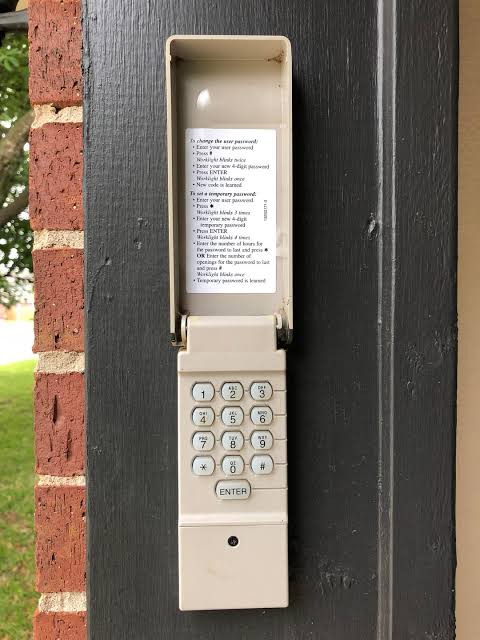
- Go to your exterior keypad.
- Enter your desired 4-digit PIN. Choose a code that is memorable but not easily guessed (avoid birthdays or sequential numbers like 1234).
- Press and hold the ENTER button.
- While holding ENTER, press the Learn button on the motor unit (you may need a ladder or helper). Alternatively, on some models, you press Learn first, then enter the code and press ENTER within 30 seconds.
- Watch for confirmation: The motor unit lights will flash, or you will hear two clicks. The keypad LED will also blink.
- Release the ENTER button.
Step 4: Test Immediately
Enter your new 4-digit code and press ENTER. The door should activate. Test it 2–3 times to confirm consistent operation. If it fails, repeat Step 3, ensuring you complete the sequence within the 30-second window.
Troubleshooting: When the Keypad Won’t Accept the New Code
Even with perfect execution, issues arise. Here are the most common solutions based on field experience:
- Battery Failure: This is the #1 cause of programming failure. Replace with a fresh 9V alkaline battery before reprogramming. Weak batteries can power the light but fail to transmit the signal.
- Signal Interference: LED bulbs in the garage opener can interfere with radio frequencies. Temporarily unscrew the opener’s light bulb and retry programming.
- Rolling Code Desync: If the keypad was programmed but doesn’t work, the rolling code counter may be out of sync. Perform a full factory reset (hold Learn for 10 seconds) and reprogram all devices.
- Antenna Issues: Ensure the hanging antenna wire is fully extended and not touching metal surfaces or wrapped around the rail.
- Keypad Damage: Inspect for water damage, cracked casing, or stuck buttons. Outdoor keypads typically last 5–7 years before needing replacement due to weather exposure.
Best Practices for Choosing a Secure Garage Door Code
Your code is only as strong as its randomness. Follow these guidelines:
- Avoid Patterns: No repeating digits (1111), sequences (1234), or keyboard patterns (2580).
- Don’t Use Personal Data: Birth years, addresses, and phone numbers are the first things thieves try.
- Length Matters: If your keypad supports 5 or 6 digits, use them. A 6-digit code offers 1 million combinations versus 10,000 for 4 digits.
- Change Seasonally: Tie code changes to daylight saving time or holiday seasons as a memory trigger.
- Never Share Publicly: Avoid posting your code in family group chats or on social media. Use temporary guest codes if your system supports them.
Frequently Asked Questions (FAQ)
Q1: Can I change my Craftsman keypad code without accessing the motor unit?
On most modern Craftsman/LiftMaster keypads, no. The motor’s Learn button must be pressed to authorize new codes. However, some newer Wi-Fi-enabled keypads allow code management through the myQ app without physical motor access. Check your specific model’s capabilities.
Q2: How many codes can a Craftsman keypad store?
Standard wireless keypads typically store one primary user code. Some premium models support up to 4 individual user codes plus a temporary guest code. Refer to your manual for exact capacity.
Q3: What happens if I enter the wrong code too many times?
Most Craftsman keypads have a lockout feature. After 3–5 incorrect attempts, the keypad will disable for 30–60 seconds to prevent brute-force attacks. Wait for the LED to stop flashing rapidly before trying again.
Q4: Do I need to reprogram my remotes when I change the keypad code?
Not necessarily. If you simply add a new keypad code using the Learn button, existing remotes remain functional. However, if you perform a full factory reset (holding Learn for 10+ seconds), all devices are erased and must be reprogrammed.
Q5: My keypad works intermittently. Is it the code or the hardware?
Intermittent operation usually indicates hardware issues, not code problems. Check the battery first, then inspect for moisture ingress, corroded contacts, or antenna positioning. If the battery is fresh and the issue persists, the keypad likely needs replacement.
Q6: Can weather affect keypad programming?
Yes. Extreme cold (below 20°F/-6°C) can reduce battery output and slow LCD response. If programming fails in winter, try during warmer afternoon hours or temporarily warm the keypad with your hands before attempting. Humidity and rain can also cause contact corrosion over time.
Conclusion
Mastering how to change the code on Craftsman garage door keypad is an essential skill for every homeowner. By following the steps outlined above, you not only restore convenient access but also reinforce your home’s first line of defense against intrusion. Remember to identify your model correctly, use fresh batteries, choose a strong non-sequential code, and test thoroughly after programming.
Regular code updates take less than five minutes but provide lasting peace of mind. Don’t wait until you’re locked out or compromised—take control of your garage security today.
Found this guide helpful? Share it with friends, family, or neighbors who might be struggling with their Craftsman keypad! Post it on Facebook, tweet it, or send it via text. Together, we can make our communities safer, one secure garage at a time. 🔐🏡
Leave a Reply