If you’re asking, “How To Change Code On A Genie Garage Door Opener”, you’re likely concerned about security or trying to reset access after losing a remote. That’s a smart move—updating your garage code is one of the easiest ways to protect your home.
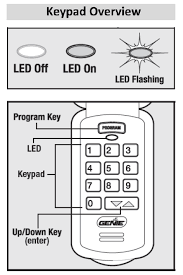
In this guide, you’ll learn exactly how to change your Genie garage door code step-by-step, even if you’ve never done it before.
Read too: Tc1 Tricode Garage Door Opener Remote W/ Clip Chamberlain: Complete Guide
How To Change Code On A Genie Garage Door Opener (Step-by-Step)
Changing the code on a Genie garage door opener typically involves resetting the system and reprogramming your remotes or keypad.
Step 1: Locate the “Learn” or “Program” Button
The first step is to find the control button on your opener unit.
Where to look:
- On the back or side of the motor housing
- Under the light cover
What it looks like:
- Small button labeled “Learn Code”, “Program”, or “Set”
- Often near an LED indicator light
Step 2: Clear the Existing Code (Reset System)
This step removes all old remotes and keypads from the system.
How to reset:
- Press and hold the “Learn” button for 6–10 seconds
- Wait until the LED light turns off
- Release the button
✅ This means all previous codes are erased.
Important:
Do this if you lost a remote or moved into a new home.
Step 3: Program a New Remote
After resetting, you’ll need to sync your remote again.
Steps:
- Press the “Learn” button once
- LED light will start blinking
- Press the button on your remote (hold for 2–3 seconds)
- Wait for the LED to blink or the door to move
Testing:
Stand about 1–3 meters (3–10 feet) away and test the remote.
Step 4: Set a New Keypad Code (If Applicable)
If your Genie system includes a keypad:
How to set a new PIN:
- Press the “Program” button on the opener
- Enter your desired PIN (3–8 digits) on the keypad
- Press “Enter”
- Wait for confirmation (light blink or click sound)
Example:
- Enter code: 2580
- Press Enter → Door responds → Code saved
Why Should You Change Your Garage Door Code?
Changing your code isn’t just about convenience—it’s about security.
Common Reasons:
- Lost or stolen remote
- Moving into a new house
- Suspected unauthorized access
- Routine security upgrade
Security Insight:
Modern garage systems use rolling code technology, which generates a new code each time you use the remote. This prevents hacking and signal copying.
Learn more here:
https://en.wikipedia.org/wiki/Garage_door_opener
Common Problems When Changing the Code (And Fixes)
1. Remote Won’t Sync
Cause: Programming window expired
Fix: Repeat steps within 30 seconds
2. Keypad Not Working
Cause: Low battery or incorrect PIN
Fix: Replace battery and reprogram
3. LED Light Not Responding
Cause: Power issue
Fix: Check power supply and circuit breaker
4. Door Doesn’t Move After Programming
Cause: Signal interference or incorrect pairing
Fix: Move closer and retry
Genie vs Other Garage Door Openers (Quick Comparison)
| Feature | Genie | Other Brands |
|---|---|---|
| Programming Ease | Easy | Moderate |
| Security | High (rolling code) | High |
| Compatibility | Medium | High |
| Price Range | $$ | $$–$$$ |
Expert Tips for Better Security
To maximize your garage security:
- Change your code every 6–12 months
- Avoid simple PINs like “1234”
- Keep remotes inside your home, not in your car
- Disable unused remotes
Pro Tip:
Always reset the system after buying a used home.
DIY Time Estimate
| Task | Time Required |
|---|---|
| Reset system | 1–2 minutes |
| Program remote | 2–3 minutes |
| Set keypad code | 3–5 minutes |
👉 Total time: Under 10 minutes
Advantages vs Disadvantages of Changing Code
Advantages:
- Improves home security
- Prevents unauthorized access
- Easy and quick process
Disadvantages:
- Requires reprogramming all devices
- Temporary inconvenience
Maintenance Tips After Changing Code
Keep your Genie system running smoothly:
- Replace batteries every 12–18 months
- Clean keypad regularly
- Test remotes monthly
- Keep opener firmware updated (if smart-enabled)
FAQ: How To Change Code On A Genie Garage Door Opener
1. How often should I change my garage door code?
It’s recommended every 6–12 months, or immediately after losing a remote.
2. Will changing the code erase all remotes?
Yes, resetting the system removes all previously connected remotes and keypads.
3. Can I set multiple remotes after changing the code?
Yes, most Genie systems support 3–7 remotes.
4. Why is my Genie remote not working after reset?
You may need to reprogram it properly within the activation window.
5. Can I change the code without the remote?
Yes, you can use the keypad or directly program from the opener unit.
6. Is it safe to use a universal remote with Genie?
Yes, as long as it’s compatible with Genie frequency and technology.
Conclusion
Now you know exactly how to change code on a Genie garage door opener—and it’s easier than you might have thought. With just a few simple steps, you can improve your home’s security and regain full control of your garage access.
Whether you’re resetting after a move or upgrading your security habits, this small action makes a big difference.
If this guide helped you, feel free to share it on social media—someone else might need this simple fix today! 🚪
Leave a Reply