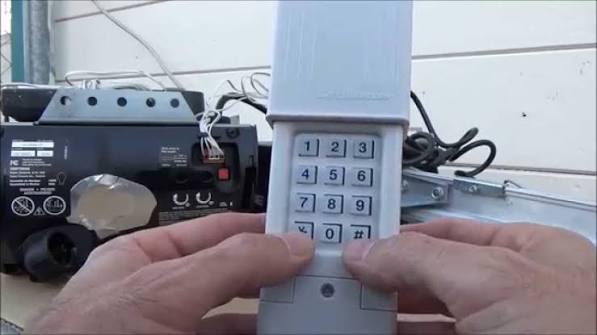
Have you ever worried that your old garage door remote might fall into the wrong hands? Or perhaps you recently moved into a new home and want to ensure previous owners can no longer access your garage? Learning how to change code on a clicker garage door opener is one of the simplest yet most effective ways to enhance your home’s security. In this comprehensive guide, we will walk you through the process, ensuring your garage remains a safe and private space for your family and belongings.
Why Changing Your Garage Door Code Is Essential for Home Security
Before diving into the technical steps, it is crucial to understand why this task matters. Many homeowners underestimate the vulnerability of their garage doors. According to recent security studies, a significant percentage of home burglaries occur through unlocked or easily accessed garages.
Your garage door opener uses a specific radio frequency to communicate with the motor unit. If you are using the factory-default code or a code that hasn’t been changed in years, it may be susceptible to “code grabbing” or simple guesswork. By updating your code, you create a unique digital handshake between your remote and the opener, significantly reducing the risk of unauthorized entry.
Identifying Your Garage Door Opener Model
Not all garage door openers are created equal. The method to change the code depends heavily on the brand and age of your system. Before you start, locate the motor unit hanging from your garage ceiling. Look for a label that displays the manufacturer’s name and model number.
The most common brands in the US market include:
- Chamberlain
- LiftMaster
- Genie
- Craftsman
If you cannot find the model number, check the user manual. If the manual is lost, most manufacturers provide downloadable PDFs on their official websites by searching the serial number found on the motor unit.
Fixed Code vs. Rolling Code Systems
It is important to distinguish between two types of technology:
- Fixed Code (Older Models): These use a static sequence of switches or dials inside the remote. Changing the code involves physically adjusting these switches.
- Rolling Code (Newer Models): These generate a new code every time you press the button. To “change” the code, you essentially reset the system so the opener learns a new remote signal.
Most modern openers installed after 1993 use rolling code technology for enhanced security. For more detailed information on encryption standards in garage door systems, you can refer to Wikipedia’s article on Garage Door Openers.
Step-by-Step Guide: How to Change Code on a Clicker Garage Door Opener
Below are the general steps applicable to most modern rolling code openers. Always prioritize safety by keeping your hands clear of moving parts during the process.
Step 1: Locate the “Learn” Button
On your garage door motor unit, look for a small button labeled “Learn,” “Program,” or “Smart.” It is usually located near the antenna wire hanging down from the unit. The button color varies by brand:
- Yellow: Chamberlain/LiftMaster
- Purple: LiftMaster (Security+ 2.0)
- Red/Orange: Genie
- Green: Older Craftsman models
Step 2: Clear the Old Codes (Optional but Recommended)
If you want to ensure that all previous remotes are deactivated (for example, if you lost a remote), you should clear the memory first.
- Press and hold the Learn button for about 6–10 seconds.
- Wait until the indicator light next to the button turns off.
- Release the button.
- Note: This erases all paired remotes and keypads. You will need to reprogram every device you own.
Step 3: Program the New Remote
If you only want to add a new remote without deleting others, skip Step 2.
- Press the Learn button once briefly. The indicator light will turn on or blink.
- Within 30 seconds, go to your handheld clicker (remote).
- Press and hold the button on the remote that you wish to program.
- Hold it until the lights on the motor unit blink or you hear a click. This confirms the code has been accepted.
- Test the remote by pressing the button again to open and close the door.
Step 4: Reprogram Other Devices
If you cleared the memory in Step 2, you must now reprogram:
- All other handheld remotes.
- Wireless keypads outside the garage.
- HomeLink systems in your car (if applicable).
Repeat the process in Step 3 for each device.
Troubleshooting Common Issues
Even with clear instructions, things can go wrong. Here are solutions to frequent problems:
| Issue | Possible Cause | Solution |
|---|---|---|
| Remote not pairing | Dead battery | Replace the battery in the remote with a fresh CR2032 or similar type. |
| Light blinks but door doesn’t move | Safety sensors blocked | Check the photo-eye sensors near the floor. Ensure they are aligned and clean. |
| Learn button not responding | Power issue | Unplug the opener for 1 minute, then plug it back in to reset the logic board. |
| Code resets randomly | Interference | LED light bulbs can cause interference. Try switching to incandescent bulbs temporarily to test. |
Expert Tips for Maintaining Garage Door Security
Changing the code is just one part of maintaining a secure garage. Here are additional recommendations from security experts:
- Update Batteries Regularly: Weak batteries can cause signal errors, forcing you to reprogram frequently. Change them annually.
- Secure the Wall Console: If your wall-mounted button is visible from outside, consider installing a cover or relocating it. Thieves can use a coat hanger to reach through a gap in the door and press the button.
- Use Vacation Mode: Many modern openers have a “Vacation” or “Lock” feature that disables remote access entirely while you are away. Activate this via the wall console or smartphone app.
- Inspect Physical Hardware: Ensure the emergency release cord is not accessible from outside. Zip-tie it high up if necessary to prevent manual unlocking.
FAQ Section
1. Can I change the code without the original remote?
Yes, you can. As long as you have access to the motor unit in the garage and can press the “Learn” button, you can program a new remote. However, if you have cleared the memory, you will need to reprogram all existing devices.
2. How often should I change my garage door code?
It is recommended to change your code at least once a year, or immediately if you lose a remote, move into a new home, or suspect unauthorized access. Regular updates minimize the window of opportunity for potential intruders.
3. What if my garage door opener doesn’t have a “Learn” button?
If your opener is very old (pre-1993) and lacks a Learn button, it likely uses dip switches. You will need to open both the remote and the motor unit casing to manually match the switch positions. Consider upgrading to a modern universal receiver kit for better security.
4. Will changing the code affect my smartphone app control?
If you use a Wi-Fi-enabled opener (like MyQ), changing the remote code typically does not affect the app. However, if you perform a full memory reset, you may need to reconnect your Wi-Fi hub to the motor unit following the manufacturer’s specific instructions.
5. Is it possible to hack a garage door opener?
While difficult, older fixed-code systems are vulnerable to code-grabbing devices. Modern rolling-code systems are much more secure because the code changes with every use. Keeping your firmware updated and using rolling-code technology is your best defense against hacking.
6. What do I do if the Learn button light stays solid and doesn’t blink?
A solid light usually indicates that the opener is in programming mode but hasn’t received a signal. If it stays solid for too long, it may time out. Try pressing the Learn button again and immediately pressing the remote button. If the issue persists, consult your manufacturer’s support line.
Conclusion
Learning how to change code on a clicker garage door opener is a straightforward process that yields significant peace of mind. By taking just 10–15 minutes to update your security settings, you protect your vehicle, tools, and home from potential intruders. Remember to identify your model, locate the Learn button, and follow the pairing steps carefully.
Don’t wait for a security breach to take action. Check your garage door opener today. If you found this guide helpful, please share it with your friends and family on social media to help them secure their homes too. Stay safe, and keep your garage secure!
Leave a Reply