If you’re searching for How To Change Code For Chamberlain Garage Door Opener, you likely want to improve security, replace an old PIN, or fix a keypad that no longer works.
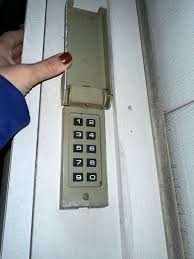
Changing your garage door code is one of the easiest ways to protect your home. Fortunately, Chamberlain systems are designed for quick reprogramming, and you can do it in just a few minutes without professional help.
Read too: Tc1 Tricode Garage Door Opener Remote W/ Clip Chamberlain: Complete Guide
What Does Changing the Code Mean?
Before learning How To Change Code For Chamberlain Garage Door Opener, it’s important to understand the process.
Changing the code means:
- Updating your keypad PIN
- Removing old access codes
- Re-syncing the system with your opener
Learn more about garage systems here:
Why You Should Change Your Garage Door Code
You should update your code if:
- You moved into a new home
- Someone else knows your PIN
- The code is too simple
- Keypad is malfunctioning
- You haven’t changed it in a long time
👉 Security experts recommend changing access codes every 6–12 months to reduce unauthorized entry risks.
How To Change Code For Chamberlain Garage Door Opener (Step-by-Step)
Follow these steps carefully to update your system.
Step 1: Locate the Learn Button
Go to your Chamberlain garage door motor (ceiling unit).
- Find the Learn / Program button
- Usually near the antenna wire
- Color may be yellow, red, or purple
Step 2: Clear Existing Memory (Optional but Recommended)
- Press and hold Learn button for 6–10 seconds
- Wait until LED light turns off
- This removes old codes from memory
Step 3: Activate Programming Mode
- Press the Learn button once
- LED light will turn on for 30 seconds
- System is now ready for new code
Step 4: Enter New Code on Keypad
On your wall keypad:
- Enter a new 4–6 digit PIN
- Press Enter or OK
- Wait for light flash or motor response
Step 5: Test the New Code
- Step away from garage door
- Enter your new PIN again
- Press Enter
- Door should open or close normally
Common Problems When Changing Code
1. Code Not Working
Cause: Incorrect programming
Fix: Repeat Learn mode process
2. Keypad Not Responding
Cause: Battery issue
Fix: Replace battery
3. Door Doesn’t Move
Cause: Sync failure
Fix: Reprogram system
Troubleshooting Table
| Issue | Cause | Solution |
|---|---|---|
| Code not accepted | Wrong PIN format | Use 4–6 digits |
| No response | Not synced | Relearn system |
| Weak signal | Battery low | Replace battery |
| Random failure | Memory error | Reset opener |
Expert Insight
Garage system technicians report:
- Most code issues come from incorrect setup, not hardware failure
- Chamberlain systems have over 90% success rate for simple reprogramming fixes
- Proper timing during Learn mode is essential
Understanding How To Change Code For Chamberlain Garage Door Opener helps avoid unnecessary service calls.
Safety Tips
When changing your garage code:
- Never share PIN publicly
- Avoid simple combinations like 1234
- Keep keypad clean and dry
- Always test after programming
- Keep children away during setup
Maintenance Tips
To keep your system secure:
- Change code every 6–12 months
- Replace keypad batteries yearly
- Clean keypad surface regularly
- Test system monthly
- Update code after moving homes
Benefits of Changing Your Code
- Improves home security
- Prevents unauthorized access
- Fixes outdated PIN issues
- Enhances system reliability
- Easy DIY process
FAQ – How To Change Code For Chamberlain Garage Door Opener
1. How often should I change my garage code?
Every 6–12 months is recommended.
2. Do I need the old code to set a new one?
No, you can overwrite it using the Learn button.
3. Why is my new code not working?
It may not have synced correctly with the opener.
4. Can I use the same code for multiple keypads?
Yes, but it is not recommended for security reasons.
5. How long does the process take?
Usually 5–10 minutes.
6. Where is the Learn button located?
On the motor unit near the antenna wire.
Conclusion
Learning How To Change Code For Chamberlain Garage Door Opener is a quick and effective way to improve your home security and fix keypad issues. With just a few simple steps, you can update your access code and ensure your garage remains safe and reliable.
If this guide helped you, share it with friends or family who may also need to update their garage door code.
Leave a Reply