If your remote suddenly stops working, you’re probably wondering How To Change Battery In LiftMaster Garage Door Remote. Don’t worry—this is one of the easiest fixes you can do at home. In just a few minutes, you can replace the battery and restore full functionality without calling a technician.
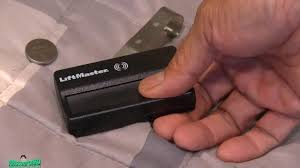
How To Change Battery In LiftMaster Garage Door Remote (Quick Answer)
To change the battery:
- Open the remote case
- Remove the old battery
- Insert a new battery (correct type)
- Close the case and test
Read too: Tc1 Tricode Garage Door Opener Remote W/ Clip Chamberlain: Complete Guide
👉 The entire process takes 2–5 minutes.
What Battery Does a LiftMaster Remote Use?
Different models use different batteries.
Common Battery Types
- CR2032 (most common)
- CR2025
- 9V battery (older models)
👉 Always check the label inside your remote before buying a replacement.
Tools You’ll Need
You don’t need much:
- Small flathead screwdriver (or coin)
- Replacement battery
- Clean cloth (optional)
Step-by-Step: How To Change Battery In LiftMaster Garage Door Remote
Follow these detailed steps:
Step 1: Open the Remote Case
- Look for a small notch on the side
- Use a flathead screwdriver or coin
- Gently twist to open
⚠️ Avoid using excessive force to prevent damage.
Step 2: Remove the Old Battery
- Carefully take out the battery
- Note the positive (+) and negative (-) orientation
Step 3: Clean the Battery Contacts (Optional)
- Use a dry cloth
- Remove dust or corrosion
👉 This can improve signal performance.
Step 4: Insert the New Battery
- Place the battery in the correct direction
- Ensure it sits securely
Step 5: Close the Remote Case
- Snap the case back together
- Make sure it clicks into place
Step 6: Test the Remote
- Stand within 5–10 feet of the garage door
- Press the button
✅ Your remote should now work normally.
Why Isn’t My LiftMaster Remote Working After Battery Replacement?
Sometimes the issue isn’t just the battery.
Common Causes
- Incorrect battery type
- Battery installed backward
- Dirty contacts
- Remote needs reprogramming
Quick Troubleshooting Checklist
- Double-check battery orientation
- Ensure battery is new and functional
- Clean contacts
- Reprogram the remote
👉 About 25–30% of remote issues persist due to incorrect installation.
How Long Do LiftMaster Remote Batteries Last?
On average:
- 1–2 years lifespan
Factors affecting battery life:
- Frequency of use
- Temperature conditions
- Battery quality
Signs Your Remote Battery Is Dying
Watch for these warning signs:
- Reduced range
- Delayed response
- Intermittent operation
- No response at all
Should You Reprogram the Remote After Changing the Battery?
Usually, no.
👉 Most LiftMaster remotes retain programming even after battery replacement.
However, reprogram if:
- Remote stops syncing
- You reset the opener
- Signal issues persist
How LiftMaster Remote Technology Works
LiftMaster remotes use radio frequency signals and rolling code technology to communicate securely with the opener.
Learn more here:
https://en.wikipedia.org/wiki/Garage_door_opener
Battery Types Comparison
| Battery Type | Lifespan | Cost | Common Use |
|---|---|---|---|
| CR2032 | 1–2 years | Low | Most remotes |
| CR2025 | 1 year | Low | Slim remotes |
| 9V | 1–2 years | Medium | Older models |
Tips to Extend Battery Life
Best Practices
- Use high-quality batteries
- Avoid extreme temperatures
- Press buttons only when needed
- Store remote in a dry place
👉 These habits can extend battery life by up to 30%.
Common Mistakes to Avoid
Avoid these simple errors:
- ❌ Using the wrong battery type
- ❌ Installing battery backward
- ❌ Forcing the case open
- ❌ Ignoring corrosion
Do All LiftMaster Remotes Open the Same Way?
No—designs vary.
Types of Remotes
- Sliding cover models
- Snap-open cases
- Screw-secured cases
👉 Always inspect your model before opening.
When Should You Replace the Remote Instead?
Consider replacing if:
- Buttons are worn out
- Internal components are damaged
- Remote is very old
FAQ: How To Change Battery In LiftMaster Garage Door Remote
1. How often should I change my LiftMaster remote battery?
Typically every 1–2 years, depending on usage.
2. What is the most common battery type?
CR2032 coin cell batteries are the most widely used.
3. Do I need to reprogram after changing the battery?
Usually no, unless the remote loses connection.
4. Why is my remote still not working?
Check battery orientation, compatibility, and consider reprogramming.
5. Can I use rechargeable batteries?
It’s not recommended, as voltage may differ.
6. Is it safe to open the remote myself?
Yes, as long as you handle it gently and follow proper steps.
Conclusion
Learning How To Change Battery In LiftMaster Garage Door Remote is a quick and simple fix that can save you time and frustration. In just a few minutes, you can restore your remote’s performance and avoid unnecessary repairs.
By following the step-by-step guide and best practices, you’ll keep your garage door system running smoothly and reliably.
If this guide helped you, share it on social media so others can fix their garage remote issues just as easily!
Leave a Reply