If you’re searching “How To Change Battery In Craftsman Garage Door Opener”, chances are your remote stopped working or your opener is beeping unexpectedly. This is a very common issue—and thankfully, it’s one of the easiest fixes you can do yourself.
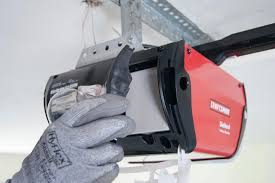
In this guide, you’ll learn exactly how to replace the battery in both your Craftsman remote and backup system quickly and safely.
Read too: Tc1 Tricode Garage Door Opener Remote W/ Clip Chamberlain: Complete Guide
How To Change Battery In Craftsman Garage Door Opener (Step-by-Step)
Let’s start with the most practical solution. Depending on your setup, you may need to replace either the remote battery or the backup battery inside the opener unit.
Step-by-Step: Changing the Remote Battery
What You’ll Need:
- Replacement battery (commonly CR2032 or CR2016)
- Small flathead screwdriver
Step 1: Open the Remote Case
- Locate the small notch on the side or back
- Insert a screwdriver and gently pry open
Step 2: Remove the Old Battery
- Take note of battery orientation (+/- side)
- Carefully remove the old battery
Step 3: Insert the New Battery
- Insert new battery with correct polarity
- Ensure it sits firmly in place
Step 4: Close the Remote
- Snap the cover back together
- Press until fully sealed
Step 5: Test the Remote
- Stand 3–10 feet (1–3 meters) away
- Press the button and confirm operation
✅ Done! Your remote should now work like new.
Step-by-Step: Changing the Backup Battery (Opener Unit)
Some Craftsman garage door openers include a backup battery for power outages.
Tools Needed:
- Replacement battery (usually 12V)
- Screwdriver
Step 1: Disconnect Power
Always unplug the opener before starting.
Step 2: Locate Battery Compartment
- Usually on the back or bottom of the motor unit
- May be behind a panel
Step 3: Remove Old Battery
- Disconnect wires carefully
- Remove the battery
Step 4: Install New Battery
- Connect wires to new battery
- Match positive (+) and negative (-) terminals
Step 5: Restore Power and Test
- Plug the opener back in
- Test door operation and backup system
How Do You Know the Battery Needs Replacement?
Common Signs:
- Remote not responding
- Reduced signal range
- LED light dim or off
- Opener beeping (backup battery warning)
Quick Tip:
If your remote only works up close, the battery is likely weak.
What Battery Does a Craftsman Garage Opener Use?
Remote Batteries:
- CR2032 (most common)
- CR2016
Backup Batteries:
- 12V sealed lead-acid battery
Battery Life Expectancy
| Component | Average Lifespan |
|---|---|
| Remote battery | 1–2 years |
| Backup battery | 3–5 years |
👉 Regular replacement ensures consistent performance.
Common Mistakes to Avoid
1. Installing Battery Backwards
Always check polarity before inserting.
2. Using Wrong Battery Type
Check your model to avoid compatibility issues.
3. Not Closing Remote Properly
Loose casing can cause connection issues.
4. Ignoring Warning Beeps
Beeping usually signals low backup battery—don’t ignore it.
Expert Insight: Why Batteries Fail
Garage door opener batteries degrade over time due to usage and environmental factors like temperature and humidity.
Learn more about battery technology here:
https://en.wikipedia.org/wiki/Battery_(electricity)
DIY vs Professional Replacement
| Task | DIY | Professional |
|---|---|---|
| Remote battery | Very easy | Not needed |
| Backup battery | Easy | Optional |
| Cost | Low | Higher |
👉 Recommendation:
Most homeowners can handle this DIY.
Maintenance Tips for Longer Battery Life
- Replace batteries every 12–18 months
- Keep remotes away from extreme heat
- Avoid dropping the remote
- Test opener monthly
Real-Life Example
Scenario:
A homeowner notices their remote only works within a few feet.
Solution:
- Replace CR2032 battery
- Test from distance
Result:
Range restored instantly—problem solved in under 5 minutes.
Advantages vs Disadvantages
Advantages:
- Quick and simple fix
- Low cost
- No technical skills required
Disadvantages:
- Must replace periodically
- Easy to forget until failure
FAQ: How To Change Battery In Craftsman Garage Door Opener
1. How often should I change the battery?
Remote batteries last 1–2 years, backup batteries last 3–5 years.
2. Why is my opener beeping?
It usually indicates a low backup battery that needs replacement.
3. Can I use any coin battery?
No, use the exact type recommended (e.g., CR2032).
4. Do I need to reprogram the remote after changing the battery?
No, replacing the battery does not erase programming.
5. What happens if the backup battery dies?
The opener will not work during power outages.
6. Is it safe to replace the battery myself?
Yes, as long as you follow basic safety steps like disconnecting power.
Conclusion
Now you know exactly how to change battery in Craftsman garage door opener—whether it’s the remote or the backup unit. This simple maintenance task can restore performance, improve reliability, and prevent unexpected failures.
It only takes a few minutes, but it makes a big difference in your daily convenience.
If this guide helped you, feel free to share it on social media—someone else might need this quick fix too! 🚪
Leave a Reply