Is your keypad unresponsive or failing to open your garage door? That’s a common sign of a drained battery. Learning How To Change Battery In Chamberlain Garage Door Opener Keypad is a quick and easy fix that restores full functionality in just a few minutes.
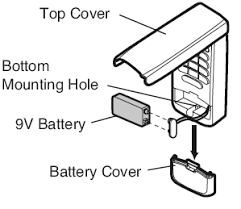
What Battery Does a Chamberlain Keypad Use?
Before replacing the battery, it’s important to know the correct type.
Common Battery Types:
- 9V battery (most common)
- CR2032 coin cell (newer slim models)
Read too: How Do You Change Code On Garage Door Keypad Fast?
💡 Tip: Check the back of your keypad or user manual to confirm.
How To Change Battery In Chamberlain Garage Door Opener Keypad (Step-by-Step)
Follow these simple steps to replace your keypad battery safely.
Step 1: Gather Tools and Materials
You’ll need:
- Replacement battery (9V or CR2032)
- Small screwdriver (if required)
- Clean cloth
✔️ Make sure the battery is fresh and high quality.
Step 2: Locate the Battery Compartment
- Open the keypad cover
- Look for the battery compartment inside
- Some models have a sliding cover or screw panel
📍 Typically located behind the keypad face.
Step 3: Remove the Old Battery
- Carefully disconnect or slide out the battery
- Note the positive (+) and negative (-) orientation
⚠️ Avoid forcing the battery out to prevent damage.
Step 4: Insert the New Battery
- Place the new battery in the correct orientation
- Ensure it fits snugly
🔋 A loose battery may cause intermittent issues.
Step 5: Close the Compartment
- Secure the cover or tighten screws
- Ensure it is properly sealed
✔️ This protects the keypad from weather exposure.
Step 6: Test the Keypad
- Enter your PIN
- Press the Enter button
- Check if the garage door responds
✅ If it works, the replacement was successful!
How Do You Know If the Keypad Battery Is Dead?
Here are common warning signs:
- Keypad not lighting up
- Delayed response
- Reduced operating range
- Intermittent functionality
💡 Most keypad batteries last 1–2 years.
Do You Need to Reprogram the Keypad After Changing the Battery?
In most cases, no.
However, you may need to reprogram if:
- The keypad loses memory
- Battery was removed for a long time
- System resets automatically
How Long Does It Take to Replace the Battery?
- Average time: 5–10 minutes
- No technical skills required
👉 It’s one of the easiest garage door maintenance tasks.
Advantages vs Disadvantages of DIY Battery Replacement
Pros and Cons
| Advantages | Disadvantages |
|---|---|
| Quick and easy | Requires correct battery type |
| Low cost | Possible reprogramming |
| No technician needed | Risk of incorrect installation |
Common Mistakes to Avoid
Avoid these errors for a smooth replacement:
❌ Mistakes:
- Installing the battery backward
- Using the wrong battery type
- Not securing the cover properly
- Forgetting to test after replacement
What If the Keypad Still Doesn’t Work?
If replacing the battery doesn’t fix the issue:
Troubleshooting Steps:
- Check keypad wiring (if applicable)
- Reprogram the keypad
- Inspect for physical damage
- Replace the keypad if necessary
Expert Insight: Why Battery Maintenance Matters
Garage door keypads rely on consistent power to function properly. A weak battery can cause delayed signals or complete failure. Regular battery checks ensure reliability and prevent unexpected lockouts.
How to Extend Keypad Battery Life
Follow these tips to maximize battery performance:
- Use high-quality alkaline batteries
- Avoid extreme temperatures
- Keep the keypad clean and dry
- Replace batteries annually
Signs You Should Replace the Battery Immediately
Watch for these indicators:
- Dim or no backlight
- Multiple attempts needed to open the door
- Keypad stops working suddenly
Understanding Garage Door Keypad Systems
Garage door keypads use wireless signals to communicate with the opener.
To learn more about how these systems function, visit:
https://en.wikipedia.org/wiki/Garage_door_opener
FAQ: How To Change Battery In Chamberlain Garage Door Opener Keypad
Q1: What battery does a Chamberlain keypad use?
Answer: Most use a 9V battery, but some models use a CR2032 coin cell.
Q2: Do I need to reset the keypad after changing the battery?
Answer: Usually no, unless the system loses memory.
Q3: How often should I replace the battery?
Answer: Every 1–2 years or when performance drops.
Q4: Why is my keypad still not working after replacing the battery?
Answer: It may need reprogramming or could be damaged.
Q5: Can I use rechargeable batteries?
Answer: It’s not recommended, as they may provide inconsistent power.
Q6: Is replacing the battery difficult?
Answer: No, it’s a simple process that takes just a few minutes.
Conclusion
Learning How To Change Battery In Chamberlain Garage Door Opener Keypad is a quick and essential skill for maintaining your garage access system. With just a few simple steps, you can restore functionality, improve reliability, and avoid unnecessary frustration.
Make battery checks part of your regular maintenance routine to keep everything running smoothly. If this guide helped you, share it on social media so others can fix their keypad issues too!
Leave a Reply