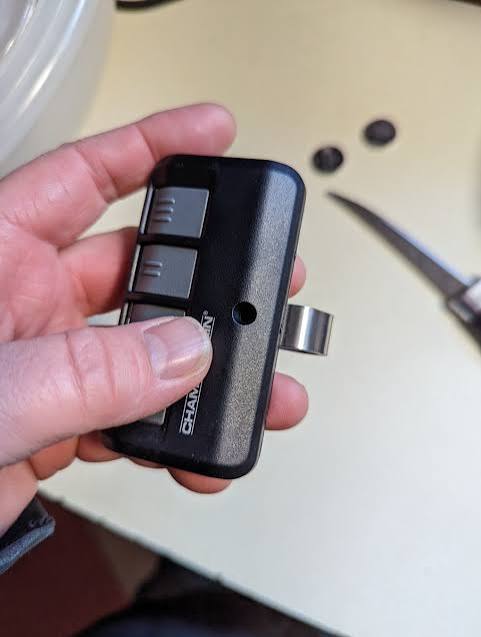
Is your garage door remote suddenly unresponsive, or did your Chamberlain opener fail during a power outage? You’re not alone—thousands of homeowners face this frustrating issue every month. Knowing how to change battery in a Chamberlain garage door opener can save you time, money, and the hassle of calling a technician. This comprehensive guide will walk you through everything you need to know, from identifying the right battery type to troubleshooting common problems after replacement.
Why Does Your Chamberlain Garage Door Opener Need a New Battery?
Before diving into the replacement process, it’s essential to understand why batteries matter in your garage door system. Chamberlain garage door openers typically use batteries in two places:
- The handheld remote control – This is the most common battery replacement scenario.
- The backup battery system – Higher-end models like the Chamberlain MyQ series include a built-in rechargeable battery that keeps your opener functioning during power outages.
According to Chamberlain’s official support documentation, remote control batteries typically last 6–12 months depending on usage frequency. Meanwhile, backup batteries should be replaced every 3–5 years to ensure reliable performance during emergencies.
Ignoring a dead battery isn’t just inconvenient—it can leave you stranded outside your home or unable to access your vehicle. Let’s fix that.
What Type of Battery Does a Chamberlain Garage Door Remote Use?
Most Chamberlain garage door remotes use standard coin-cell batteries, specifically:
- CR2032 (most common)
- CR2025 (older models)
- CR2016 (compact remotes)
To confirm which battery your remote requires:
- Check the inside of the battery compartment (usually printed on the metal contact plate).
- Refer to your owner’s manual.
- Visit Chamberlain’s official support page for model-specific information.
Pro Tip: Always purchase batteries from reputable brands like Energizer, Duracell, or Panasonic. Cheap generic batteries may leak or provide inconsistent voltage, potentially damaging your remote’s circuitry.
Step-by-Step: How to Change Battery in a Chamberlain Garage Door Opener Remote
Follow these detailed instructions to replace your remote’s battery safely and efficiently.
Step 1: Gather Your Tools and Materials
You’ll need:
- A new CR2032 (or appropriate type) battery
- A small flathead screwdriver or coin (for prying open the case)
- A clean, dry workspace
Step 2: Open the Remote Control Housing
Locate the seam along the edge of your remote. Most Chamberlain remotes have a small notch or slot designed for opening. Insert your screwdriver or coin into this slot and gently twist to separate the two halves of the casing.
Warning: Apply minimal force to avoid cracking the plastic housing. If it doesn’t open easily, double-check that you’re inserting the tool in the correct location.
Step 3: Remove the Old Battery
Once the remote is open, you’ll see the coin-cell battery held in place by a metal clip or friction fit. Carefully lift the old battery out using your fingernail or the edge of the screwdriver. Note the orientation—the positive (+) side usually faces up.
Step 4: Insert the New Battery
Place the new battery into the compartment with the positive (+) side facing the same direction as the old one. Press down gently until it sits flush and secure.
Step 5: Reassemble the Remote
Align the two halves of the remote casing and press them together firmly until you hear a click. Ensure there are no gaps around the edges.
Step 6: Test the Remote
Stand within 10–15 feet of your garage door and press any button. The door should respond immediately. If it doesn’t:
- Double-check the battery orientation.
- Ensure the battery is fully seated.
- Try reprogramming the remote (see FAQ section below).
How to Replace the Backup Battery in Chamberlain MyQ Openers
If you own a Chamberlain model with a backup battery system (such as the B970, B850, or MyQ-enabled units), the process differs slightly.
Identifying Models with Backup Batteries
Check your opener’s label or manual for mentions of “backup battery,” “battery backup,” or “emergency operation.” These models typically feature a sealed lead-acid or lithium-ion battery pack located inside the motor unit housing.
Replacement Process Overview
- Unplug the opener from the power source.
- Remove the light lens cover to access the internal compartment.
- Disconnect the old battery by unplugging its connector.
- Install the new battery (Chamberlain part number varies by model; consult your manual).
- Reconnect and test by simulating a power outage.
Important: Backup battery replacement is more complex than remote battery changes. If you’re uncomfortable working with electrical components, consider hiring a certified technician. Chamberlain recommends professional installation for warranty preservation.
Common Mistakes to Avoid When Changing Garage Door Batteries
Even simple tasks can go wrong if you’re not careful. Here are frequent errors homeowners make:
| Mistake | Consequence | Solution |
|---|---|---|
| Installing battery backward | Remote won’t work | Always check polarity markings |
| Using wrong battery type | Poor performance or damage | Verify model requirements first |
| Forcing the remote case open | Cracked housing | Use gentle pressure and correct tool |
| Ignoring corrosion on contacts | Intermittent connectivity | Clean contacts with rubbing alcohol |
| Not testing after replacement | Undetected issues | Always verify functionality immediately |
Troubleshooting: What If the Remote Still Doesn’t Work?
If you’ve replaced the battery correctly but your remote remains unresponsive, try these steps:
- Reprogram the remote: Hold the “Learn” button on your opener until the LED blinks, then press the remote button within 30 seconds.
- Check for interference: Other electronics (LED bulbs, Wi-Fi routers) can disrupt signals. Move potential sources away.
- Inspect the antenna: Ensure the hanging wire antenna on your opener isn’t damaged or obstructed.
- Test with another remote: If a second remote works, the issue may be with the first remote’s internal circuitry.
For more technical details on garage door opener mechanisms, you can reference the general overview on Wikipedia’s garage door opener page.
How Often Should You Replace Garage Door Opener Batteries?
Establishing a maintenance schedule prevents unexpected failures:
- Remote controls: Every 6–12 months, or when response becomes sluggish.
- Backup batteries: Every 3–5 years, or per manufacturer recommendations.
- Keychain remotes: These smaller units may need replacement every 4–8 months due to smaller battery capacity.
Expert Insight: According to industry professionals, proactive battery replacement costs less than $10 annually, compared to $150–$300 for emergency service calls.
FAQ Section
Q1: Can I use a rechargeable battery in my Chamberlain remote?
A: While technically possible, rechargeable coin-cell batteries often provide lower voltage (3.0V vs. 3.7V for lithium), which may cause inconsistent performance. Standard disposable CR2032 batteries are recommended for reliability.
Q2: How do I know if my Chamberlain opener has a backup battery?
A: Check your model number against Chamberlain’s product database. Models with “B” in the name (e.g., B970, B850) typically include backup systems. You can also look for a battery compartment inside the motor housing.
Q3: Will changing the battery erase my remote’s programming?
A: No. Battery replacement does not affect the remote’s stored codes. However, if the remote was already unpaired, you’ll need to reprogram it after installing the new battery.
Q4: Where can I buy replacement batteries for Chamberlain openers?
A: CR2032 batteries are available at most retail stores (Walmart, Target, Home Depot) and online retailers (Amazon, Best Buy). For backup batteries, order directly from Chamberlain or authorized dealers to ensure compatibility.
Q5: Is it safe to replace the backup battery myself?
A: Remote battery replacement is completely safe. Backup battery replacement involves working with electrical components and should only be attempted if you’re comfortable following technical instructions. When in doubt, hire a professional.
Q6: Why does my new battery drain so quickly?
A: Rapid battery drain may indicate a short circuit, stuck button, or faulty remote. Try cleaning the button contacts with isopropyl alcohol. If the problem persists, the remote may need replacement.
Conclusion
Learning how to change battery in a Chamberlain garage door opener is a simple yet valuable skill that empowers you to maintain your home’s security and convenience. Whether you’re swapping out a CR2032 in your handheld remote or planning ahead for backup battery replacement, this guide has equipped you with the knowledge to handle both scenarios confidently.
Remember: regular maintenance prevents emergencies. Set a calendar reminder to check your remote batteries twice a year, and inspect your backup system every few years. Your future self will thank you when you’re never locked out again.
Found this guide helpful? Share it with friends and family on social media who might benefit from these tips. Don’t forget to bookmark this page for future reference!
Leave a Reply