If your garage remote has been lost, shared with too many people, or you simply want better security, learning How To Change A Chamberlain Garage Door Opener Code is essential. Many homeowners are surprised to find that updating the code is quick and does not require technical experience.
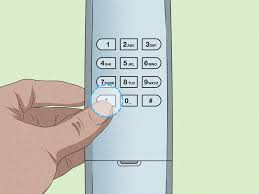
In this guide, you’ll learn exactly how to reset and change your Chamberlain garage door opener code safely and correctly in just a few minutes.
What Is a Chamberlain Garage Door Opener Code?
A Chamberlain garage door opener code is a secure digital signal used between your remote control, keypad, and garage motor unit. Each time you press the remote, a unique encrypted code is sent to open or close the door.
Read too: Tc1 Tricode Garage Door Opener Remote W/ Clip Chamberlain: Complete Guide
Modern systems use rolling code technology, meaning the code changes every time for security purposes.
According to general security principles referenced by Wikipedia, rolling code systems are widely used in wireless access devices to prevent code theft or replay attacks.
Why Should You Change Your Garage Door Opener Code?
There are several important reasons homeowners update their garage codes:
1. Security Concerns
If someone has access to your old remote, they could enter your garage without permission.
2. Lost or Stolen Remote
Changing the code immediately prevents unauthorized access.
3. Moving Into a New Home
Always reset the system when taking ownership of a new property.
4. Malfunctioning Remote
Sometimes resetting resolves syncing issues.
How To Change A Chamberlain Garage Door Opener Code Step by Step
This is the most important section. Follow each step carefully.
Step 1: Locate the “Learn” Button
Go to your garage motor unit mounted on the ceiling.
You will find:
- A small button labeled Learn
- Usually near the antenna wire or light cover
Step 2: Clear Existing Codes (Optional but Recommended)
To fully reset security:
- Press and hold the Learn button for 6–10 seconds
- Wait until the LED light turns off
👉 This erases all previously stored remotes and keypads.
Step 3: Reprogram the System
Now you can set a new code.
- Press and release the Learn button once
- The indicator light will turn on for about 30 seconds
Step 4: Program Your Remote or Keypad
During the 30-second window:
- Press the button on your remote
- Or enter your new PIN on the keypad
- Hold for 2–3 seconds
You may see:
- Garage light flashing
- Clicking sound from motor
This confirms successful programming.
Step 5: Test the New Code
After programming:
- Wait 10 seconds
- Press the remote or keypad again
- Confirm the door responds correctly
How Long Does It Take To Change A Chamberlain Garage Door Opener Code?
On average:
- Remote reset: 2–5 minutes
- Full system reset: 5–10 minutes
- Keypad setup: 3–7 minutes
Most homeowners complete the process in under 10 minutes total.
Types of Chamberlain Security Systems
1. Fixed Code Systems (Older Models)
- Same code every time
- Less secure
- Rare today
2. Rolling Code Systems (Modern Models)
- Code changes after every use
- Much more secure
- Standard in modern homes
3. Smart Wi-Fi Systems
- Controlled via mobile app
- Remote access from anywhere
- Enhanced security alerts
Comparison: Reset vs Reprogram
| Action | Purpose | When to Use |
|---|---|---|
| Reset | Erase all codes | Lost remote or security issue |
| Reprogram | Add new devices | New remote or keypad |
| Partial update | Replace one device | Adding new user |
Common Problems When Changing Codes
1. Remote Not Syncing
- Battery may be weak
- Try replacing CR2032 battery
2. Learn Button Not Responding
- System may be locked or overloaded
- Try full reset
3. Keypad Not Working
- Incorrect PIN entry
- Out of sync programming window
4. Signal Interference
Nearby electronics may disrupt pairing.
Expert Insight: Why Rolling Codes Matter
Modern garage systems reduce hacking risk significantly. Studies in wireless access security show that rolling codes make replay attacks nearly impossible because the transmitted code changes each time.
This is why Chamberlain systems are widely trusted in residential security solutions.
Safety Tips Before Changing Your Garage Code
- Keep garage door fully closed
- Do not stand under moving door
- Keep children away during setup
- Ensure stable ladder placement if needed
Safety is critical when working near motorized systems.
How To Add Multiple Remotes After Changing Code
After resetting, you can reprogram multiple devices:
- Press Learn button
- Activate first remote
- Repeat for each additional remote
- Wait for confirmation after each device
Most systems support 3–5 remotes depending on model.
When Should You Reset Your Chamberlain Garage Opener?
Reset your system when:
- Moving into a new home
- Remote is lost or stolen
- Security breach is suspected
- System malfunctions occur
A reset ensures complete control over access.
FAQ: How To Change A Chamberlain Garage Door Opener Code
1. How do I change the code on my Chamberlain garage door opener?
Press the Learn button, clear old codes if needed, then reprogram your remote or keypad within 30 seconds.
2. Do I need to reset before changing the code?
Not always, but it is recommended for better security and clean setup.
3. Why is my Chamberlain remote not working after code change?
Most likely due to missed timing, weak battery, or incorrect programming steps.
4. How many remotes can I program to one opener?
Most Chamberlain systems allow multiple remotes, usually between 3–5 devices.
5. Does changing the code improve security?
Yes. It prevents unauthorized access from old or lost remotes.
6. Can I change the code without tools?
Yes, no special tools are required—only the Learn button and your remote or keypad.
Conclusion
Understanding How To Change A Chamberlain Garage Door Opener Code is one of the simplest yet most important home security tasks you can perform. With just a few steps, you can reset access, improve safety, and ensure only trusted users can enter your garage.
Whether you’re replacing a lost remote or upgrading security, this process takes only minutes but provides long-term peace of mind.
If you found this guide helpful, share it with friends or neighbors who may also need help securing their garage system.
Leave a Reply