Have you ever stood in your driveway, pressing the garage door remote repeatedly, only to hear silence? It’s frustrating, inconvenient, and often happens at the worst possible time. If your Chamberlain garage door opener isn’t responding, the issue might be simpler than you think: a dead battery. Learning how to change a Chamberlain garage door opener battery is a quick, cost-effective fix that can save you from calling a technician. In this comprehensive guide, we’ll walk you through everything you need to know—from identifying the right battery type to troubleshooting common issues—so you can get your garage door working smoothly again.
Why Does Your Chamberlain Garage Door Opener Need a New Battery?
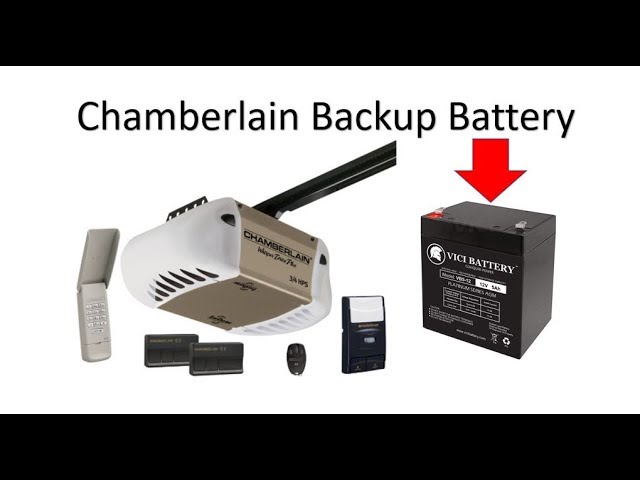
Before diving into the replacement process, it’s important to understand why batteries die and when replacement is necessary. Most Chamberlain garage door openers use backup batteries to ensure functionality during power outages. However, these batteries have a limited lifespan, typically lasting between 3 to 5 years, depending on usage and environmental conditions.
According to the U.S. Department of Energy, extreme temperatures—both hot and cold—can significantly reduce battery life. If you live in an area with harsh winters or scorching summers, your battery may degrade faster than expected. Additionally, frequent power outages can drain the battery more quickly, as it works harder to keep the system operational.
Signs Your Battery Needs Replacement
- The garage door opener doesn’t respond to remote commands
- The backup battery indicator light is flashing or off
- The door operates slowly or inconsistently
- You hear unusual clicking sounds from the motor unit
Recognizing these signs early can prevent complete system failure and ensure your garage remains secure and accessible.
What Type of Battery Does a Chamberlain Garage Door Opener Use?
Not all Chamberlain models use the same battery. Identifying the correct type is crucial for a successful replacement. Most modern Chamberlain garage door openers use one of the following:
| Model Series | Battery Type | Voltage | Typical Lifespan |
|---|---|---|---|
| Belt Drive (B-series) | Sealed Lead-Acid (SLA) | 12V | 3–5 years |
| Chain Drive (C-series) | Sealed Lead-Acid (SLA) | 12V | 3–5 years |
| Wall-Mount (Jackshaft) | Lithium-Ion | 12V | 5–7 years |
| Older Models | Alkaline (for remotes) | 9V or AA | 1–2 years |
Pro Tip: Always check your owner’s manual or the label on the battery compartment for specific recommendations. Using the wrong battery type can damage your opener or void the warranty.
For more detailed specifications, you can refer to Chamberlain’s official support page or consult the Wikipedia article on garage door openers for general technical background.
Step-by-Step Guide: How to Change a Chamberlain Garage Door Opener Battery
Now that you know which battery you need, let’s walk through the replacement process. Follow these steps carefully to ensure safety and proper installation.
Step 1: Gather Your Tools and Materials
Before starting, make sure you have the following items ready:
- Replacement battery (correct type and voltage)
- Screwdriver (Phillips or flathead, depending on your model)
- Safety gloves
- Flashlight (if working in low-light conditions)
- Clean cloth or paper towels
Step 2: Disconnect Power to the Garage Door Opener
Safety first! Locate the power cord of your garage door opener and unplug it from the electrical outlet. If your unit is hardwired, turn off the circuit breaker that supplies power to the garage. This step prevents accidental activation and protects you from electrical shock.
Step 3: Locate the Battery Compartment
The battery compartment location varies by model:
- Ceiling-mounted units: The battery is usually housed in a plastic case attached to the motor unit. Look for a small door or panel labeled “Battery.”
- Wall-mounted units: The battery may be integrated into the control box or located nearby.
- Remote controls: Open the back cover using a small screwdriver or your fingernail.
Step 4: Remove the Old Battery
Carefully disconnect the old battery by following these sub-steps:
- Unscrew or unlatch the battery compartment cover.
- Note the wiring configuration (take a photo if needed).
- Disconnect the red (positive) wire first, then the black (negative) wire.
- Lift the old battery out of the compartment.
Warning: Handle the old battery with care. Sealed lead-acid batteries contain corrosive materials. Avoid touching any leaked fluid and dispose of the battery properly at a recycling center.
Step 5: Install the New Battery
Insert the new battery by reversing the removal process:
- Place the new battery in the compartment, ensuring it sits securely.
- Connect the black (negative) wire first, then the red (positive) wire.
- Double-check that connections are tight and secure.
- Replace the compartment cover and secure it with screws or latches.
Step 6: Restore Power and Test the System
Plug the garage door opener back in or turn the circuit breaker on. Wait approximately 15–20 minutes for the new battery to charge fully. Then, test the system:
- Press the wall button to open and close the door.
- Use the remote control to ensure proper communication.
- Check the backup battery indicator light (it should be solid green, not flashing).
If the door operates smoothly, congratulations—you’ve successfully replaced the battery!
Troubleshooting Common Issues After Battery Replacement
Even after following the steps correctly, you might encounter some issues. Here’s how to address them:
Problem: The Garage Door Still Doesn’t Respond
Solution:
- Ensure the battery is fully charged (wait at least 20 minutes).
- Check that all wires are connected securely.
- Verify that the circuit breaker is on and the unit is receiving power.
Problem: The Backup Battery Light Is Flashing
Solution:
- A flashing light usually indicates a charging error or faulty connection.
- Disconnect and reconnect the battery wires.
- If the problem persists, the battery may be defective—try a different one.
Problem: The Remote Control Isn’t Working
Solution:
- Replace the remote’s batteries (typically CR2032 or AA).
- Reprogram the remote by following the instructions in your owner’s manual.
- Ensure there’s no interference from other electronic devices.
FAQ: Frequently Asked Questions About Chamberlain Battery Replacement
Q1: How often should I replace my Chamberlain garage door opener battery?
A: Most Chamberlain backup batteries last between 3 to 5 years. However, if you experience frequent power outages or live in extreme climates, you may need to replace it sooner. Regularly check the battery indicator light for early warnings.
Q2: Can I use a car battery as a replacement?
A: No. Car batteries are designed for high-current, short-duration use, while garage door opener batteries require steady, low-current output over extended periods. Using a car battery can damage your opener and pose safety risks.
Q3: Is it safe to replace the battery myself?
A: Yes, replacing the battery is a simple DIY task that most homeowners can handle. Just ensure you disconnect power first and follow safety precautions. If you’re uncomfortable working with electrical components, consult a professional technician.
Q4: What should I do with the old battery?
A: Never throw sealed lead-acid batteries in the trash. Take them to a local recycling center, auto parts store, or hazardous waste facility. Many retailers offer free battery recycling programs.
Q5: Why does my new battery drain quickly?
A: Rapid drainage could indicate:
- A faulty battery (try a different brand)
- Excessive power outages in your area
- An underlying issue with the garage door opener motor
- Poor wiring connections
If the problem continues, contact Chamberlain customer support for assistance.
Q6: Can I upgrade to a lithium-ion battery?
A: Some newer Chamberlain models support lithium-ion batteries, which offer longer lifespans and better performance in extreme temperatures. Check your model’s compatibility before upgrading. Lithium-ion batteries are more expensive upfront but may save money in the long run.
Conclusion: Take Control of Your Garage Door Maintenance
Learning how to change a Chamberlain garage door opener battery empowers you to handle minor repairs confidently, saving time and money. With the right tools, a bit of patience, and this step-by-step guide, you can ensure your garage door remains reliable and secure.
Remember, regular maintenance extends the life of your garage door system. Check your battery annually, keep the tracks clean, and lubricate moving parts as recommended by the manufacturer. By staying proactive, you’ll avoid unexpected breakdowns and enjoy peace of mind.
Did you find this guide helpful? Share it with friends and family on social media so they can tackle their garage door issues too! Don’t forget to bookmark this page for future reference. If you have questions or experiences to share, leave a comment below—we’d love to hear from you!
Leave a Reply