If your garage door suddenly stops responding or works inconsistently, a dead battery is often the culprit. Many homeowners search for how to change a battery in a garage door opener when faced with this frustrating issue. The good news? Replacing the battery is quick, affordable, and requires no technical expertise.
Why Does Your Garage Door Opener Battery Matter?
Your garage door opener relies on batteries for backup power and remote functionality. Without a working battery:
- Your opener may fail during power outages
- Remote controls may stop working
- Keypads may become unresponsive
Read too: How Do You Change Code On Garage Door Keypad Fast?
According to industry data, most garage door opener batteries last 1–3 years, depending on usage and climate conditions.
For more background on battery technology, you can visit:
https://en.wikipedia.org/wiki/Battery_(electricity)
How To Change A Battery In A Garage Door Opener (Step-by-Step)
Step 1: Identify the Type of Battery
Garage door openers typically use:
- 12V backup batteries (inside the motor unit)
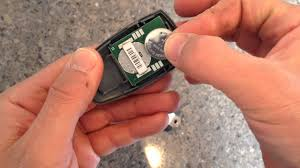
- Coin-cell batteries (CR2032) for remotes
- 9V or AA batteries for keypads
💡 Tip: Check your user manual or open the battery compartment to confirm.
Step 2: Disconnect Power for Safety
Before replacing the battery:
- Unplug the garage door opener from the power outlet
- Ensure the door is in a closed position
This reduces the risk of accidental movement or electrical issues.
Step 3: Locate the Battery Compartment
Depending on your system:
- Motor Unit: Battery compartment is usually on the back or bottom
- Remote Control: Slide open the back cover
- Keypad: Remove screws or slide panel
Step 4: Remove the Old Battery
- Carefully disconnect the battery terminals
- Note the positive (+) and negative (-) orientation
- Dispose of the old battery properly
⚠️ Avoid touching both terminals simultaneously with metal objects.
Step 5: Install the New Battery
- Insert the new battery in the correct orientation
- Secure it firmly in place
- Reconnect any clips or wires
📌 Example: Use a 12V 4.5Ah sealed lead-acid battery for most backup systems.
Step 6: Restore Power and Test
- Plug the opener back into the outlet
- Test the remote and keypad
- Open and close the garage door to confirm functionality
✔️ If everything works smoothly, you’re done!
Signs Your Garage Door Opener Battery Needs Replacement
Watch for These Common Symptoms:
- Slow or delayed door response
- Remote works only at close range
- Beeping sound from opener unit
- LED warning lights blinking
Ignoring these signs can lead to complete failure during emergencies.
Battery Types Comparison
| Battery Type | Common Use | Lifespan | Cost Range |
|---|---|---|---|
| 12V SLA Battery | Backup power unit | 1–2 years | $20–$40 |
| CR2032 Coin Cell | Remote controls | 2–3 years | $3–$10 |
| 9V Battery | Keypads | 1–2 years | $5–$15 |
| AA/AAA Batteries | Some keypads/remotes | 1–2 years | $5–$12 |
Troubleshooting After Battery Replacement
Sometimes replacing the battery doesn’t fix the issue. Here’s what to check:
1. Incorrect Installation
- Ensure correct polarity (+/-)
2. Dirty Contacts
- Clean terminals with a dry cloth
3. Programming Reset Needed
- Reprogram remote or keypad if necessary
4. Faulty Battery
- Try a different brand or new battery
Pro Tips to Extend Battery Life
Simple Habits That Make a Difference:
- Replace batteries every 12–18 months proactively
- Store remotes in moderate temperatures (avoid extreme heat/cold)
- Use high-quality, branded batteries
- Limit unnecessary button presses
🔋 Expert Insight: Premium batteries can last up to 30% longer than generic alternatives.
Advantages vs Disadvantages of Battery Replacement
Advantages:
- Quick and inexpensive fix
- Improves reliability instantly
- No professional help required
Disadvantages:
- Temporary solution (batteries wear out)
- Requires periodic maintenance
- Incorrect installation may cause issues
When Should You Replace the Battery?
You should change your garage door opener battery if:
- It’s been over 1–2 years
- You notice performance issues
- After a power outage failure
- Manufacturer recommends replacement
Regular maintenance ensures uninterrupted access and safety.
FAQ: How To Change A Battery In A Garage Door Opener
1. How often should I replace my garage door opener battery?
Typically every 1–2 years, depending on usage and battery type.
2. Can I use any battery brand?
Yes, but high-quality brands are recommended for longer lifespan and reliability.
3. Why is my garage door still not working after replacing the battery?
It could be due to incorrect installation, programming issues, or a faulty opener.
4. Is it safe to replace the battery myself?
Yes, as long as you disconnect power and follow basic safety steps.
5. Do all garage door openers have backup batteries?
No, only newer models include built-in backup battery systems.
6. What happens if the battery dies during a power outage?
You won’t be able to operate the door automatically, but you can use the manual release.
Conclusion
Knowing how to change a battery in a garage door opener is a simple yet essential skill for every homeowner. With just a few tools and minutes of your time, you can restore full functionality and avoid inconvenient breakdowns.
Don’t wait until your garage door fails—check your battery today and replace it if needed. If you found this guide helpful, share it on social media and help others keep their garage doors running smoothly!
Leave a Reply