Have you ever stood in the rain, frantically pressing a remote button that just won’t work? Or perhaps you’ve just moved into a new home and realized the previous owners didn’t leave the manual for the garage mechanism. It is a frustrating scenario that many homeowners face. Knowing how do you set up a garage door opener is not just about convenience; it is about security and peace of mind. This guide will walk you through the process with clarity, ensuring you can get your vehicle sheltered and your home secure without calling a professional.
Understanding the Basics Before You Begin
Before diving into wires and remotes, it is crucial to understand what you are working with. A garage door opener is a motorized device that opens and closes garage doors. Most modern units are controlled by remote controls located inside the car or handheld devices, as well as wall-mounted switches inside the garage.
According to industry standards, most residential openers operate on a frequency of 315 MHz or 390 MHz. However, newer models use rolling code technology for enhanced security. This means the code changes every time you press the button, preventing thieves from “capturing” the signal to open your door later.
For a deeper technical understanding of how these frequencies and security protocols work, you can refer to the detailed entry on Garage Door Openers on Wikipedia. This external resource provides historical context and technical specifications that underscore the importance of proper setup.
Tools You Will Need
To ensure a smooth installation and setup process, gather these tools beforehand:
- A sturdy stepladder
- Power drill with various bits
- Adjustable wrenches
- Screwdrivers (Phillips and flathead)
- Locking pliers
- Safety glasses
Step-by-Step Guide: How Do You Set Up A Garage Door Opener?
Setting up a garage door opener involves two main phases: physical installation (if the unit is new) and electronic programming. Since many users are replacing an old unit or setting up a new one from scratch, we will cover the critical electronic setup steps that apply to almost all brands like LiftMaster, Chamberlain, and Genie.
Step 1: Ensure Safety and Power Connection
Safety is paramount. Before touching any wiring, ensure the garage door is fully closed. If you are installing a new motor unit, plug it into a grounded outlet. Do not use an extension cord, as this can cause voltage drops and malfunction.
Pro Tip: If your opener has a battery backup, ensure it is charged before starting the programming process. This ensures that your settings are saved even if there is a power fluctuation during setup.
Step 2: Locate the “Learn” Button
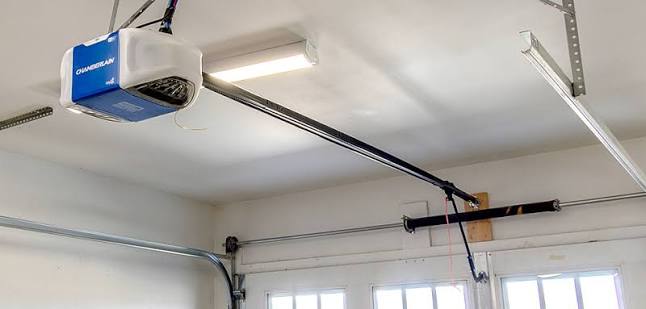
The heart of setting up your remote is the “Learn” button. This button is typically located on the back or side of the motor unit hanging from your ceiling. It is often colored yellow, purple, orange, or red, depending on the manufacturer.
- Yellow/Purple: Usually indicates Security+ 2.0 technology.
- Orange/Red: Often found on older models or specific brands like Genie.
Pressing this button puts the opener into “programming mode,” allowing it to recognize new remotes or keypads.
Step 3: Program Your Remote Control
This is the most common task for homeowners. Follow these precise steps:
- Press and release the Learn button on the motor unit. The indicator light will turn on or blink, signaling it is ready to receive a signal. You typically have 30 seconds to complete the next step.
- Within those 30 seconds, press and hold the button on your remote control that you wish to use. Hold it for about 3–5 seconds.
- Release the button when the lights on the motor unit blink or you hear a click. This confirms the code has been accepted.
- Test the remote by pressing the button again. The door should activate.
If you have multiple vehicles, repeat this process for each remote. Most modern openers can store between 8 to 15 different remote codes.
Step 4: Setting Up the Wall Console
The wall console (or keypad) inside your garage is essential for entry if you lose your remote. To set it up:
- Locate the wire terminals on the back of the wall console.
- Connect the wires to the corresponding terminals on the motor unit. Typically, this involves two wires: one for power/data and one for ground. Refer to your specific manual for color coding, as this varies by brand.
- Once wired, press the Learn button on the motor unit again.
- Immediately press and hold the button on the wall console until the motor unit lights blink.
Step 5: Adjusting Travel Limits and Force
A properly set up opener must know when to stop. If the door doesn’t close all the way or reverses immediately upon hitting the floor, you need to adjust the travel limits.
- Up Limit: Adjusts how high the door opens.
- Down Limit: Adjusts how low the door closes.
Most modern units have dials or digital screens for this. Turn the dial slightly in the direction indicated by the arrows on the casing. Make small adjustments (quarter-turns) and test the door after each change.
Force Settings: These determine how much resistance the motor feels before reversing. If the door reverses when closing on a clear path, increase the down force slightly. If it slams shut, decrease it. Always prioritize safety; the door should reverse immediately if it hits an obstruction.
Common Setup Challenges and Solutions
Even with careful planning, issues can arise. Here is a comparison of common problems and their fixes.
| Issue | Possible Cause | Solution |
|---|---|---|
| Remote not working | Dead batteries or out of sync | Replace batteries; reprogram using the Learn button. |
| Door reverses before closing | Obstruction in sensor path | Clean the safety eyes (sensors) near the floor. |
| Motor runs but door doesn’t move | Broken gear or chain | Inspect internal gears; may require professional repair. |
| Keypad unresponsive | Loose wiring | Check connections at both the keypad and motor unit. |
The Importance of Safety Sensors
Modern garage door openers are equipped with photo-eye sensors located near the floor on both sides of the door. These create an invisible beam. If the beam is broken while the door is closing, the door must reverse.
During setup, ensure these sensors are aligned perfectly. A solid LED light usually indicates proper alignment, while a blinking light suggests misalignment. This feature is mandatory under US safety standards and prevents accidents involving children or pets.
Advanced Features: Smart Home Integration
In today’s connected world, many users want to control their garage via smartphone. Setting up Wi-Fi capability adds a layer of convenience and monitoring.
- Install the Hub: Many brands require a separate Wi-Fi hub that plugs into your router and connects to the opener via a data port.
- Download the App: Install the manufacturer’s app (e.g., MyQ for Chamberlain/LiftMaster).
- Create an Account: Register your device using the serial number found on the motor unit.
- Follow In-App Instructions: The app will guide you through connecting the hub to your home network.
Once set up, you can open your garage from anywhere, receive alerts if the door is left open, and grant temporary access to delivery drivers.
FAQ Section
How long does it take to set up a garage door opener?
For a experienced DIYer, physical installation takes 4–6 hours. However, if you are only programming remotes and keypads for an existing unit, it typically takes less than 15 minutes per device.
Can I program a universal remote to my garage door opener?
Yes, most universal remotes are compatible with major brands. You will need to find the correct code set for your brand in the universal remote’s manual and follow the specific programming sequence, which often involves holding down buttons while pressing the Learn button.
Why does my garage door opener keep losing its settings?
This is often due to a weak battery in the remote or a power surge affecting the motor unit’s memory. If the unit has a backup battery, ensure it is healthy. If not, consider installing a surge protector on the outlet powering the opener.
Is it safe to set up a garage door opener myself?
Programming remotes and keypads is very safe. However, physical installation involving springs and heavy lifting can be dangerous. Torsion springs are under high tension and can cause severe injury if mishandled. For physical installation, if you are unsure, hire a professional. For electronic setup, DIY is perfectly safe.
What should I do if the “Learn” button doesn’t work?
First, check if the opener is receiving power. If the light on the motor unit is off, check your circuit breaker. If the light is on but doesn’t respond to the Learn button, the logic board may be faulty, requiring professional service.
Leave a Reply