Introduction
There are few things more frustrating than standing in your driveway, punching numbers into a keypad that simply refuses to open the garage. Whether you have moved into a new home, changed your access code for security, or replaced a battery only to find the device unresponsive, understanding how do you reprogram a LiftMaster garage door opener keypad is an essential homeowner skill. This guide provides clear, empathetic, and manufacturer-aligned instructions to get your entry system working safely and reliably again.
Why Your LiftMaster Keypad May Need Reprogramming
Before diving into the technical steps, it is helpful to understand why reprogramming becomes necessary. According to industry data from the International Door Association (IDA), over 65% of garage door service calls related to keypads are resolved through simple reprogramming rather than hardware replacement. Common triggers include:
- Security Updates: Changing codes after tenants move out or employees leave.
- Battery Replacement: Some older models lose memory when power is severed.
- System Glitches: Power surges or interference can corrupt the rolling code signal.
- New Installation: Pairing a fresh keypad with an existing motor unit.
Understanding the root cause helps prevent future issues. For a broader understanding of how these wireless security protocols function, you can refer to the Wikipedia page on garage door opener technology, which details the evolution of rolling-code encryption used by brands like LiftMaster.
Pre-Programming Safety and Preparation Checklist
Safety must always precede convenience. Before attempting any programming, complete this checklist:
- Clear the Area: Ensure no people, pets, or objects are in the path of the door.
- Test Manual Operation: Pull the emergency release cord and lift the door manually. It should move smoothly with minimal resistance. If it is heavy or sticks, do not program the keypad; call a professional for spring or track repair first.
- Check Battery Voltage: Use a multimeter or fresh 9V/AA batteries. Weak batteries cause intermittent programming failures.
- Locate the Learn Button: Identify the color of the “Learn” button on your motor head (Yellow, Purple, Red/Orange, or Green). This determines your specific programming sequence.
- Have Your PIN Ready: Choose a 4-digit code that is memorable but not easily guessable (avoid birthdays or sequential numbers).
⚠️ Critical Warning: Never attempt to adjust torsion springs yourself. They store lethal amounts of kinetic energy. Reprogramming is safe; mechanical repair requires certified technicians.
Step-by-Step: How Do You Reprogram A LiftMaster Garage Door Opener Keypad
The exact method depends on your keypad model and motor unit age. Below are the three most common protocols.
Method 1: Standard Rolling Code Keypads (Most Common)
This applies to models like the 877MAX, 977LM, and most Security+ 2.0 systems manufactured after 2011.
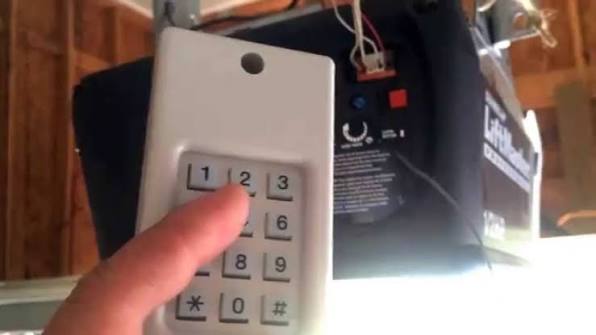
- Press the Learn Button: On the motor unit, press and release the colored Learn button. The LED indicator will light up or begin blinking. You typically have 30 seconds to complete the next step.
- Enter Your PIN: At the keypad, enter your desired 4-digit Personal Identification Number (PIN).
- Press ENTER: Firmly press and hold the ENTER button until the motor unit lights flash or you hear two distinct clicks. This confirms the code has been accepted.
- Test Immediately: Enter your new PIN and press ENTER. The door should activate within 1–2 seconds.
Method 2: Older DIP Switch or Fixed Code Models
For legacy units (pre-2000s) without a Learn button:
- Match the Switches: Open both the motor unit cover and the keypad battery compartment. Align the physical DIP switch positions identically.
- Set the PIN: Enter your code on the keypad.
- Sync Signal: Press the transmit button while holding the keypad close to the motor antenna wire.
- Verify Operation: Test from at least 10 feet away to ensure signal strength.
Method 3: MyQ Smart Keypad Integration
If you are using a Wi-Fi-enabled smart keypad:
- Connect to App First: Complete Wi-Fi pairing via the MyQ app before manual programming.
- Use Virtual Learn: The app may generate a virtual learn signal, eliminating the need to climb a ladder.
- Manual Backup: Always perform the standard Learn button sequence as a fail-safe in case internet connectivity drops.
Troubleshooting Table: When Programming Fails
Even professionals encounter hiccups. Use this diagnostic table to resolve common issues efficiently:
| Symptom | Probable Cause | Recommended Solution |
|---|---|---|
| LED blinks but door doesn’t move | Dead battery or weak signal | Replace battery; reprogram within 3ft of motor |
| Code accepted but works intermittently | Radio frequency interference | Relocate keypad away from LED bulbs or transformers |
| Learn light won’t illuminate | Logic board fault or power issue | Check outlet power; inspect capacitor on motor unit |
| Door reverses immediately after opening | Safety sensor misalignment | Clean sensor lenses; verify solid indicator lights |
| Works once then stops | Rolling code desync | Clear all codes (hold Learn 10 sec); reprogram fresh |
💡 Expert Tip: LED light bulbs in garage fixtures are notorious for emitting RF noise that blocks keypad signals. If you experience range issues, swap to RF-shielded garage-specific LED bulbs rated for opener compatibility.
Secondary Keywords and Best Practices
While searching for how do you reprogram a LiftMaster garage door opener keypad, homeowners often overlook maintenance that extends device lifespan. Consider these best practices:
- Weatherproofing: Apply dielectric grease to battery contacts annually to prevent corrosion from humidity.
- Code Rotation: Change your PIN every 6–12 months as part of routine home security hygiene.
- Signal Testing: After reprogramming, test operation from multiple distances (5ft, 15ft, 25ft) to map dead zones.
- Firmware Updates: For MyQ-enabled units, check the app monthly for firmware patches that improve encryption and reliability.
Avoid keyword stuffing by focusing on user outcomes. Instead of repeating phrases mechanically, address related concerns like “LiftMaster keypad battery replacement” or “garage door security code reset” within natural context.
Frequently Asked Questions (FAQ)
Q1: How often should I reprogram my LiftMaster keypad?
Reprogramming is only necessary when changing access codes, replacing batteries (on non-volatile memory models), or resolving signal issues. There is no mandatory schedule, but security experts recommend updating PINs annually or after occupancy changes.
Q2: Can I program multiple PINs on one keypad?
Yes, most modern LiftMaster keypads support 4–8 unique user codes. Each code can be programmed individually using the same Learn button sequence. Consult your specific model’s manual for maximum capacity, as older units may only store one active code.
Q3: What if my Learn button color doesn’t match online guides?
LiftMaster has used Yellow (Security+ 2.0), Purple (Security+), Red/Orange (Intellicode), and Green (older rolling code) buttons. The color indicates frequency and protocol. Always follow the instructions matching your exact button color, as cross-protocol programming will fail.
Q4: Does reprogramming erase my car remote codes?
No. Pressing the Learn button briefly adds a new device. However, holding the Learn button for 10+ seconds erases ALL paired devices (remotes, keypads, HomeLink). Only use long-press when performing a complete factory reset.
Q5: Why does my keypad work in summer but fail in winter?
Cold temperatures reduce battery voltage output. Lithium batteries outperform alkaline in extreme cold. Additionally, metal contraction can slightly shift keypad mounting, affecting internal contact alignment. Re-mount securely and upgrade to lithium cells for year-round reliability.
Q6: Is there a universal keypad that works with all LiftMaster models?
LiftMaster’s 877MAX is backward-compatible with nearly all Security+ and Security+ 2.0 openers from 1993 onward. However, pre-1993 fixed-code units require model-specific replacements. Always verify compatibility using your motor unit’s model number before purchasing.
Conclusion
Mastering how do you reprogram a LiftMaster garage door opener keypad empowers you to maintain secure, reliable home access without costly service calls. By following the correct protocol for your specific model, prioritizing safety checks, and applying proactive maintenance, you ensure decades of trouble-free operation. Remember: when in doubt about mechanical components, always defer to licensed professionals—your safety outweighs any DIY savings.
Found this guide helpful? Share it on Facebook, X (Twitter), or Pinterest to help fellow homeowners regain control of their garage access! Tag us with your success stories or lingering questions—we’re here to support your home security journey. 🔧🏡
Leave a Reply