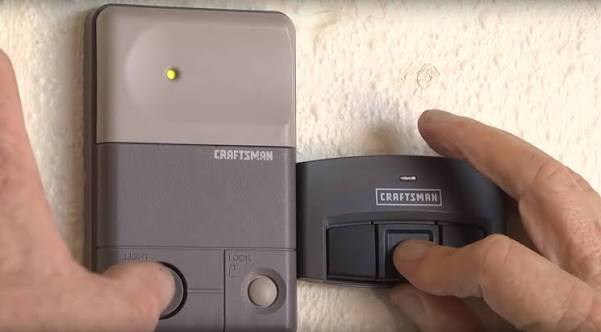
There is nothing more frustrating than pressing your remote and watching your garage door stay stubbornly closed. If you are dealing with this exact issue, you are probably wondering, how do you reprogram a Craftsman garage door opener to get your daily routine back on track? Don’t worry; syncing your remote is a simple DIY task that takes just a few minutes.
How Do You Reprogram A Craftsman Garage Door Opener Using the Learn Button?
Most modern Craftsman models manufactured after 1993 use a “Learn” or “Smart” button. The modern garage door opener relies on rolling code technology for enhanced security, meaning the remote and motor must be perfectly synced.
Before you begin, grab a sturdy step stool and a flashlight. You will need to access the motor unit hanging from your garage ceiling.
Step 1: Locate the Learn Button
Look at the back or side of the motor unit, near the hanging antenna wire. The Learn button is usually round or square and comes in different colors (Yellow, Purple, Red, or Orange).
Step 2: Clear the Old Memory (Optional but Recommended)
If you are buying a new remote or experiencing interference, clear the old codes first. Press and hold the Learn button for 6 to 10 seconds until the indicator LED turns off. This erases all previously paired remotes.
Step 3: Initiate the Programming Mode
Briefly press and release the Learn button. The indicator LED will light up or start blinking. You now have a strict 30-second window to complete the next step.
Step 4: Sync Your Remote
Take your handheld remote and press and hold the main button you want to use. Hold it down steadily for about 3 to 5 seconds.
Step 5: Confirm the Connection
Watch the motor unit. If the programming is successful, the overhead light on the motor will flash, or you will hear a distinct double click. Release the remote button immediately. Test it by pressing the button once.
Note: If your Learn button is Yellow, you have a Security+ 2.0 model. If it is Red or Orange, it is an older Security+ model. The steps remain exactly the same!
What If Your Craftsman Opener Uses DIP Switches Instead?
If your Craftsman model is an older legacy unit (typically manufactured before 1993), it likely does not have a Learn button. Instead, it uses a set of 12 tiny DIP (Dual Inline Package) switches inside both the motor and the remote.
To reprogram this system, you are not actually “syncing” them digitally; you are matching their physical frequency patterns.
- Open the Remote: Use a small Phillips-head screwdriver to open the battery compartment of your remote.
- Locate the Switches: You will see a row of 12 tiny sliding switches. They can be set to UP, DOWN, or CENTER.
- Access the Motor Unit: Open the light lens cover on the ceiling motor to reveal the matching 12 DIP switches.
- Match the Pattern: Carefully adjust the switches in the remote so they exactly match the UP/DOWN/CENTER pattern of the switches on the motor.
- Test the Door: Close the remote and press the button. Because the physical circuits now match, the door should operate immediately.
How Do You Reprogram an External Wireless Keypad?
Many homeowners prefer using an external keypad mounted outside the garage. If you changed your main remote, you must also reprogram the keypad.
- Press and release the Learn button on the motor unit.
- Within 30 seconds, go to your external keypad and type in your preferred 4-digit PIN.
- Press and hold the Enter (or arrow) button on the keypad for about 5 seconds.
- Wait for the motor lights to flash or hear a click. Your new PIN is now active!
DIY Reprogramming vs. Hiring a Professional
When your garage door acts up, you have two choices. Here is a quick breakdown to help you decide the best route for your situation.
| Feature | DIY Reprogramming | Hiring a Professional |
|---|---|---|
| Cost | $0 (Free) | $100 – $250 (Service call fee) |
| Time Required | 5 – 15 Minutes | 1 – 3 Days (Scheduling wait time) |
| Skill Level | Beginner (Follow instructions) | Expert (Handled for you) |
| Best For… | Simple remote syncing, dead batteries | Broken springs, misaligned sensors, motor failure |
According to the International Door Association (IDA), nearly 75% of homeowners use their garage as their primary entrance. Because of this high traffic, keeping your system synced is vital for daily security and convenience.
Troubleshooting: Why Won’t My Remote Sync?
If you followed the steps above and the door still will not respond, do not panic. Here are the most common culprits:
- Dead Batteries: This is the most common issue. Replace the remote’s battery (usually a CR2032 coin cell or a 12V battery) before attempting to reprogram.
- LED Bulb Interference: Certain cheap, energy-efficient LED bulbs emit radio frequencies that block the remote’s signal. Try unscrewing the bulbs in the motor unit and reprogramming the remote. If it works, buy “garage door friendly” LED bulbs.
- Distance Issues: Make sure you are standing within 5 to 10 feet of the motor unit when pressing the remote button during the syncing process.
- Locked Motor: Check the motor unit for a “Lock” button. If it is pressed, the remotes are disabled. Press it once to unlock the system.
Frequently Asked Questions (FAQ)
1. Where exactly is the Learn button on a Craftsman garage door opener?
The Learn button is always located on the motor head unit hanging from the ceiling. Look near the antenna wire (a thin purple, yellow, or white wire hanging down). The button is usually placed directly next to this wire and will be colored yellow, purple, red, or orange.
2. Why is my garage door remote blinking but the door won’t open?
If the LED light on your remote is blinking rapidly when you press the button, it usually indicates that the battery is dying and lacks the power to transmit a strong signal. Alternatively, if the motor unit lights are flashing 5 times, it means the radio receiver board inside the motor has failed and needs replacement.
3. Can I reprogram a used Craftsman remote to my door?
Yes, absolutely! You can easily reprogram a used or second-hand remote, provided it is compatible with your motor’s frequency. Just ensure you clear the old memory from the used remote first (usually by holding its button down for 10 seconds until its light flashes) before syncing it to your motor.
4. How often should I change my garage door opener code?
For standard handheld remotes using rolling code technology, the code changes automatically every time you use it, so you do not need to manually change it. However, if you use an external keypad with a fixed PIN, cybersecurity experts recommend changing your 4-digit PIN at least once every six months.
5. Will reprogramming the remote erase my car’s HomeLink system?
No. Reprogramming your handheld Craftsman remote will not erase the memory of your car’s built-in HomeLink system. However, if you clear the motor’s memory by holding the Learn button for 10 seconds, you will need to resync your car’s HomeLink buttons afterward.
Conclusion
Learning how do you reprogram a Craftsman garage door opener is an incredibly empowering skill that saves you time and money. Whether you are dealing with a modern Learn button system or an older DIP switch model, the process is highly straightforward and requires no specialized tools. By keeping your remote synced, you ensure your home remains secure and your daily commute runs smoothly.
Leave a Reply